OSDI '26 - Murakkab: Resource-Efficient Agentic Workflow Orchestration in Cloud Platforms
USENIX · 2026-09-08 · 16:22 · 한국어 더빙·자막 · 대본 · 발표자료 · 논문
1발표 영상
1.1
1.2
2대본 (한국어 · English)
2.1
| 시각 | 한국어 · English |
|---|---|
| 2.1.1 | 안녕하세요, 저는 Gohar 이고 오늘은 저희 연구 Murakkab, 즉 Cloud Platform(클라우드 플랫폼)에서의 Resource-Efficient(자원 효율적인) Agentic Workflow Orchestration(에이전트 워크플로 오케스트레이션)에 대해 발표하겠습니다. Hi, my name is Gohar and today I'll be talking about our work Morakab, resource efficient agentic workflow orchestration in cloud platforms. |
| 2.1.2 | 이 연구는 Microsoft Azure 동료들과 함께한 공동 연구입니다. This is joint work with my colleagues from Microsoft Azure. |
| 2.1.3 | 말할 것도 없이, 오늘날 많은 분들이 Agentic Workflow(에이전트 워크플로)와 애플리케이션을 쓰고 있습니다. 예를 들어 Microsoft Copilot 같은 생산성 도구, 프로그래밍용 Claude Code, 그리고 Adobe 의 동영상 편집 앱 같은 도메인 특화 애플리케이션도 이제 Agentic Workflow 로 만들어집니다. It goes without saying that a lot of us use agentic workflows and applications today. For example, productivity tools like Microsoft Copilot, cloud code for programming, and even domain-specific applications like video editing applications from Adobe are now built as agentic workflows. |
| 2.1.4 | 이 발표에서는 Model(모델)과 Tool(도구)을 Workflow(워크플로)로 엮은 것을 Agentic Workflow 라고 부르겠습니다. In the context of this talk, we refer to models and tools composed into workflows as agentic workflows. |
| 2.1.5 | 이 발표에서는 Agentic Workflow 의 Resource Efficiency(자원 효율)에 초점을 맞춰, 기존 Deployment(배포) 방식의 한계가 무엇이고 어떻게 개선할 수 있는지 살펴보겠습니다. And in this talk, we will focus on the resource efficiency of agentic workflows and try to examine what the limitations of existing deployments are and how to improve those. |
| 2.1.6 | 목표와 Workload(워크로드)가 이렇게 다양할 때, 그 목표를 달성하려면 시스템을 어떻게 최적으로 Configure(구성)해야 할까요? Given the diverse objectives and workloads, how do we optimally configure the system to achieve those objectives? |
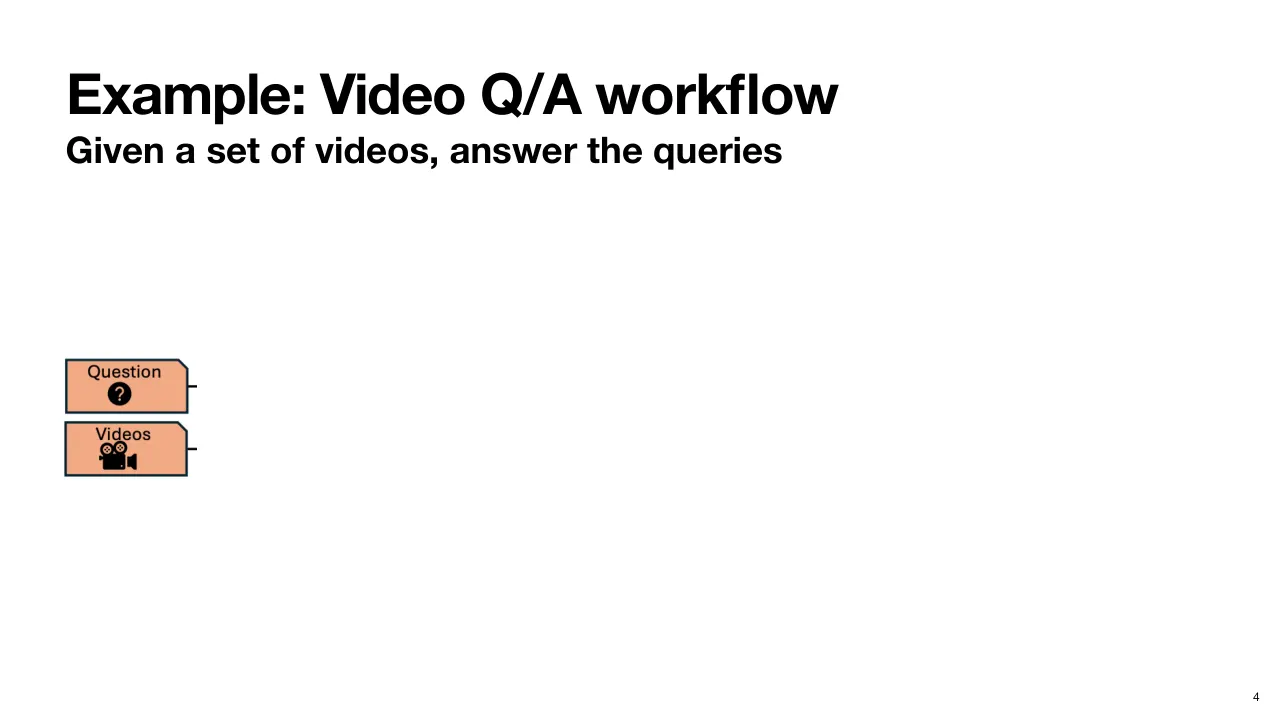
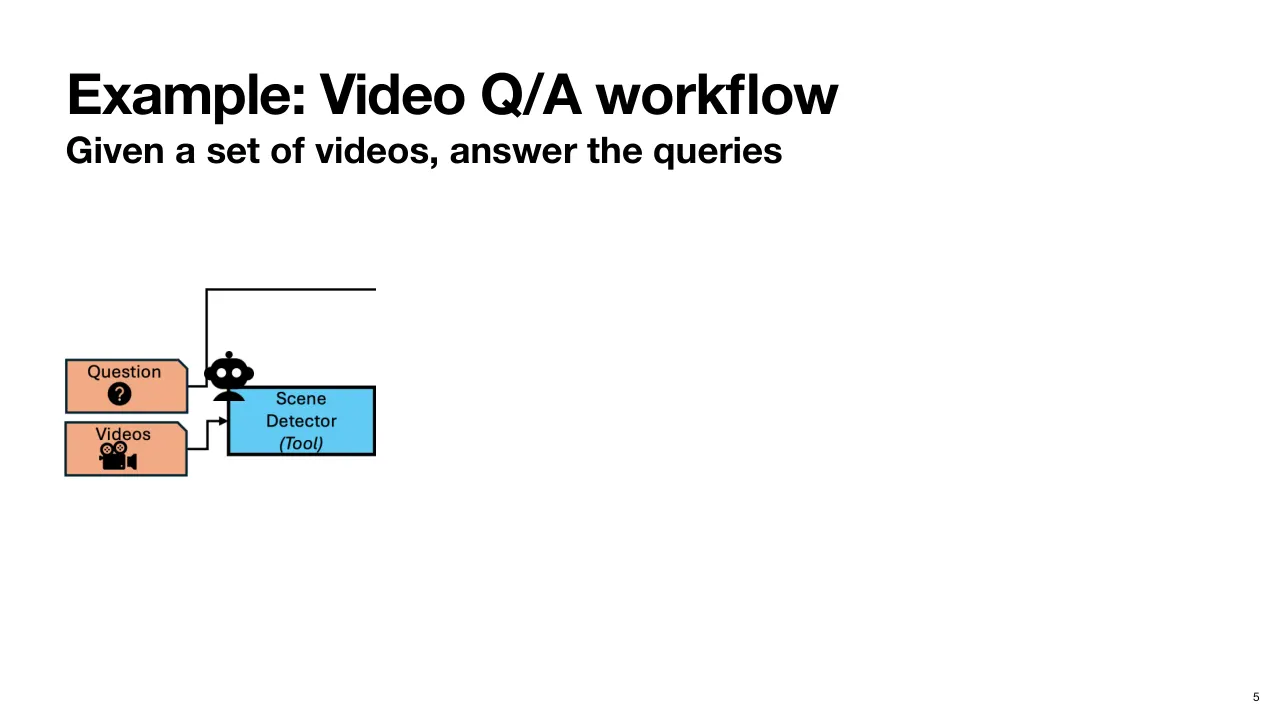
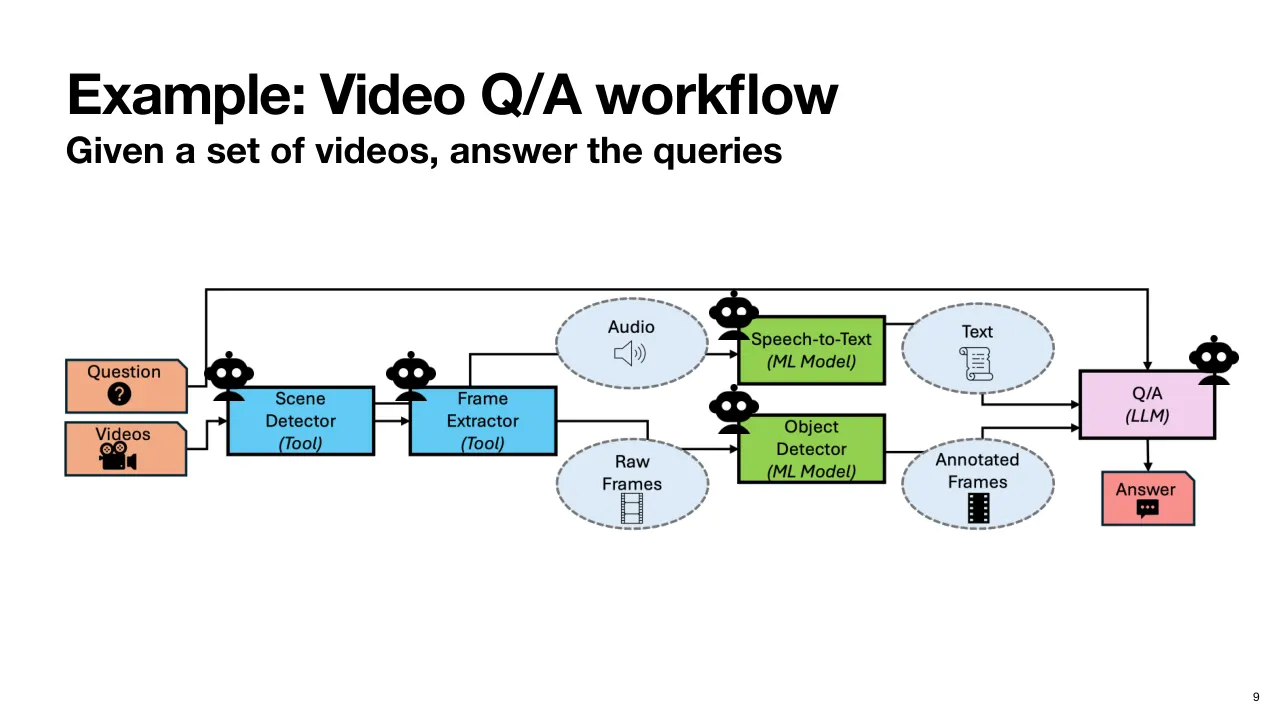
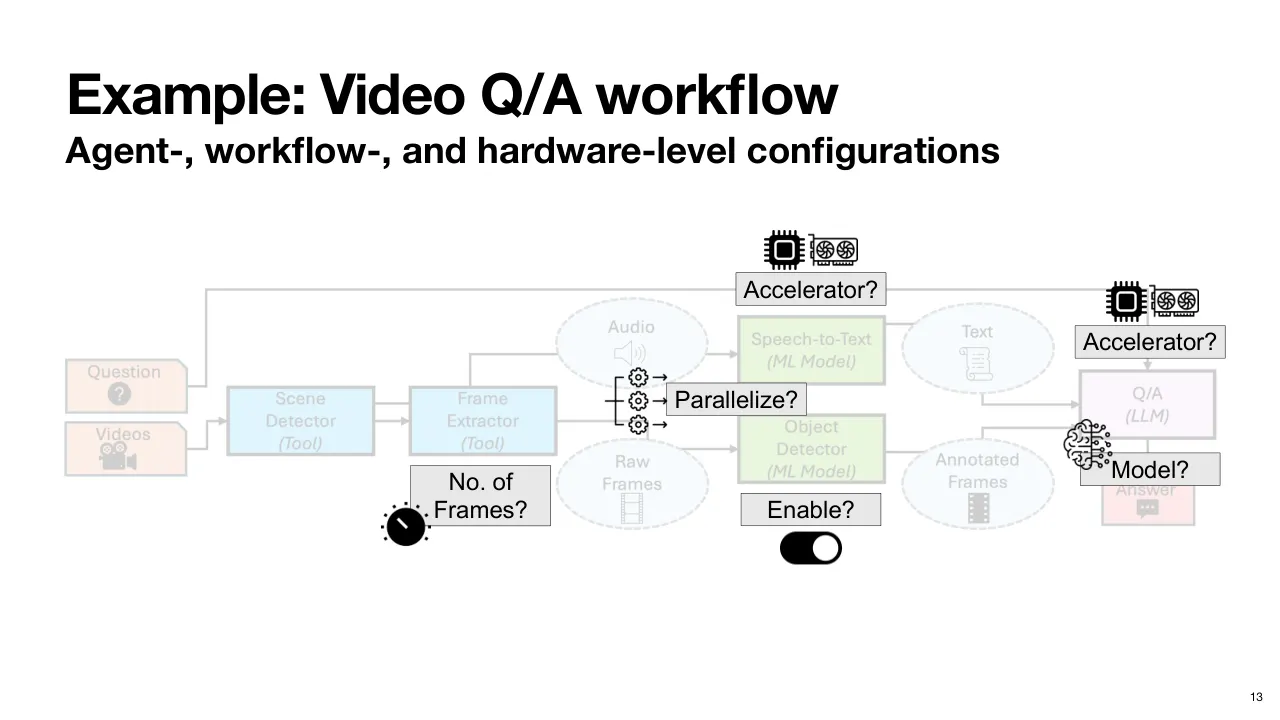
| 2.1.7 | 이 발표 내내 예시 Workflow 하나를 사용하겠습니다. 동영상 여러 개를 받아 그에 대한 질문에 답하는 Video QA(동영상 질의응답) Workflow 입니다. Let's take an example workflow for the rest of this talk. A video QA workflow that takes a set of videos and answers queries about them. |
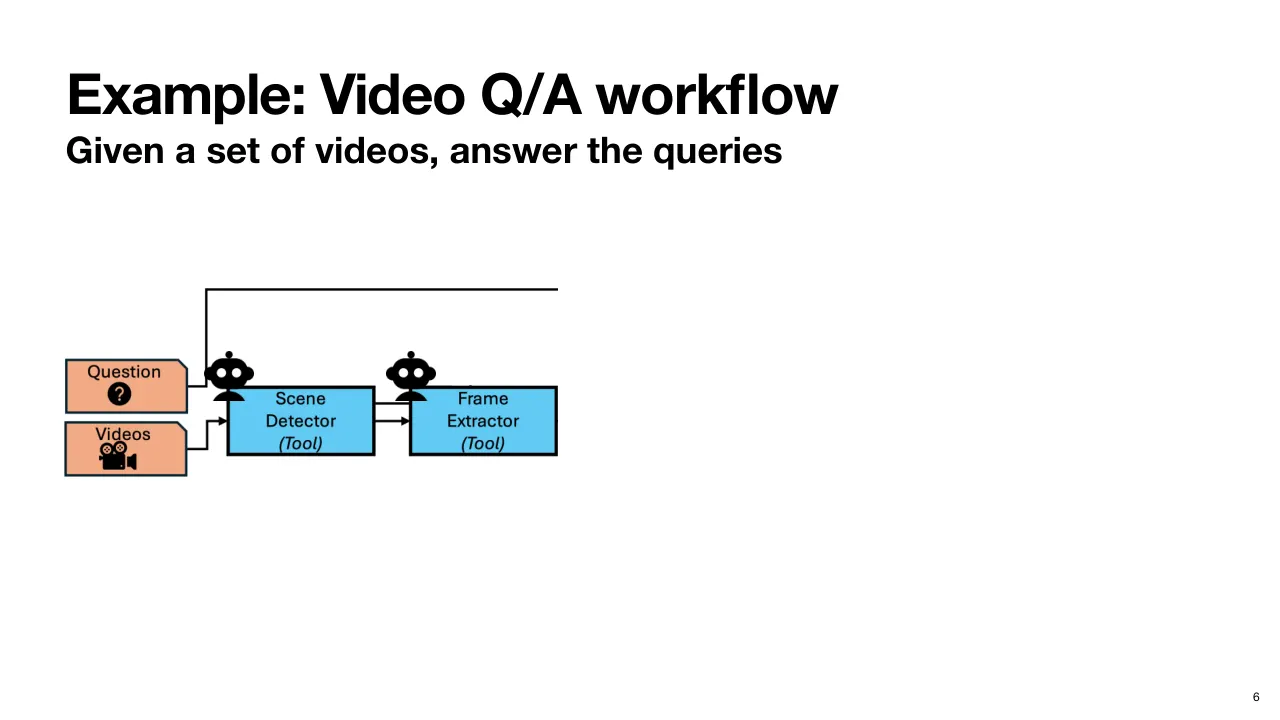
| 2.1.8 | 이 애플리케이션에 질문과 동영상을 입력하면, 이 Workflow 의 Agent(에이전트) 중 하나인 Scene Detection(장면 검출) Tool 로 전달됩니다. So, you input some questions and videos to this application and it passes them to a scene detection tool, which is one of the agents in this workflow. |
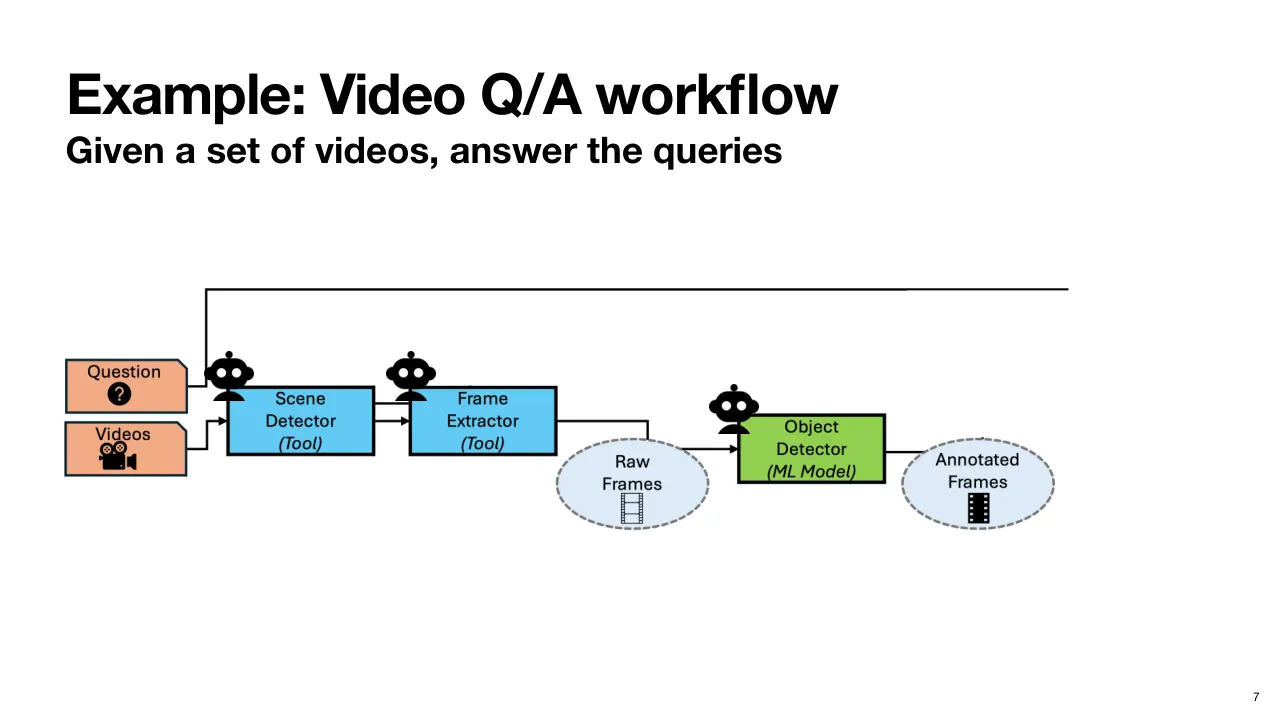
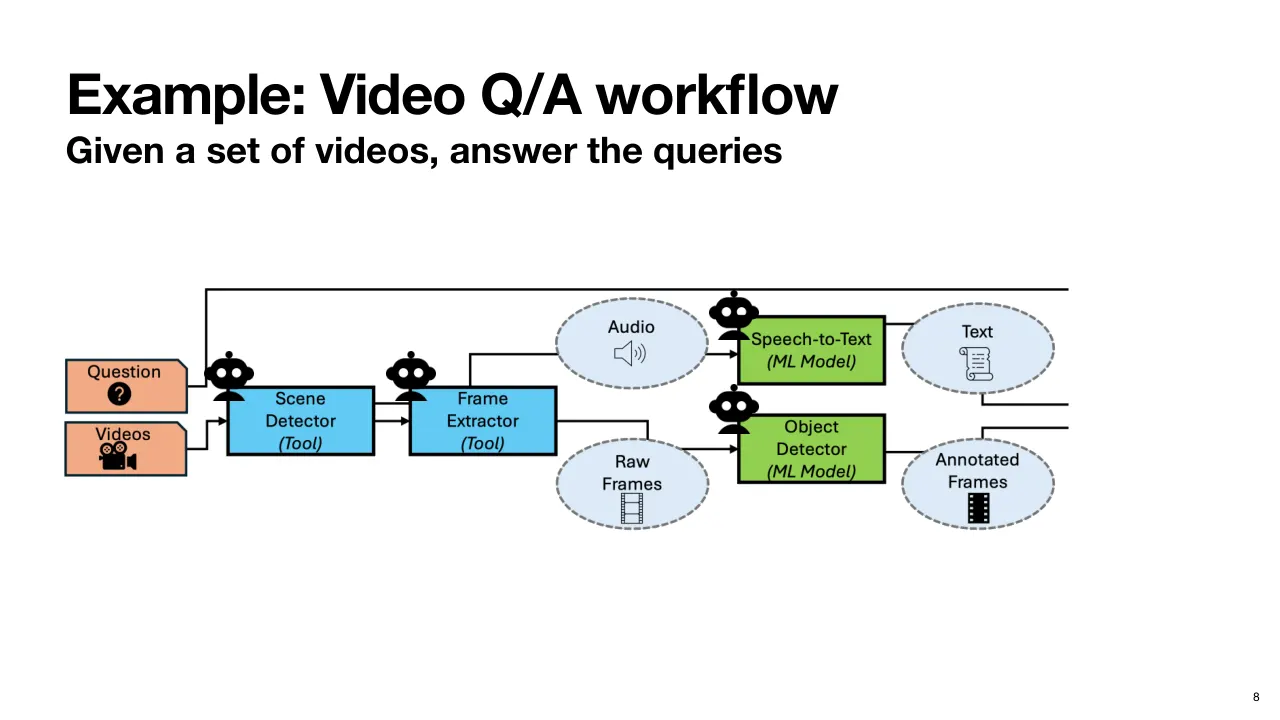
| 2.1.9 | 이것은 Frame Extraction(프레임 추출) Agent 로 이어지고, 여기서 나온 Raw Frame(원본 프레임)은 Object Detection(객체 검출) Model 로 들어가 Annotated Frame(주석 달린 프레임)이 만들어집니다. This feeds into a frame extraction agent which may produce raw frames that are then fed into an object detection model which produces annotated frames. |
| 2.1.10 | 이와 병렬로, Frame Extractor 가 각 프레임 묶음에 해당하는 Audio Track(오디오 트랙)도 추출할 수 있고, 이것은 Speech-to-Text(음성-텍스트 변환) Model 로 들어가 Transcript(받아쓰기 텍스트)를 만듭니다. In parallel, potentially, we can have the frame extractor also extract the audio track associated with sets of frames, which is fed into a speech-to-text model that produces a text transcript. |
| 2.1.11 | 이 모든 Intermediate Output(중간 출력)은 원래 질문과 함께 Multimodal LLM(멀티모달 LLM)에 들어가 답을 얻습니다. All of this intermediate output, along with the original question, is fed into a multimodal LLM to obtain an answer. |
| 2.1.12 | 이 연구에서는 Workflow 에 쓰이는 Model 과 Tool 을 모두 Agent 로 간주한다는 점에 유의해 주세요. Note that in the context of this work, we consider models and tools being used in this workflow as all agents. |
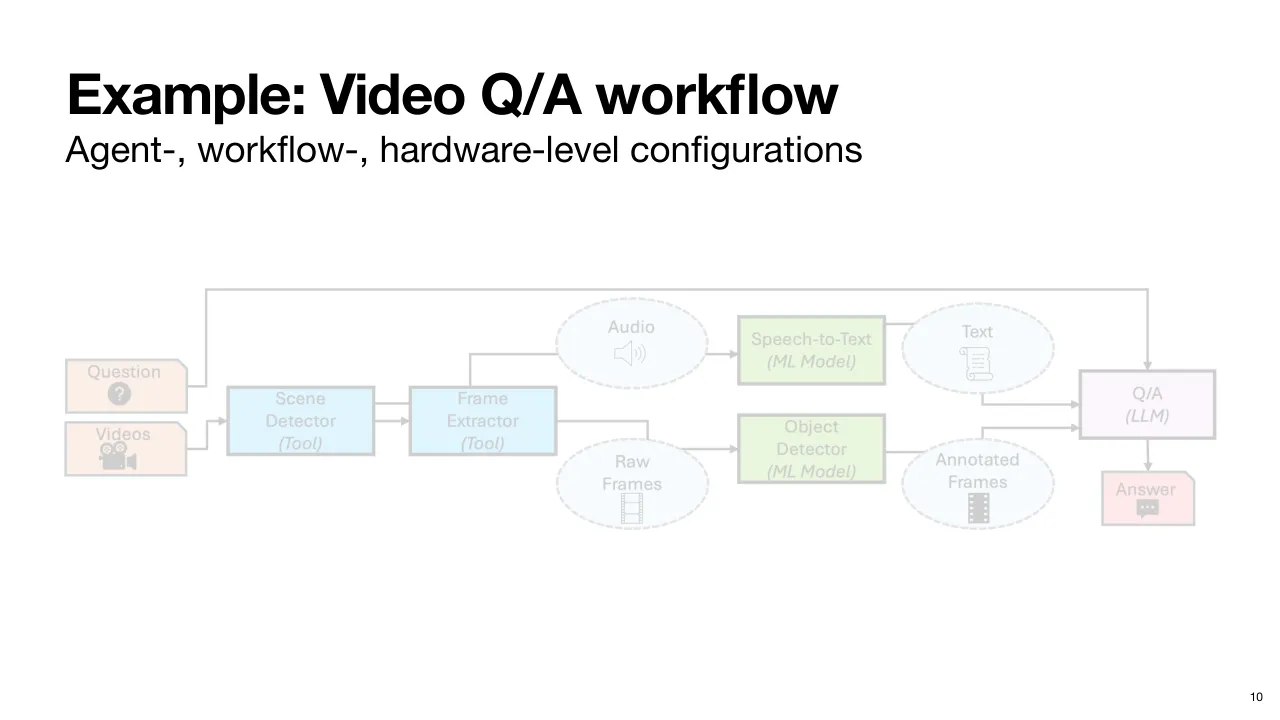
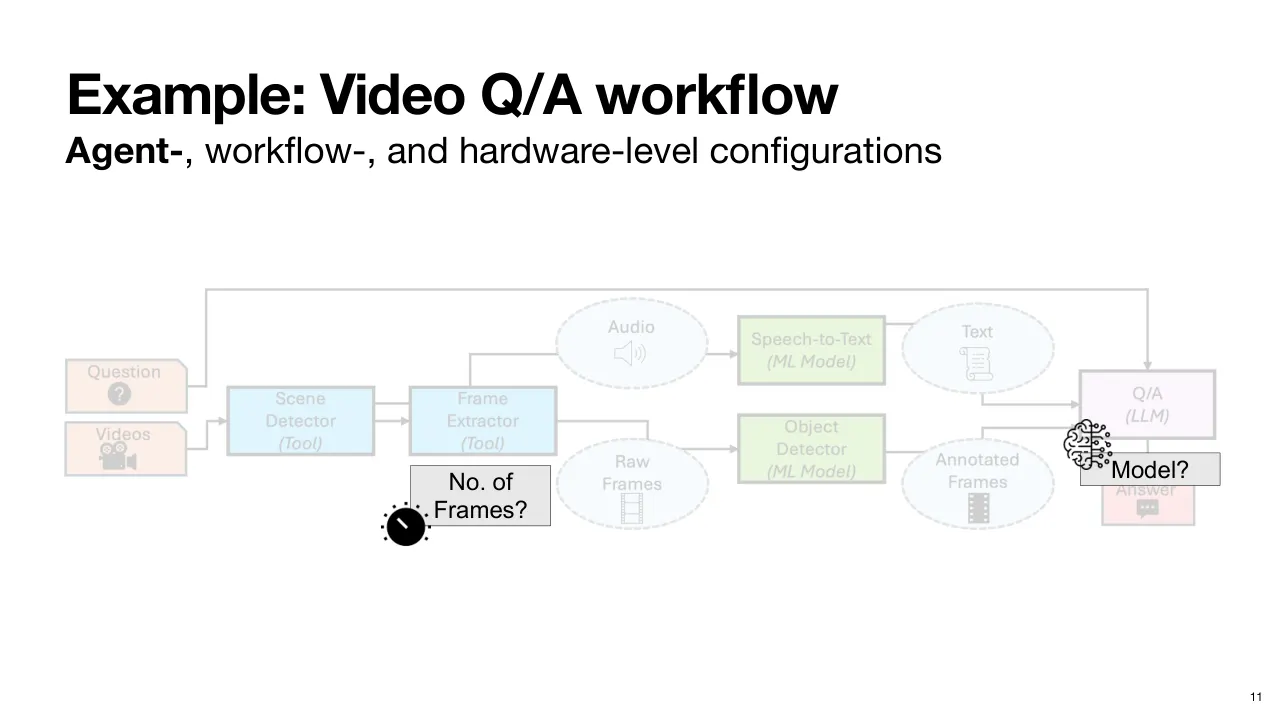
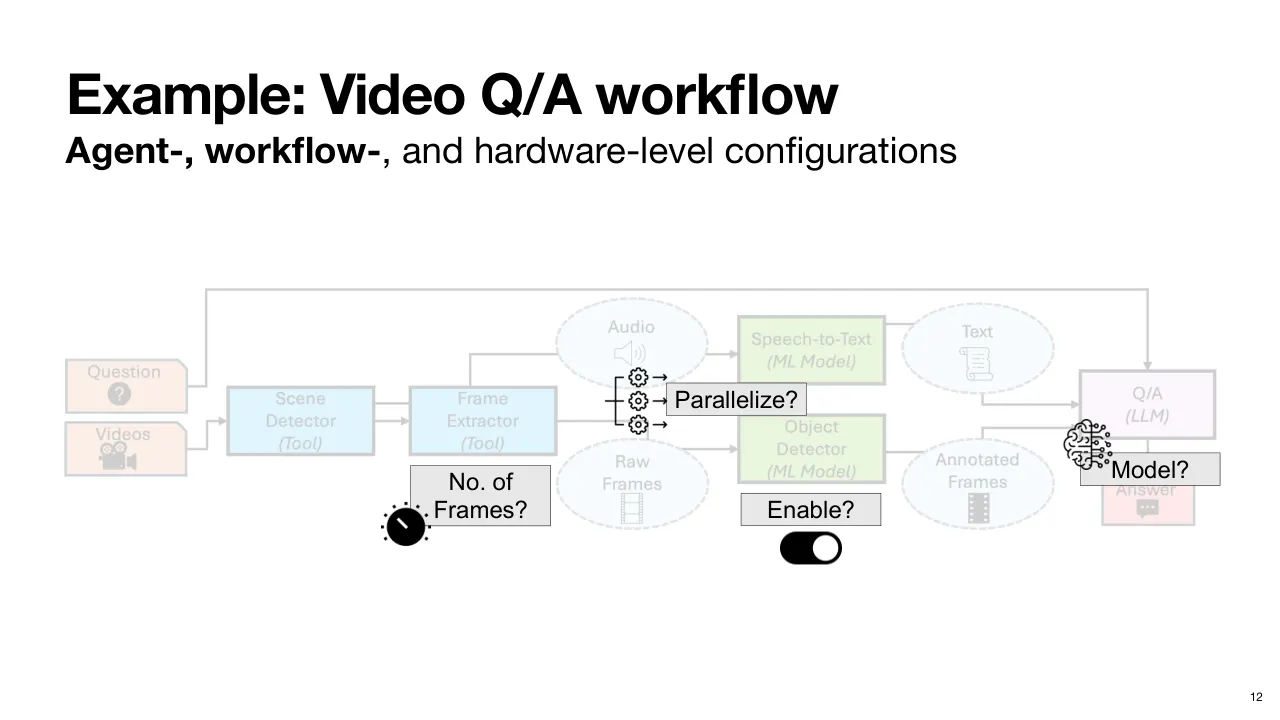
| 2.1.13 | 이 Workflow 에는 여러 수준에서 설정할 수 있는 요소가 많습니다. Now, there are many configurable pieces in this workflow at different levels. |
| 2.1.14 | 예를 들어 Frame Extractor Agent 가 추출할 프레임 수나, QA Agent 에 쓸 Model 이 무엇인지는 Agent-Level Configuration(에이전트 수준 설정)의 예입니다. For example, the number of frames to extract in the frame extractor agent or which model to use for the QA agent, are examples of agent level configurations. |
| 2.1.15 | Workflow 안의 특정 Agent 를 켤지, 예를 들어 Object Detector 를 쓸지 말지, 그리고 DAG(방향성 비순환 그래프)의 일부를 Parallelize(병렬화)할지는 Workflow-Level Configuration(워크플로 수준 설정)이며, 각각 서로 다른 Trade-off(상충 관계)를 가집니다. Whether to enable some agent in the workflow, for example, do we want to use an object detector or not, and whether we want to parallelize pieces of the tag, are workflow level configurations, each presenting different trade-offs. |
| 2.1.16 | 마지막으로, 여러 Agent 를 어떤 자원이나 Accelerator(가속기)에서 돌릴지는 Hardware-Level Configuration(하드웨어 수준 설정)입니다. And finally, which resources or accelerators to run various agents on, are hardware level configurations. |
| 2.1.17 | 그럼 오늘날 이런 Workflow 를 어떻게 정의하고 설정하는지 봅시다. So, let's see how such a workflow is defined and configured today. |
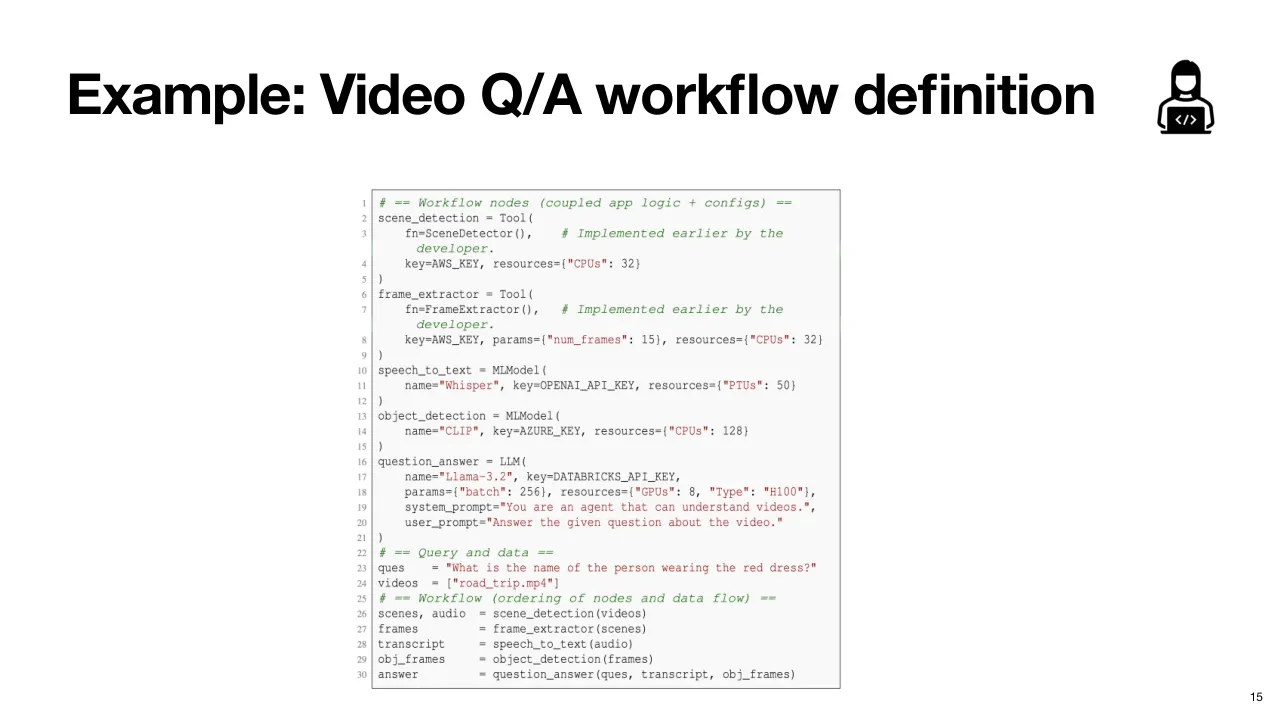
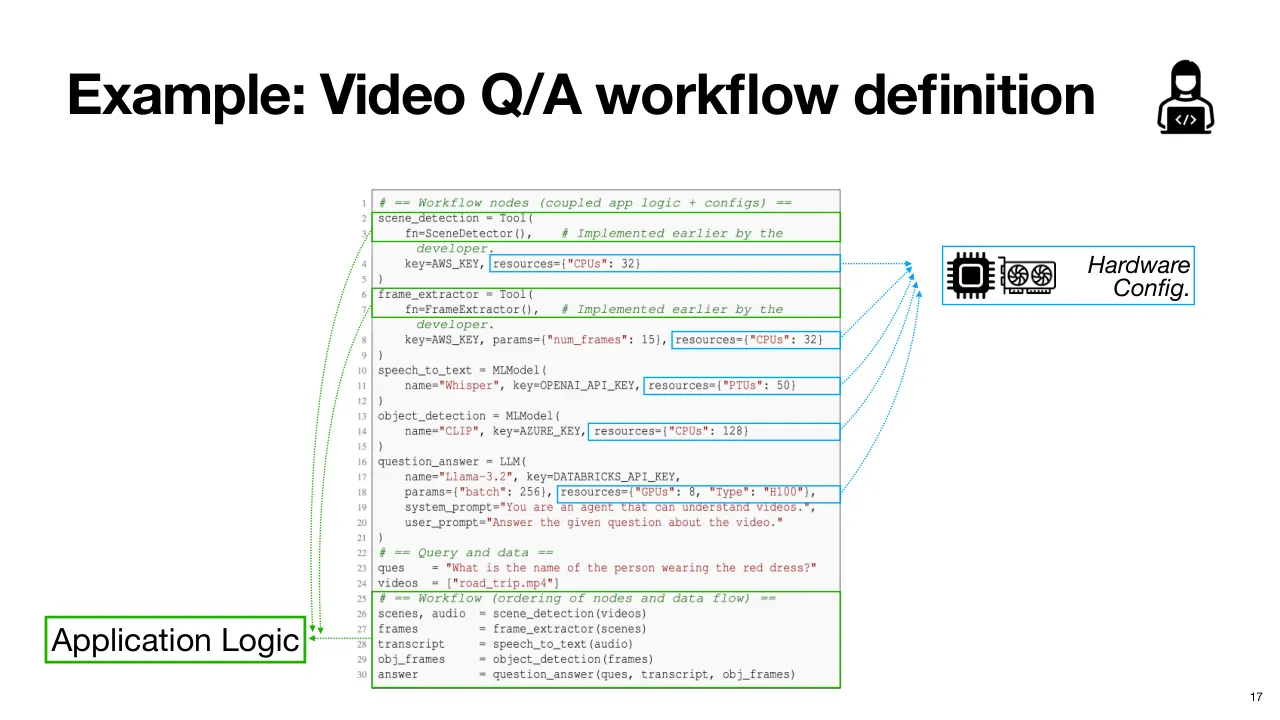
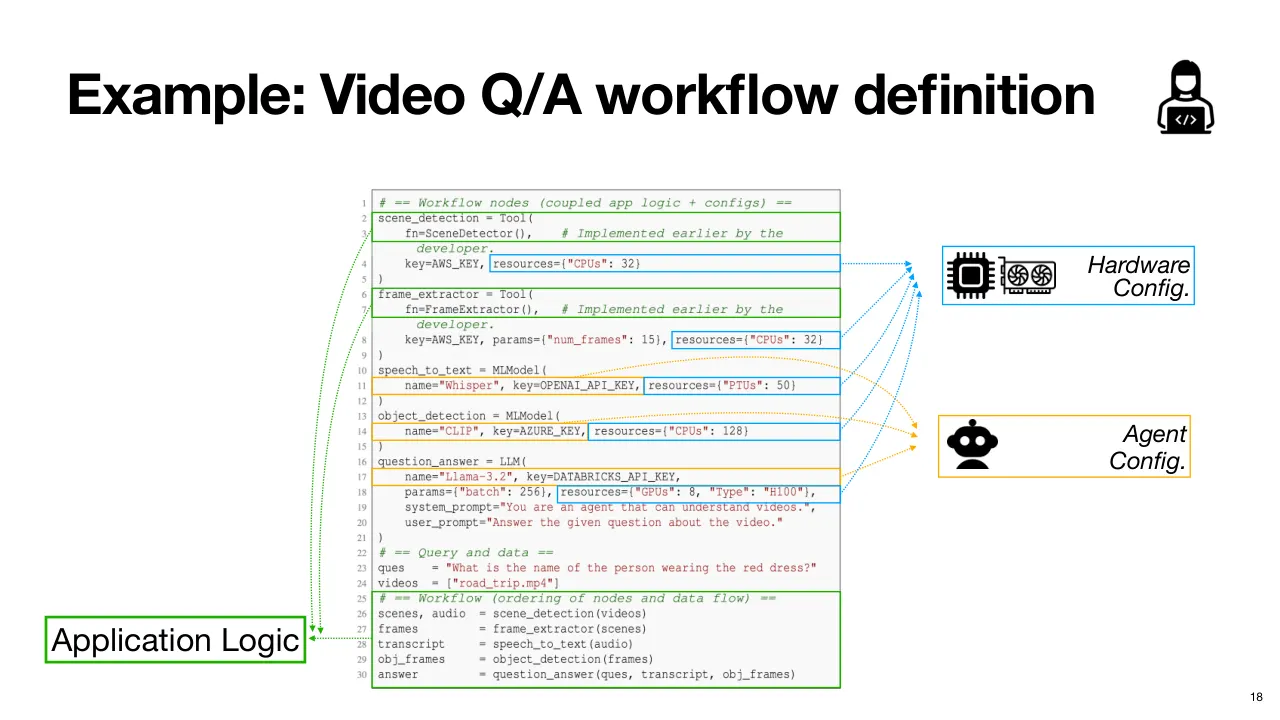
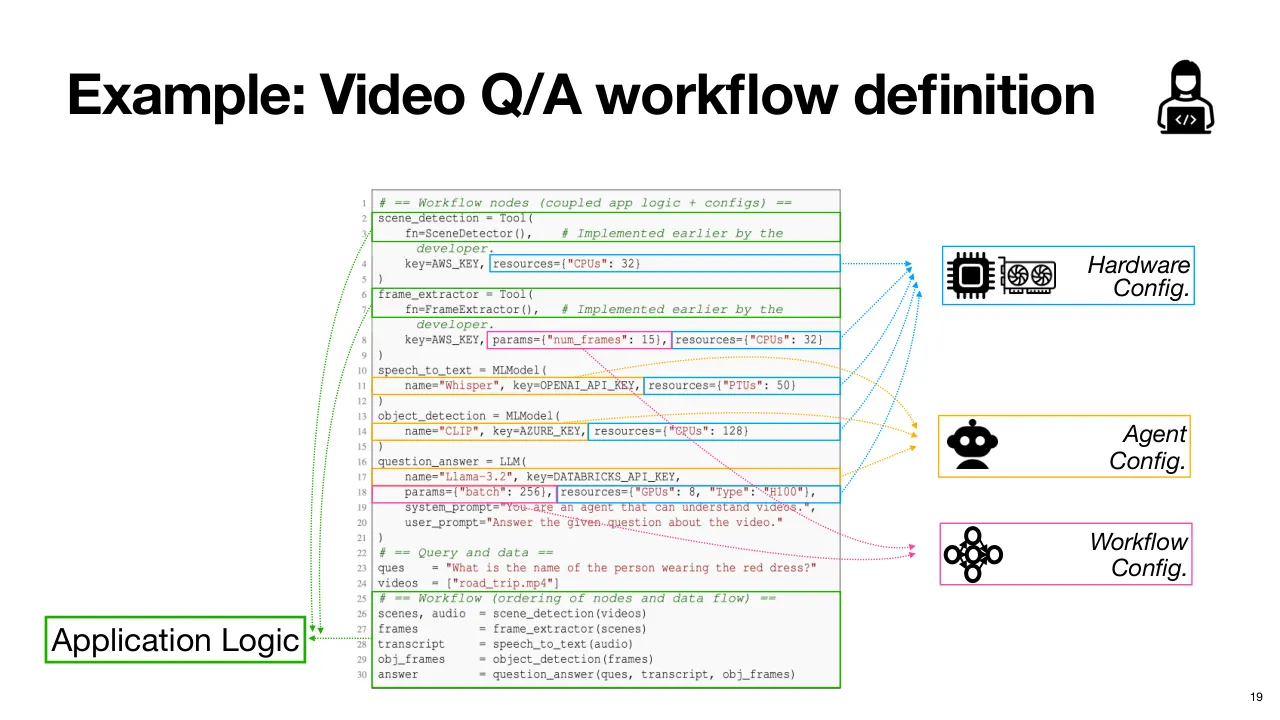
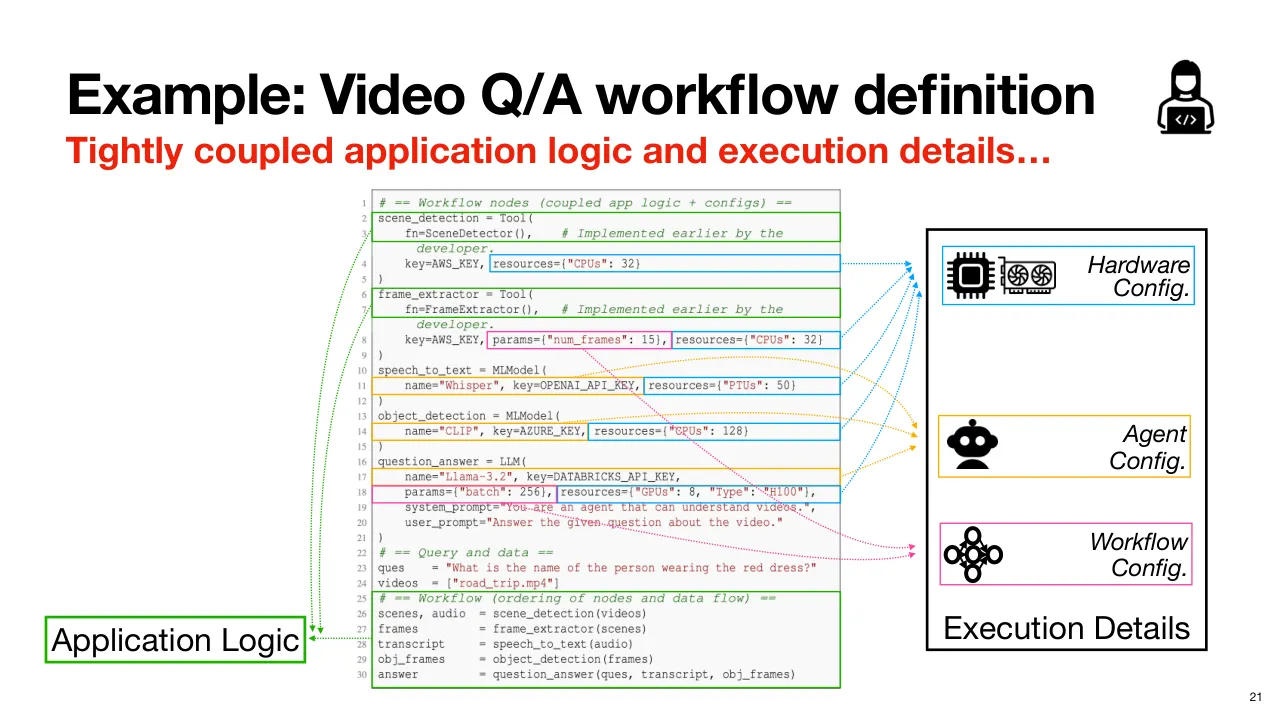
| 2.1.18 | 여기 핵심을 보여 주는 비교적 일반적이고 단순화한 예시가 있습니다. 특정 Framework(프레임워크)는 아니고 구현 방식에 따라 달라질 수 있지만, 큰 메시지는 거의 같습니다. So, here is a relatively generic, simplified example that illustrates some of the key points. This is not any specific framework, and things may vary based on how you choose to proceed, but the high-level message is roughly the same. |
| 2.1.19 | 먼저 여러 Module(모듈)이 정의돼 있고, 각자 자기 Parameter(매개변수)를 가진다는 점을 보세요. First, notice that there are various modules defined here, each with their own parameters. |
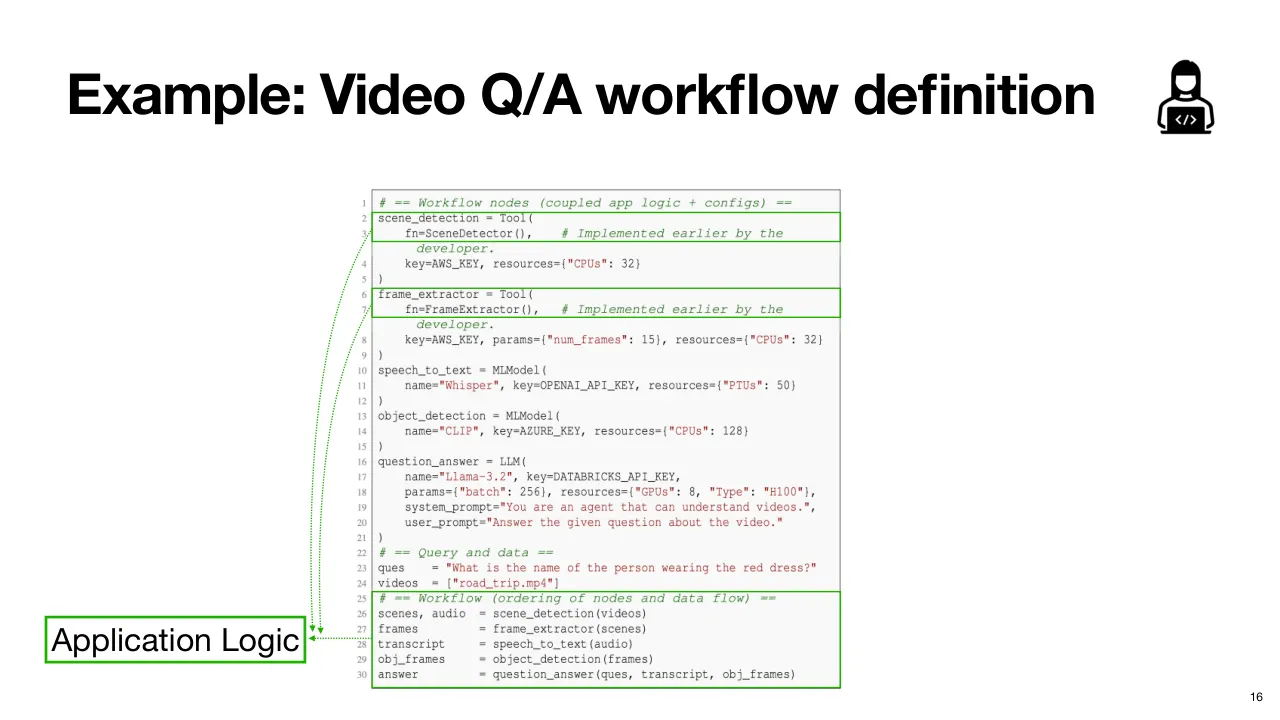
| 2.1.20 | 앞에서 본 각 작업마다 이런 Module 이 있습니다. 이것들이 Application Logic(애플리케이션 로직)을 이루고, 작업 사이에 Data Flow(데이터 흐름)를 구성해 Workflow 로 실행합니다. You have a bunch of these modules for each task that we saw earlier. These comprise your application logic, and you construct a data flow between these tasks to execute as a workflow. |
| 2.1.21 | 물론 이것도 매우 중요하지만, 여기에는 훨씬 더 많은 것이 들어 있습니다. 그게 무엇인지 봅시다. This is, of course, very important, but there is a lot more going on here as well. So, let's take a look at what that is. |
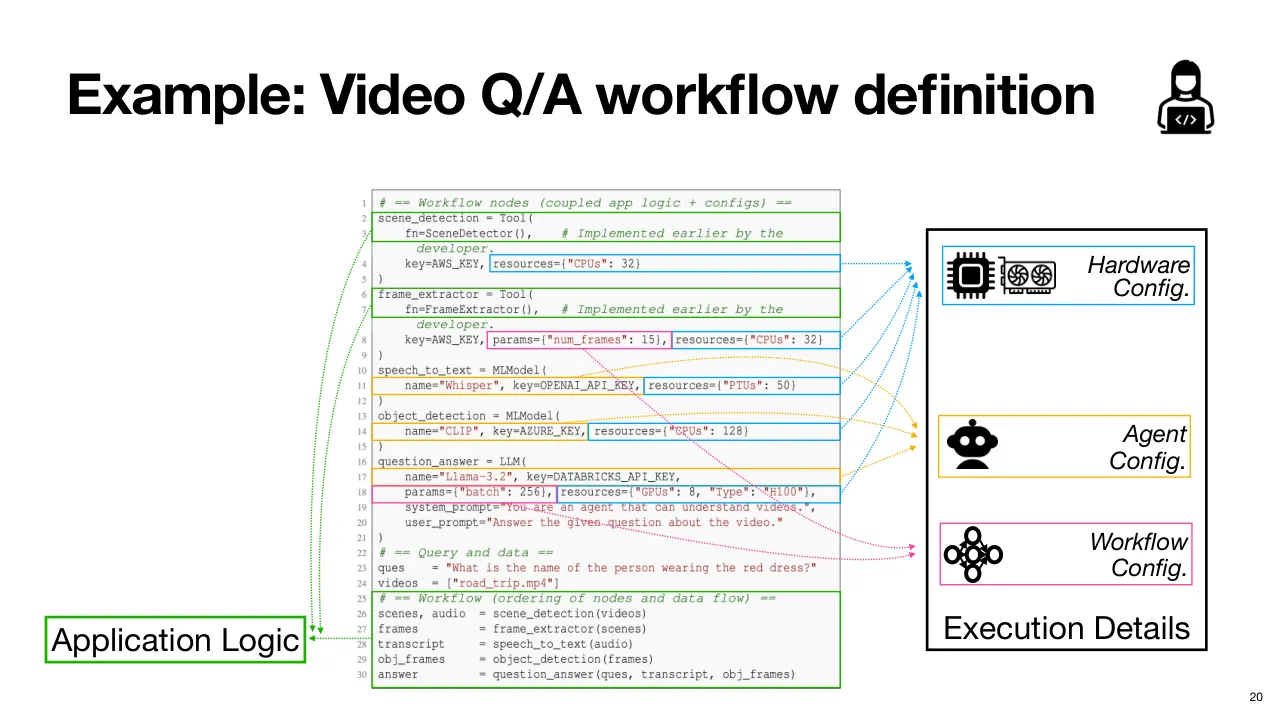
| 2.1.22 | 대부분의 Module 에 Resource Configuration(자원 설정)이 있습니다. 이것이 Hardware Configuration 입니다. You see resource configuration for most of these modules here. These are your hardware configurations. |
| 2.1.23 | 그다음 Agent Configuration 이 있어, 각 Agent 에 어떤 Model 을 쓸지 같은 것을 지정합니다. Then you have agent configurations, specifying things like which models to use for each agent. |
| 2.1.24 | Workflow Configuration 도 있습니다. You have workflow configurations. |
| 2.1.25 | 이것들이 모두 Execution Detail(실행 세부사항)입니다. And these all are your execution details. |
| 2.1.26 | 정의 안에서든, 또는 부분적으로 자원을 Provisioning(할당·준비)하고 Workflow 를 배포할 때든, 이 모든 결정을 미리 내려야 합니다. Whether in the definition itself, or partially when provisioning resources and deploying the workflow, all of these decisions need to be made up front. |
| 2.1.27 | 그런데 문제는 Application Logic 이 Execution Detail 과 매우 강하게 Coupled(결합)되어 있고, 정의 전체가 고정된 채로 배포된다는 것입니다. The problem, however, is the application logic is very tightly coupled with the execution details, and the whole definition is baked in and deployed. |
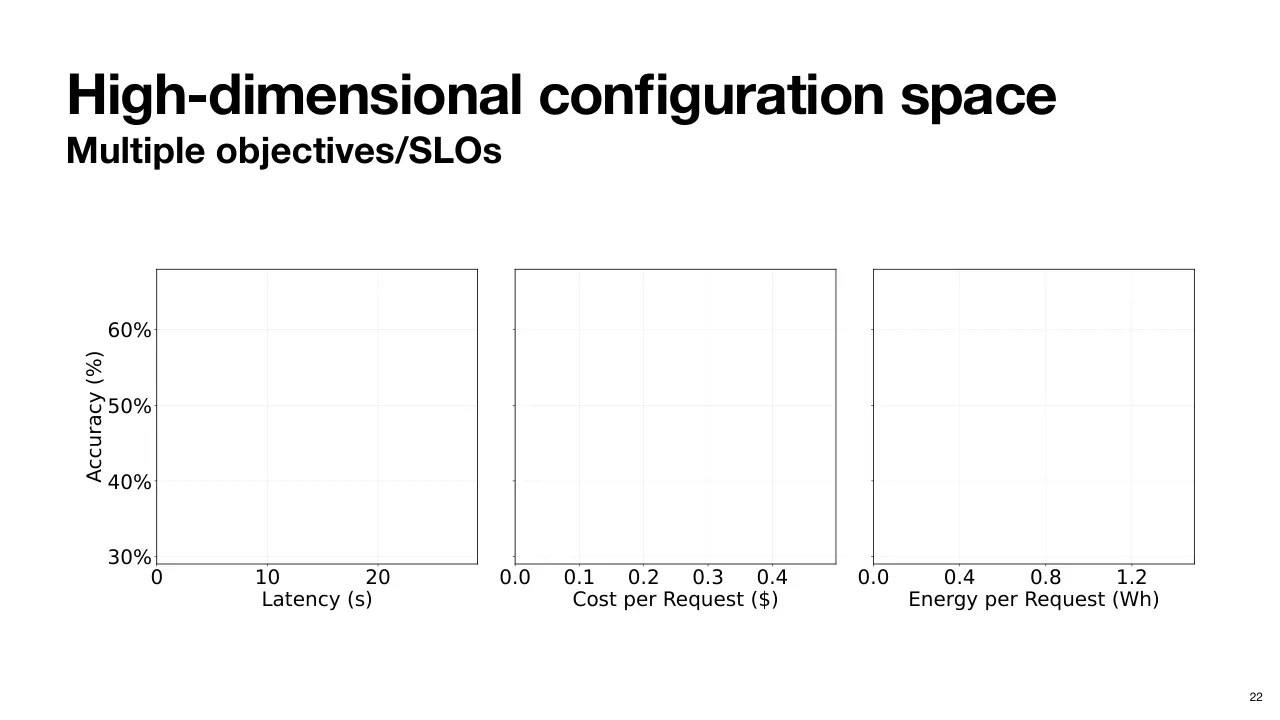
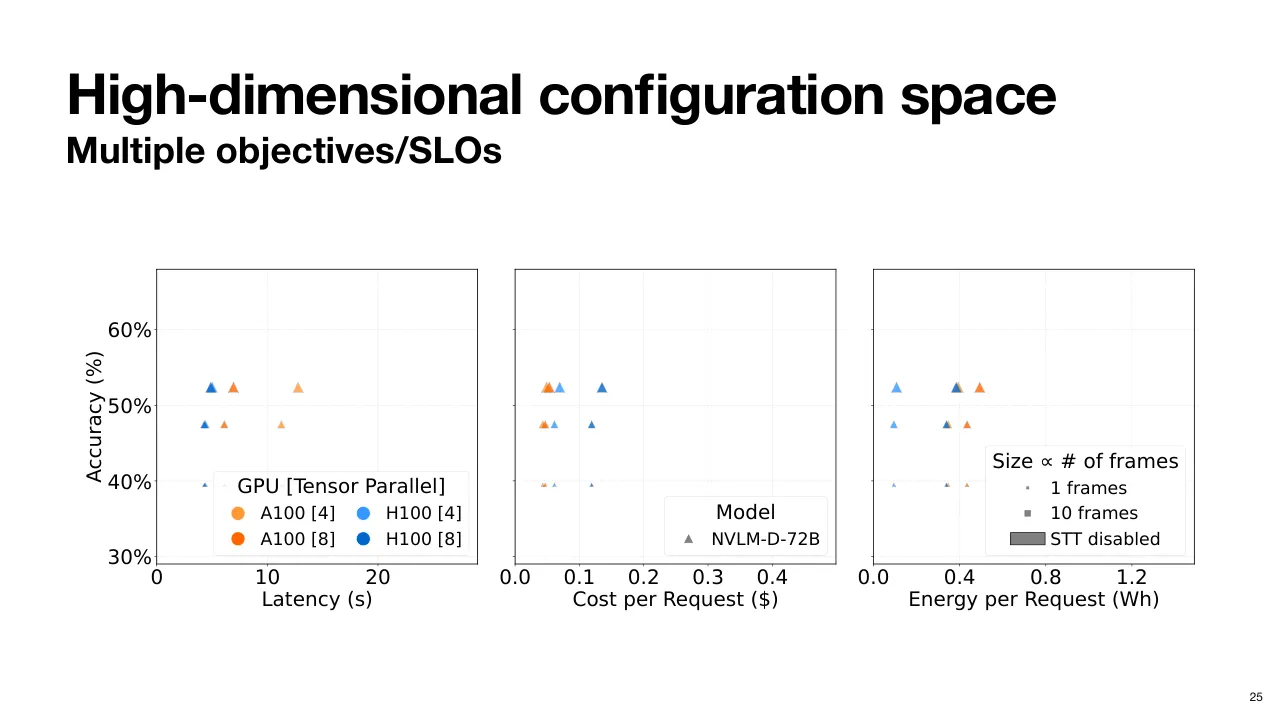
| 2.1.28 | 감을 잡기 위해 이 Configuration Space(설정 공간)의 일부를 시각화해 보겠습니다. 이것은 그중 몇 개일 뿐입니다. Just to put things in perspective, let's visualize part of this configuration space. There are just a few of these. |
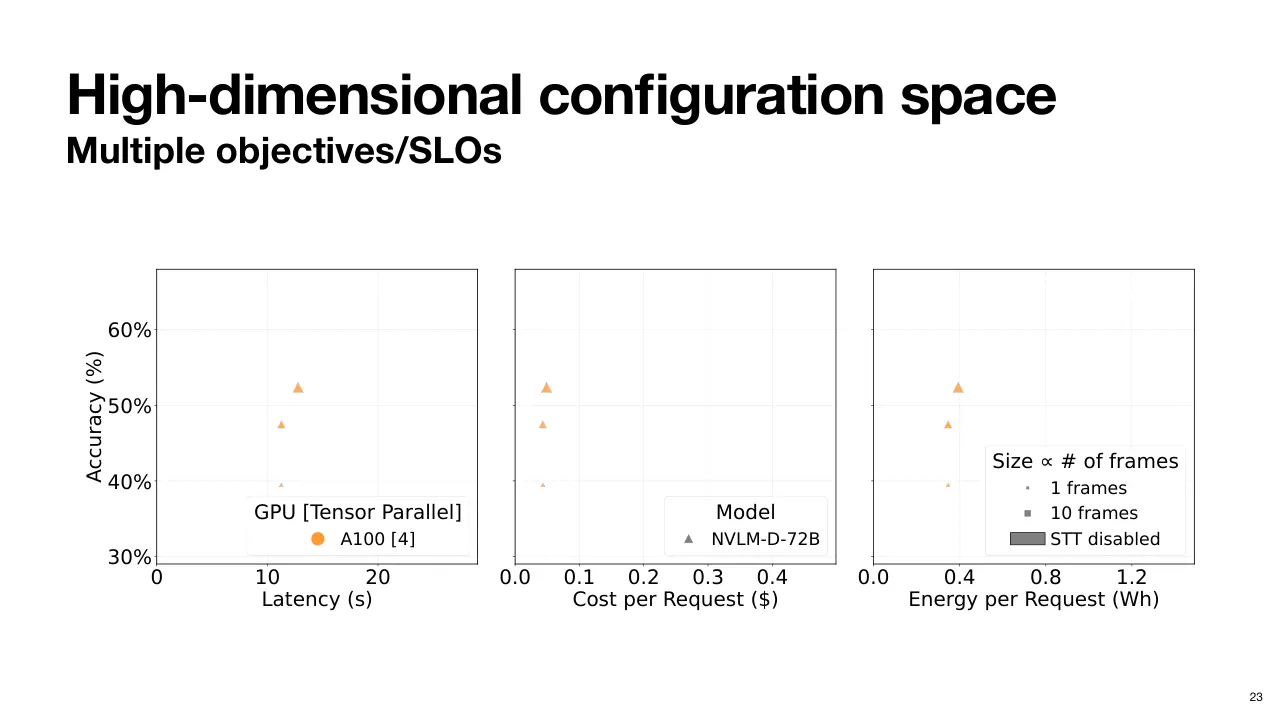
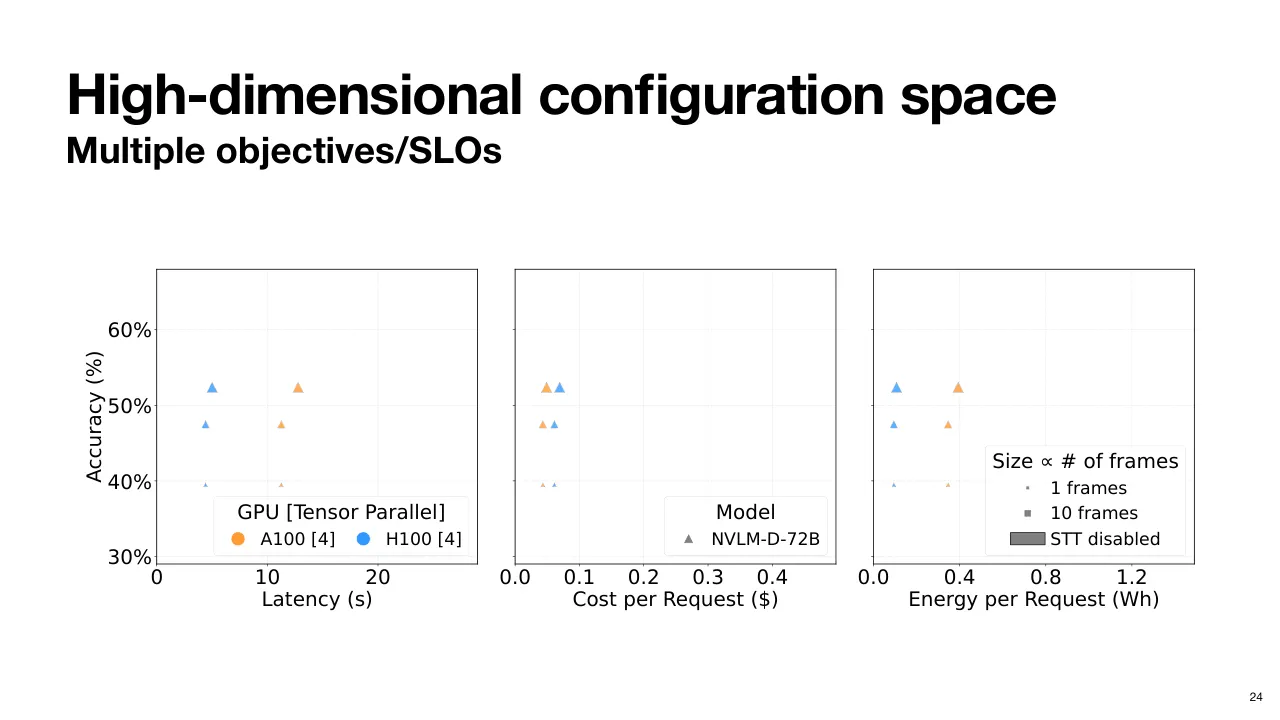
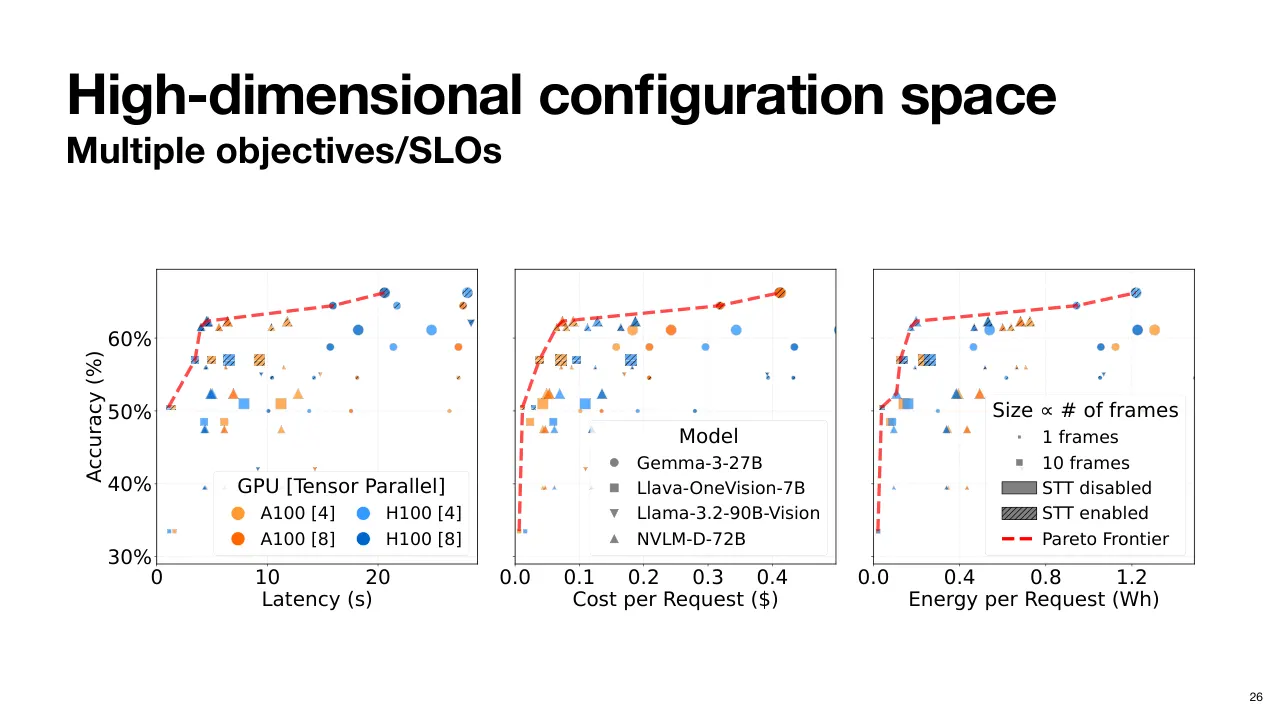
| 2.1.29 | Y축은 Accuracy(정확도)이고, 각 subplot 의 X축은 차례로 Latency(지연 시간), 요청당 Cost(비용), 요청당 Energy Consumption(에너지 소비)입니다. So, the Y-axis has accuracy, and the X-axis for each of the subplots has latency, cost per request, and energy consumption per request, respectively. |
| 2.1.30 | 앞의 Video QA Workflow 를 생각해 봅시다. QA Agent 의 Multimodal LLM 으로 NVLM Model 을 쓰고, Frame Extractor 의 추출 프레임 수를 몇 가지로 두고, Speech-to-Text 는 끄고, Hardware 로는 A100 네 개를 Tensor Parallelism(텐서 병렬)으로 묶어 씁니다. Let's consider the video QA workflow from earlier. So, we take the NVLM model as the multimodal LLM of choice for the QA agent, a couple of different options for the number of frames to extract in the frame extractor, and And disable speech-to-text, and use A100s with tensor parallelism four as the hardware choice. |
| 2.1.31 | 그러면 목표별로 이렇게 몇 가지 선택지가 나옵니다. This gives us us a few of these options for each objective. |
| 2.1.32 | GPU 종류를 더하고, Parallelism(병렬화) 옵션을 더하고, Model 을 더하면 이 Configuration Space 는 순식간에 폭발합니다. We can add more GPU types, we can add more parallelism options, we can add more models, and this configuration space blows up really fast. |
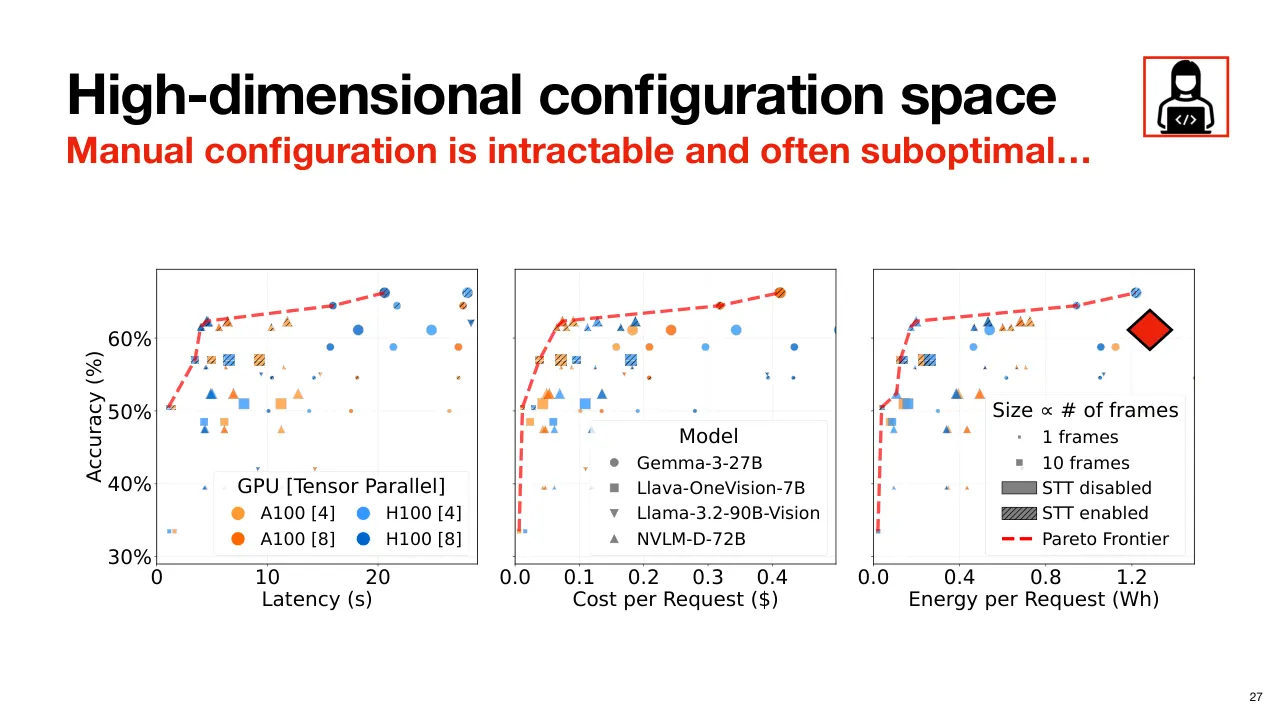
| 2.1.33 | 즉 Agentic Workflow 는 비교적 단순한 것조차 제대로 설정하기가 쉽지 않습니다. 그리고 정답인 설정이 하나 있는 것도 아닙니다. 요청의 SLO(서비스 수준 목표)와 배포 목표에 따라 달라집니다. So, clearly, agentic workflows, even relatively simple ones, are not so easy to configure properly. And there is not a single correct configuration. It is a function of your request SLOs and deployment objectives. |
| 2.1.34 | 그리고 사람이 손으로 설정을 고르는 Manual Configuration(수동 설정)은 대개 Pareto Optimal(파레토 최적)이 아닙니다. 예를 들어 정확도는 이상적이지 않으면서 자원과 에너지는 더 낭비할 수 있습니다. And manual configuration, or trying to pick these configurations manually by hand, is often not Pareto optimal. You may end up being less than ideal in terms of accuracy while also wasting more resources and energy, for example. |
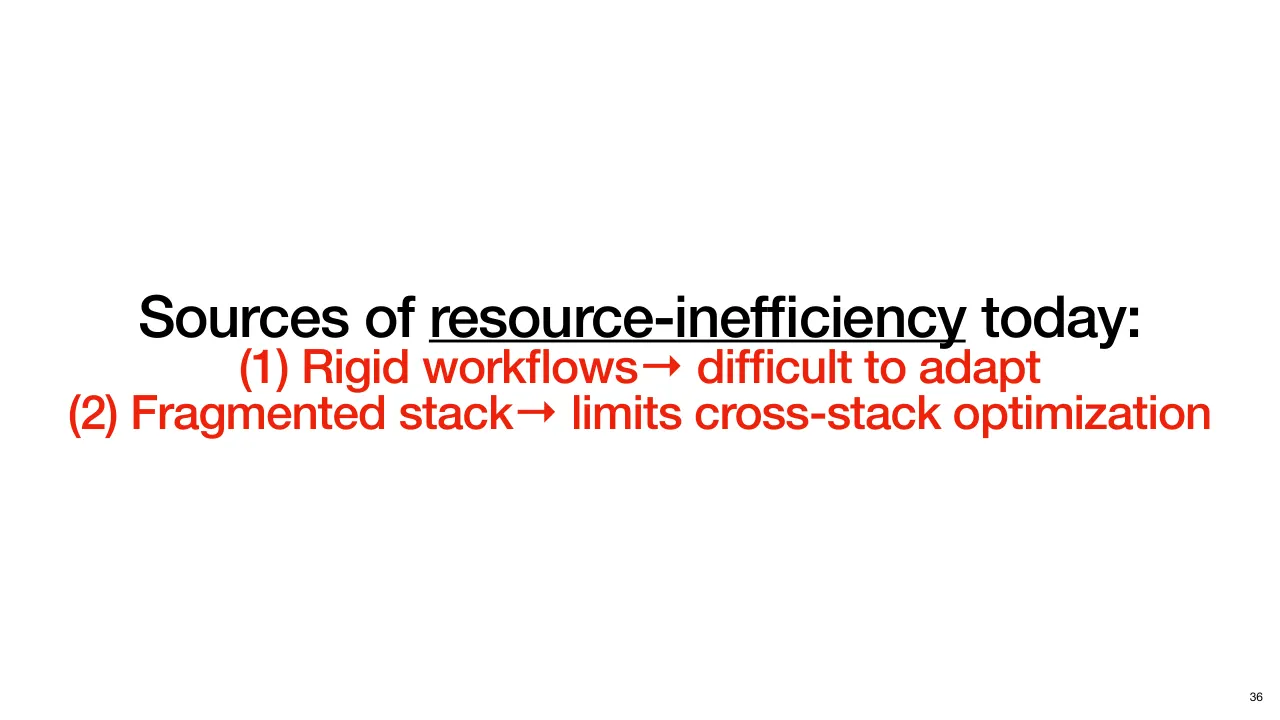
| 2.1.35 | 이것이 오늘날 비효율의 첫 번째 원인입니다. 설정이 정의에 고정된 Rigid Workflow(경직된 워크플로)는 나중에 바꾸기 어렵습니다. So, all of this is our first source of inefficiency today. Rigid workflows that have configurations baked into the definitions are difficult to adapt later. |
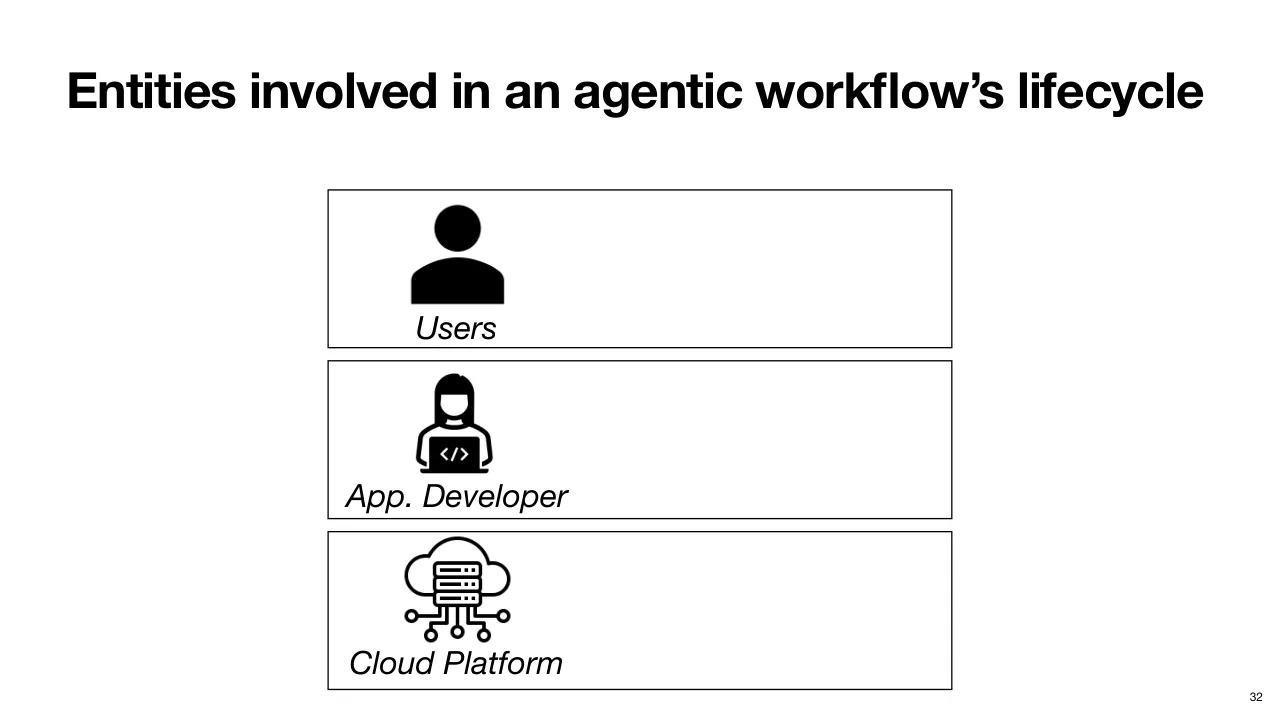
| 2.1.36 | 이제 Workflow 를 정의하고 설정했다고 가정하고, 개발부터 배포까지 Workflow 의 나머지 Life Cycle(생애 주기)과 관련된 주체들을 살펴봅시다. Now, assuming you have defined and configured this workflow, let's take a look at the remainder of the workflow's life cycle from its development to deployment and the different entities involved. |
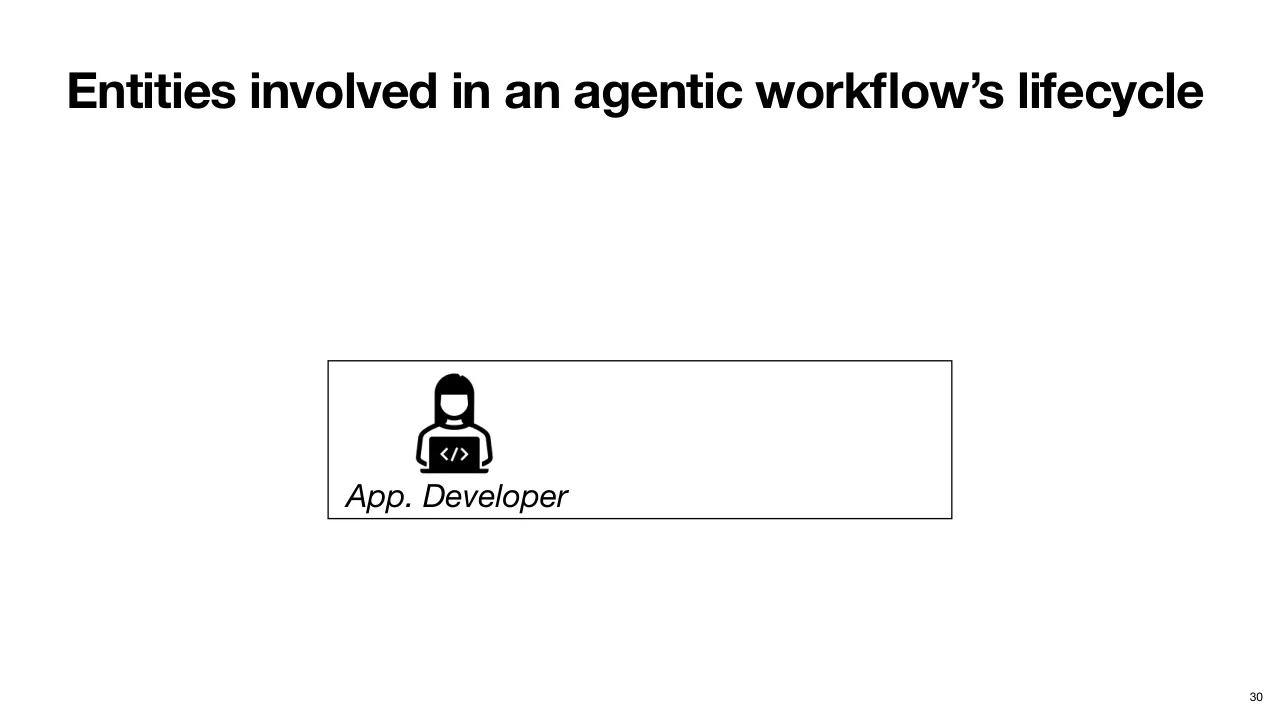
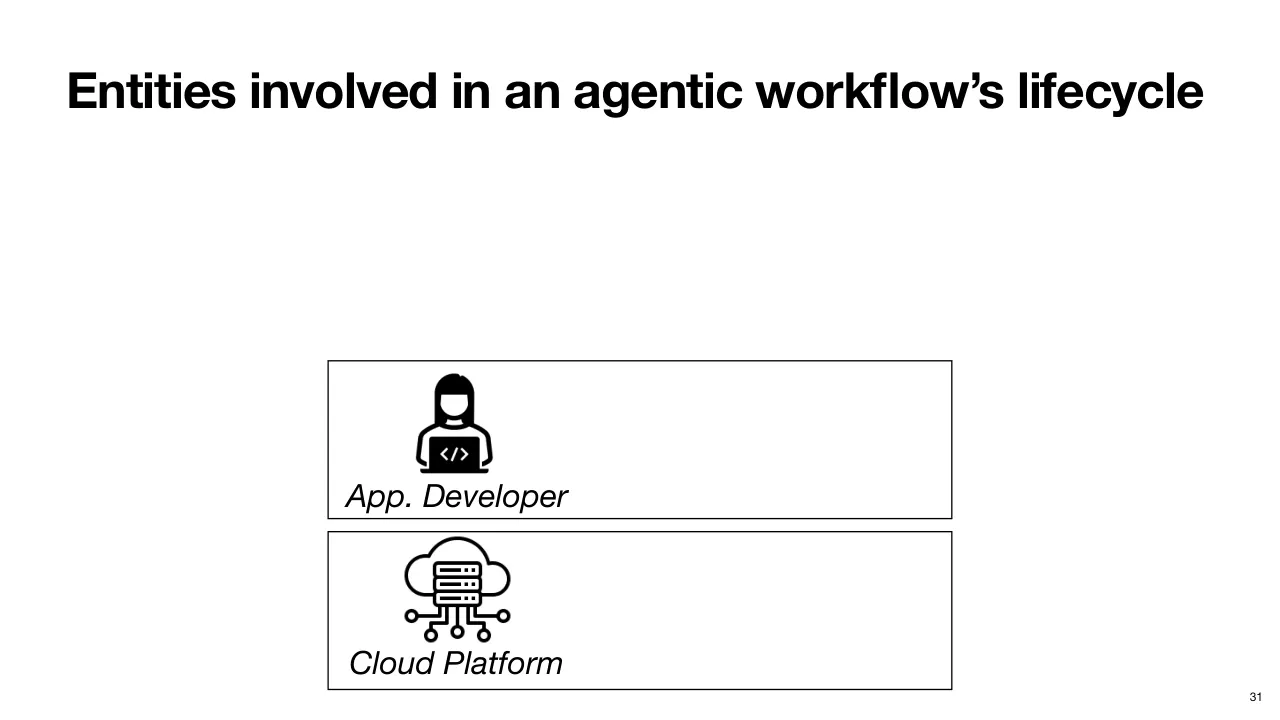
| 2.1.37 | 앞에서 본 것처럼 Application Developer(애플리케이션 개발자)가 Workflow 를 정의·설정한 뒤, 애플리케이션의 구성 요소를 하나 이상의 Cloud Platform 에 배포하고, 예를 들어 HTTP Endpoint(엔드포인트)로 End User(최종 사용자)에게 노출합니다. So, we saw how the application developer defines and configures the workflow, then deploy it and the pieces of this application across one or more cloud platforms, and then expose them to end users, say using an HTTP endpoint. |
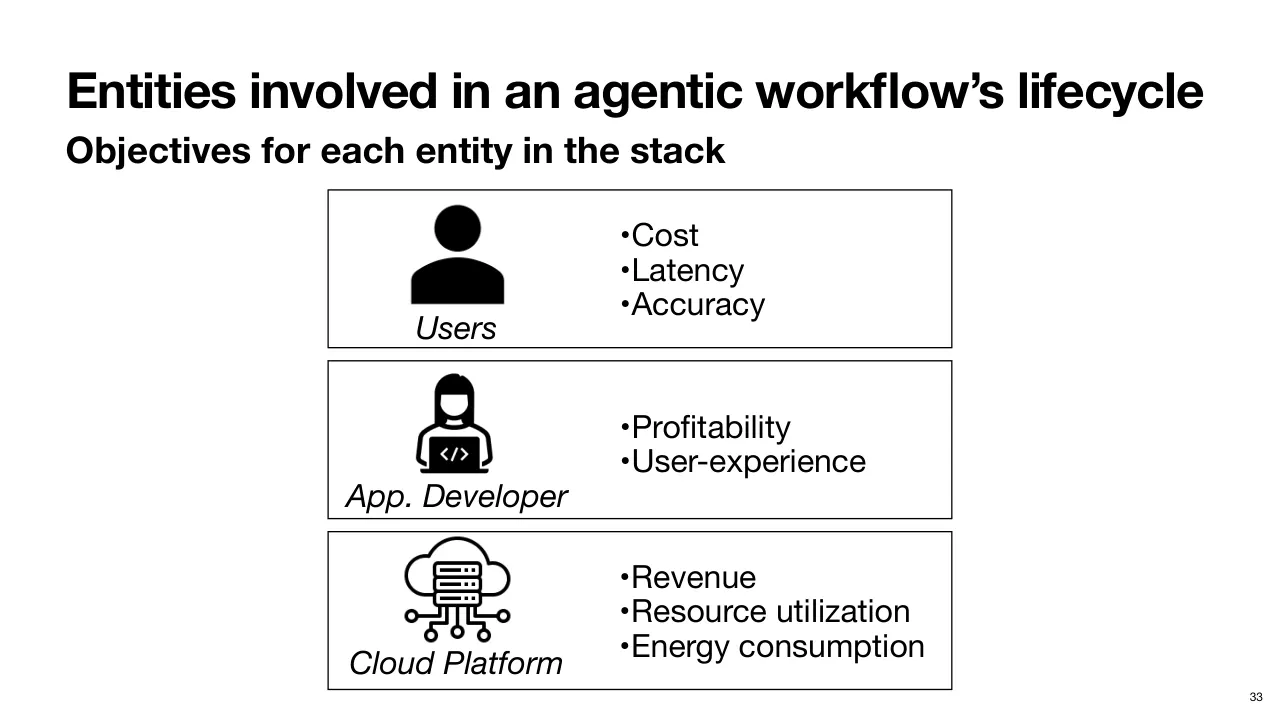
| 2.1.38 | 이 주체들이 각자 조금씩 다른 목표를 가진다는 점에 주목하세요. Now, notice how all of these entities have somewhat different objectives. |
| 2.1.39 | 사용자마다 Cost, Latency, Accuracy 세 축을 중시하는 정도가 다릅니다. Different users may care about the three axes of cost, latency, and accuracy with varying degrees. |
| 2.1.40 | 개발자는 애플리케이션의 수익성을 중시하고 좋은 사용자 경험을 제공하고 싶어 합니다. Developers care about profitability from their application and want to provide a good user experience. |
| 2.1.41 | Cloud Platform 은 수익을 높이기 위해 효율을 극대화하고 자원과 에너지 소비를 최소화하려 합니다. And the cloud platform wants to maximize efficiency, minimize resources and energy consumption to drive up revenues. |
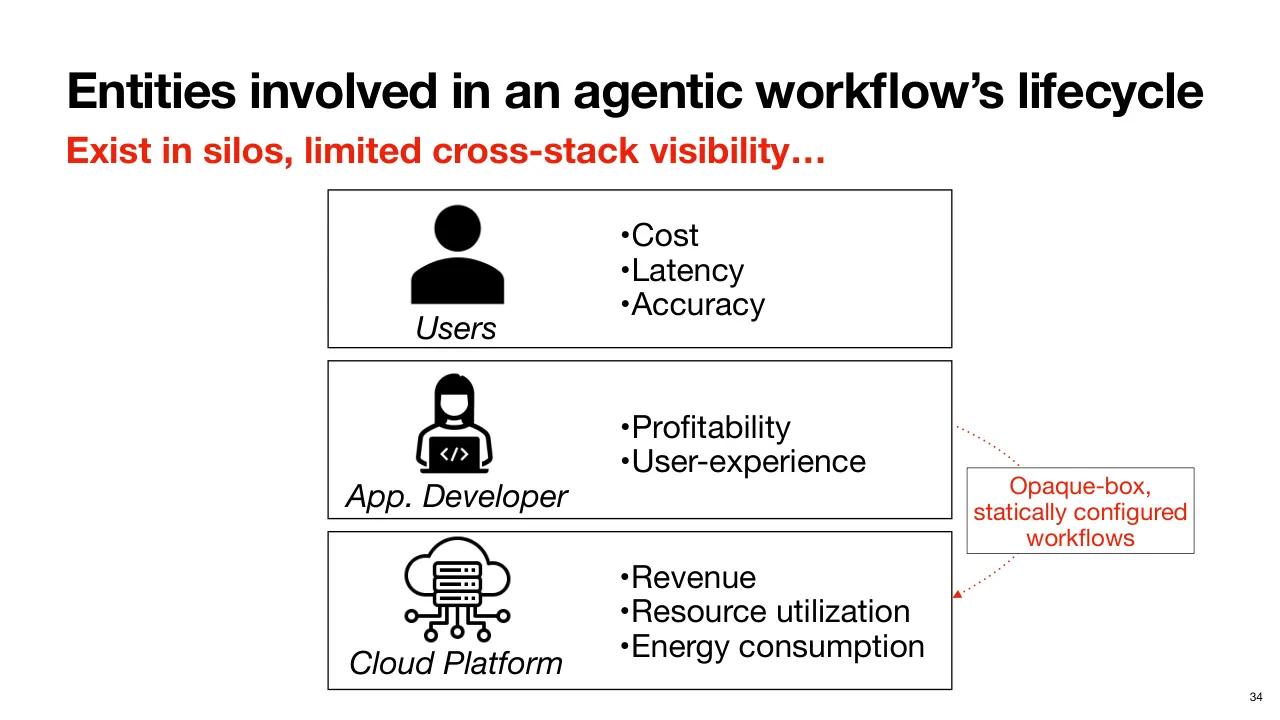
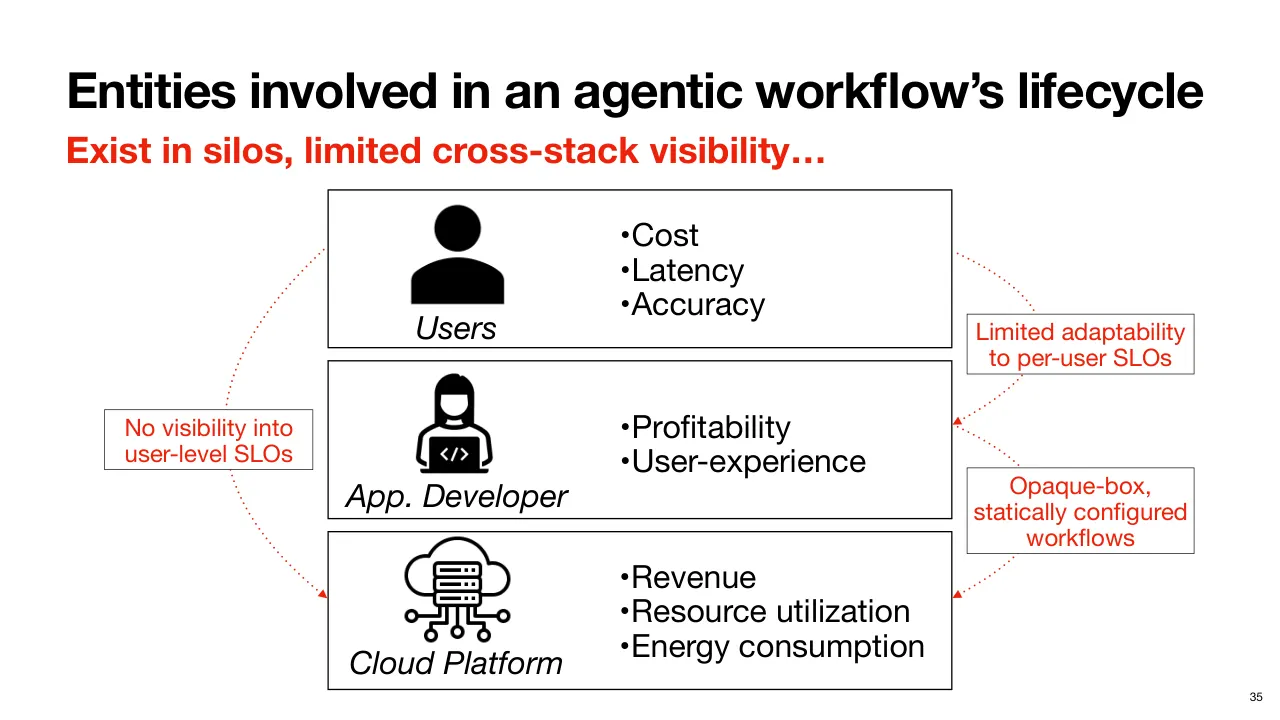
| 2.1.42 | 하지만 안타깝게도 오늘날 이 계층들은 서로를 전혀 Visibility(가시성) 있게 보지 못합니다. But unfortunately, today, none of these layers has visibility into the other. |
| 2.1.43 | Cloud Platform 은 정적으로 설정된 애플리케이션을 Opaque Box(불투명한 상자)로만 봅니다. 시스템 상황이 바뀌어도 Workflow 를 조정하거나 재설정해 자원 효율을 높일 수 없습니다. The cloud platform sees an opaque box statically configured application. It cannot adapt or reconfigure the workflow with changing system dynamics to yield better resource efficiency. |
| 2.1.44 | 개발자도 사용자별 선호에 맞춰 조정하지 못합니다. One-size-fits-all(모두에게 같은) 애플리케이션을 배포합니다. The developers are not really able to adapt to their users' preferences individually. They deploy an application that is one-size-fits-all. |
| 2.1.45 | 마찬가지로 Cloud Platform 도 사용자의 SLO 를 파악해 효율을 극대화하는 다른 Resource Allocation(자원 할당) 결정으로 바꾸지 못합니다. Similarly, neither is the cloud platform able to capture the users' SLO and translate those into different resource allocation decisions to maximize efficiency. |
| 2.1.46 | 효율이 좋아지면 물론 Stack(스택)의 모두에게 이득입니다. 예를 들어 더 낮은 비용과 더 나은 사용자 경험으로 이어질 수 있습니다. 하지만 오늘날은 그와 거리가 멉니다. And better efficiency, of course, would benefit everyone in the stack. For example, it can reflect in lower cost and better user experience. But we are far from this today. |
| 2.1.47 | 이것이 두 번째 비효율입니다. Fragmented Stack(분절된 스택)이 Cross-Stack Optimization(스택 전반 최적화)을 막아, 전역적으로 효율적인 설정 대신 Local Optima(국소 최적)에 머물게 합니다. So, this highlights the second inefficiency, which is a fragmented stack limits cross-stack optimization, leading to local optima rather than globally efficient configurations. |
| 2.1.48 | 그래서 저희의 목표는 이렇습니다. Agentic Workflow 를 End-to-End(종단 간)로 통합 Orchestration 해서, 사용자 수준 SLO 를 만족하면서 높은 자원 효율을 내는 것입니다. And this brings us to our goal. We want unified end-to-end orchestration of agentic workflows to deliver high resource efficiency while satisfying user-level SLOs. |
| 2.1.49 | 이를 위해 이 비전의 일부를 구현한 시스템 Murakkab 을 제시합니다. 핵심 아이디어는 두 가지입니다. To this end, we present our system Morakab that realizes part of this vision. And it does it through two key ideas. |
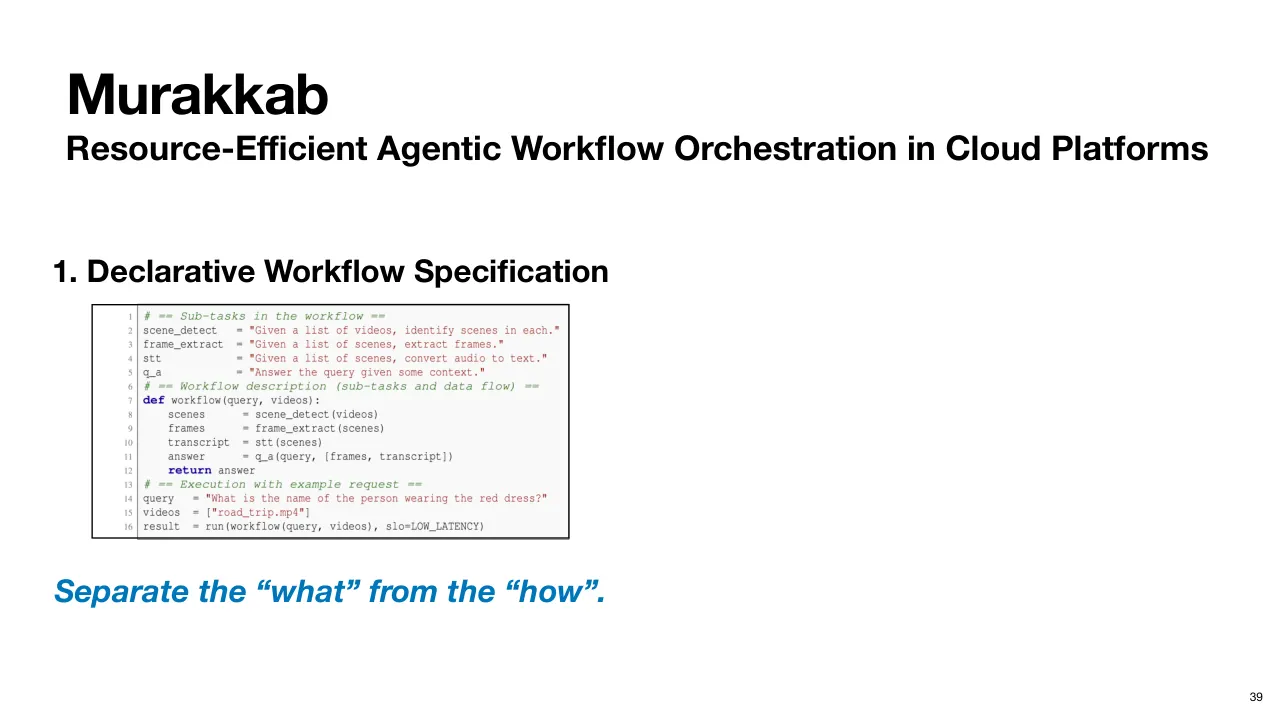
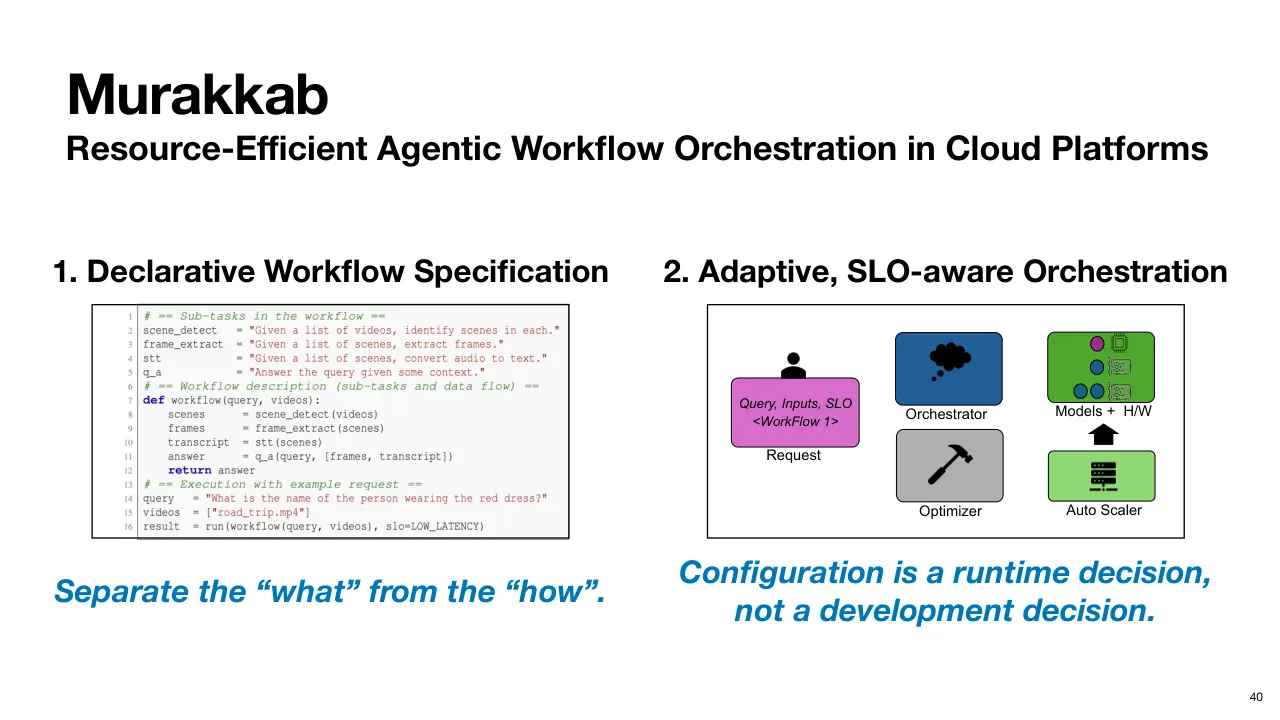
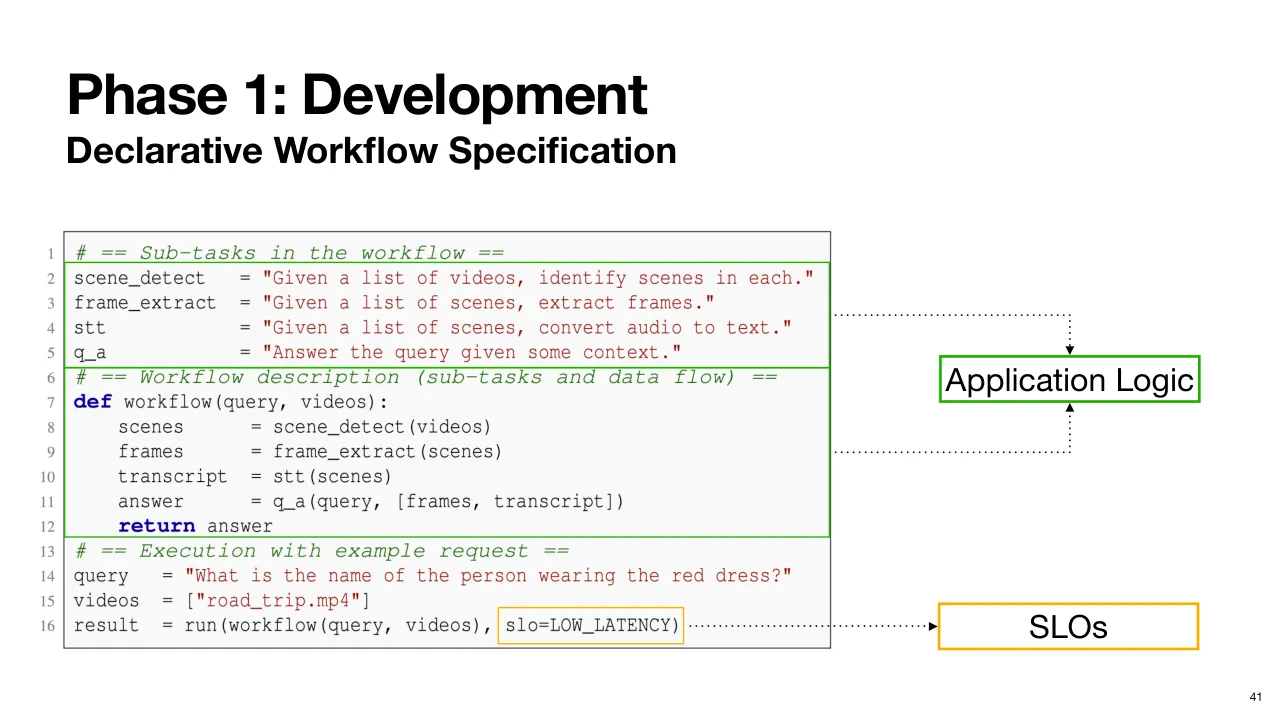
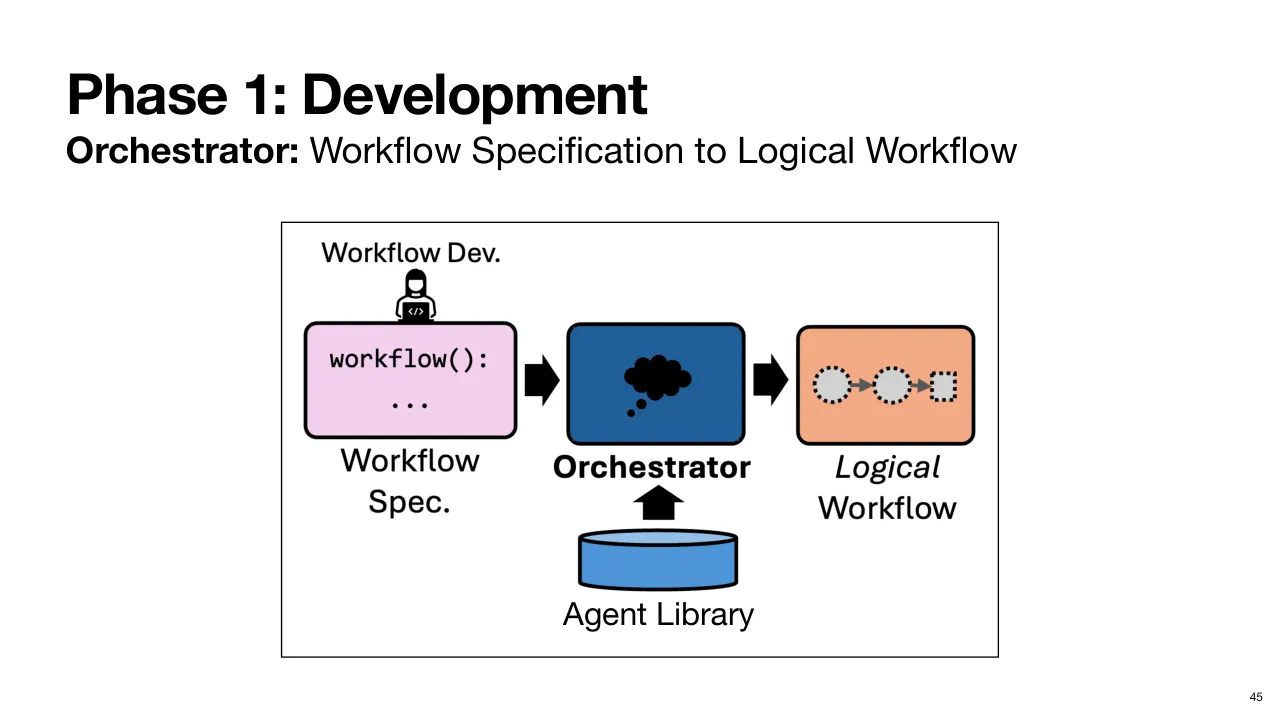
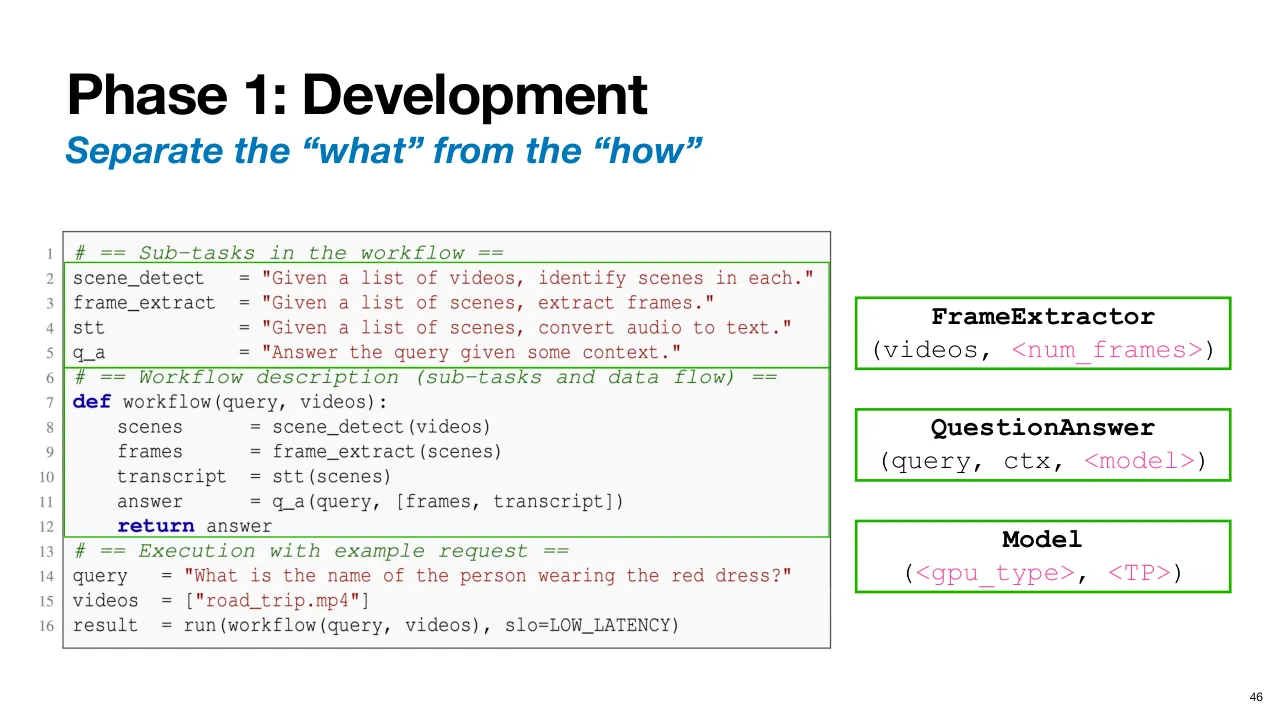
| 2.1.50 | 첫째, Application Logic 과 Execution Detail 을 분리하는 Declarative Workflow Specification(선언적 워크플로 명세)을 씁니다. 다시 말해 무엇과 어떻게를 분리합니다. First, it uses declarative workflow specifications that decouple application logic from execution details. In other words, we separate the what from the how. |
| 2.1.51 | 개발자는 애플리케이션의 의도와 작업 구성을 표현하는 데만 집중합니다. 설정은 Workflow 개발 단계에서 완전히 빠집니다. The developer's job is to focus on expressing the intent of the application and the task composition. The configurations are taken out of the development phase of the workflow entirely. |
| 2.1.52 | 그다음 Murakkab 은 Adaptive(적응형) SLO-Aware(SLO 인지) Orchestrator(오케스트레이터)로 이 Agentic Workflow 들을 하나의 틀 아래서 전체적으로 생성하고 최적화합니다. 여러 Workflow, 들어오는 요청, 시스템 상황을 더 잘 보는 Visibility 를 활용해 SLO 를 만족하면서 자원 효율을 높입니다. 다시 말해 설정을 개발 시점이 아니라 Runtime(실행 시점)의 결정으로 만듭니다. Morakab then uses an adaptive SLO-aware orchestrator that generates and optimizes these agentic workflows holistically under a single umbrella. It leverages greater visibility to the different workflows, the incoming requests, and the system dynamics to be more resource-efficient while satisfying the SLOs. In other words, we make configuration a runtime decision, not a development time decision. |
| 2.1.53 | 이제 개발자 입장에서 Workflow Specification 은 이처럼 대부분 자연어로 쓴 간단한 명세이고, 주로 Application Logic 에만 집중합니다. The workflow specification now, from the perspective of the developer, is just a simple spec, mostly in natural language like this, which is mainly just focusing on the application logic. |
| 2.1.54 | 요청이 도착할 때 Low Latency(낮은 지연)나 정확도 최대화 같은 Query-Specific(질의별) SLO 가 붙어 최적화 과정을 이끌 수 있습니다. At request arrival time, there may be query-specific SLOs like low latency or maximize accuracy, etc., to guide the optimization process. |
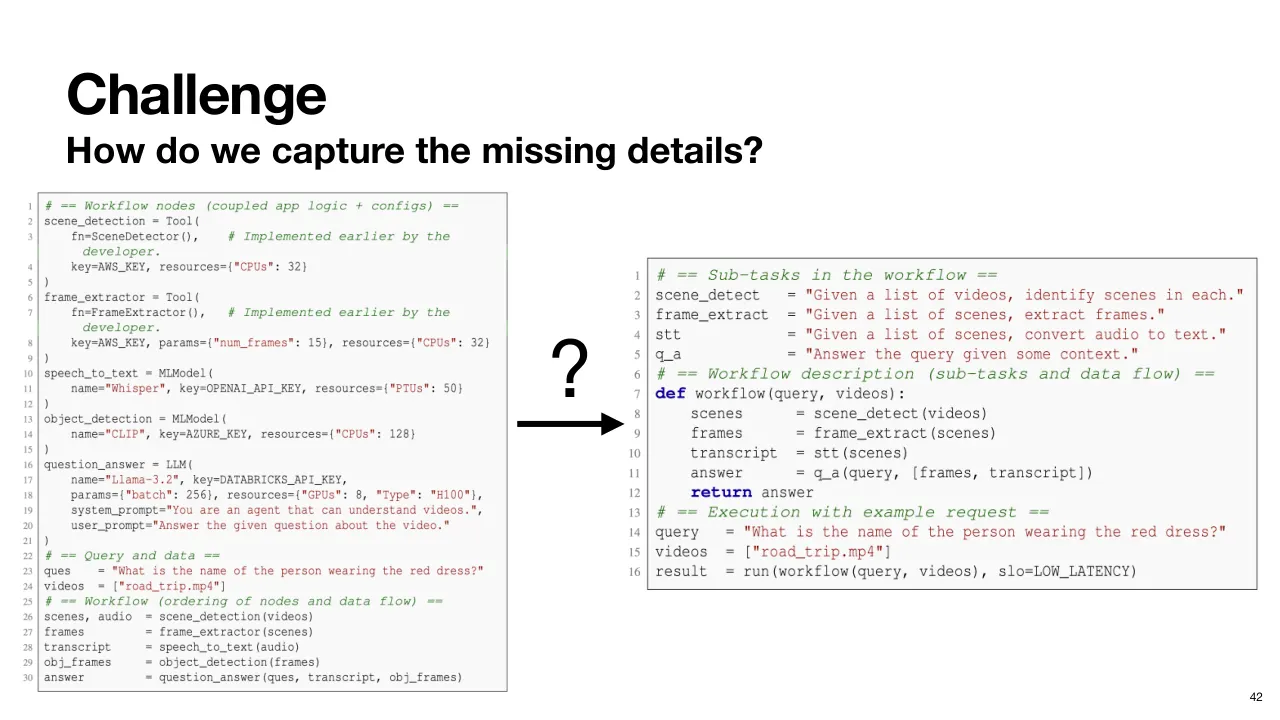
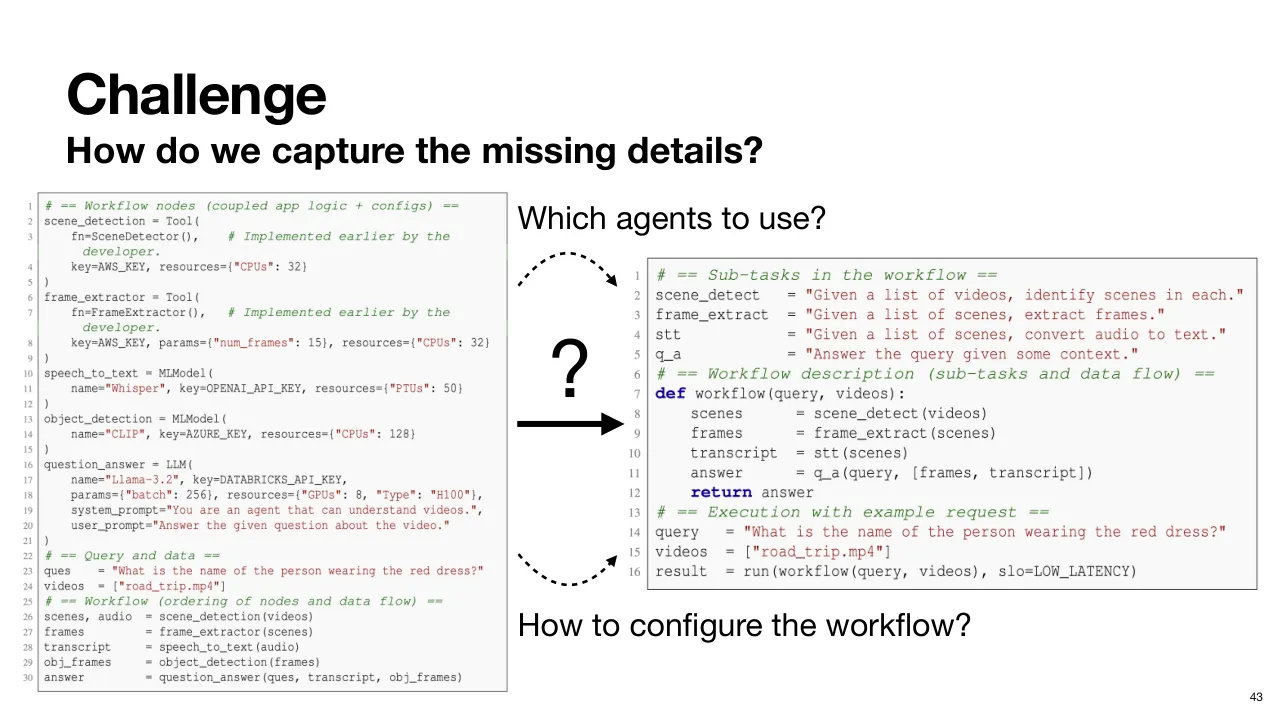
| 2.1.55 | 하지만 여기서 큰 과제가 있습니다. 왼쪽처럼 모든 세부사항을 손으로 지정한 표현에서, 오른쪽처럼 애플리케이션의 의도만 표현하고 나머지는 없는 단순한 선언적 명세로 어떻게 넘어갈까요? But here's the big challenge. How do you go from the representation on the left, which has hand-specified every detail, to the simpler declarative specification on the right that only expresses the intent of the application, but nothing else? |
| 2.1.56 | Murakkab 은 모든 Execution Detail 을 어떻게 스스로 알아낼까요? How does Morakab figure out all the execution details on its own? |
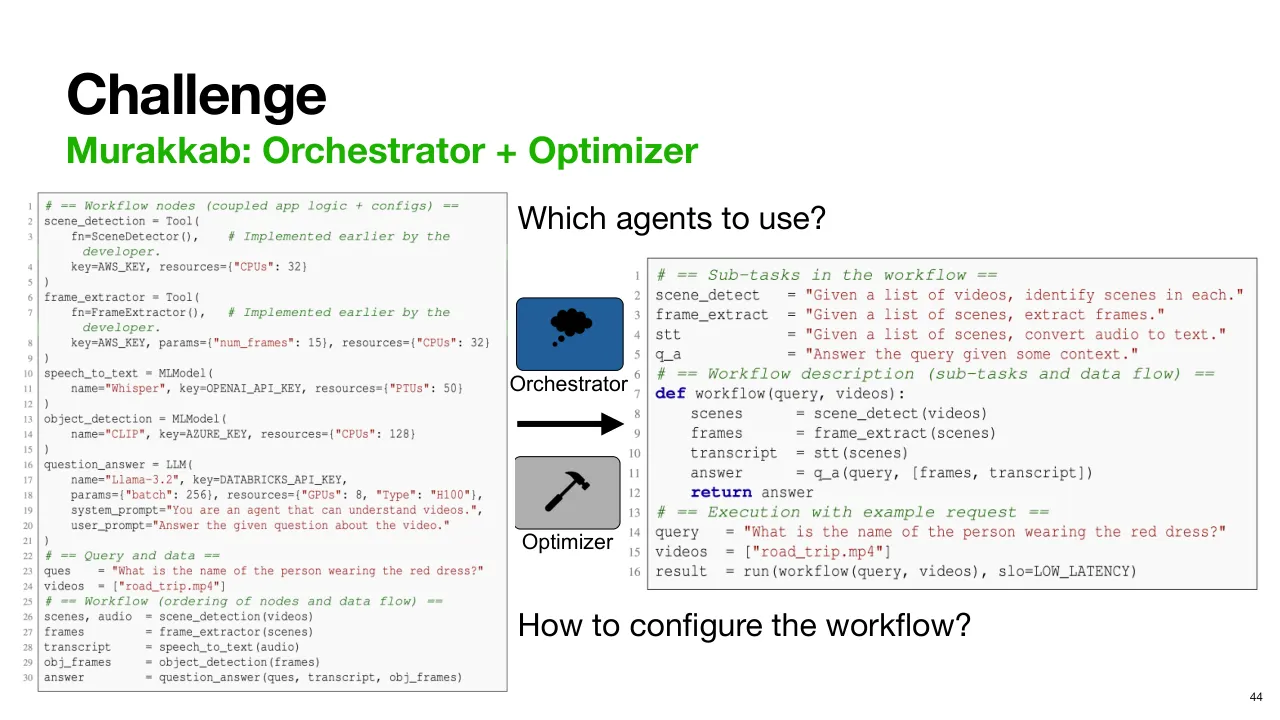
| 2.1.57 | 필요한 정보는 크게 두 가지입니다. 첫째, 명세된 각 작업에 어떤 Agent 를 쓸지, 둘째, Agent·Workflow·Hardware 등 여러 수준에서 Workflow 를 어떻게 설정할지입니다. There are two main pieces of information that need. First, which agents to use for each of the specified tasks, and two, how to configure the workflow at various levels like the agent, workflow, and hardware levels. |
| 2.1.58 | Murakkab 은 이를 Centralized Orchestrator(중앙 오케스트레이터)와 Optimizer(최적화기)로 해결합니다. And Marabou does it through a centralized orchestrator and an optimizer. |
| 2.1.59 | Centralized Orchestrator 와 Agent Library(에이전트 라이브러리)가 있습니다. 각 Agent 는 호출용 Interface(인터페이스), Agent 를 설정하는 Configuration 집합, 그리고 자연어 설명을 제공합니다. 그래서 Orchestrator 가 명세의 작업에 맞는 Agent 를 고를 수 있습니다. We have a centralized orchestrator and library of agents. Each agent exposes an interface to invoke the agent, a set of configurations to configure the agent, and a natural language description of the agent so that the orchestrator can pick the right agent given a task in the specification. |
| 2.1.60 | Tool Calling(도구 호출) 능력이 있는 LLM 이 Workflow 의 각 작업에 알맞은 Agent 를 고르지만, 설정은 전혀 고르지 않습니다. An LLM with tool calling ability selects an appropriate agent for each task in the workflow, but does not select any configurations. |
| 2.1.61 | 명세를 아직 설정되지 않은 Agent 들의 DAG 로 바꾸는 Logical Workflow(논리적 워크플로)만 구성합니다. It only constructs a logical workflow transforming the specification into a DAG of agents that are still unconfigured. |
| 2.1.62 | Orchestrator 는 여기 보이는 것처럼 Logical Workflow 의 Node(노드)를 고를 수 있습니다. The orchestrator is able to pick nodes for the logical workflow like shown here. |
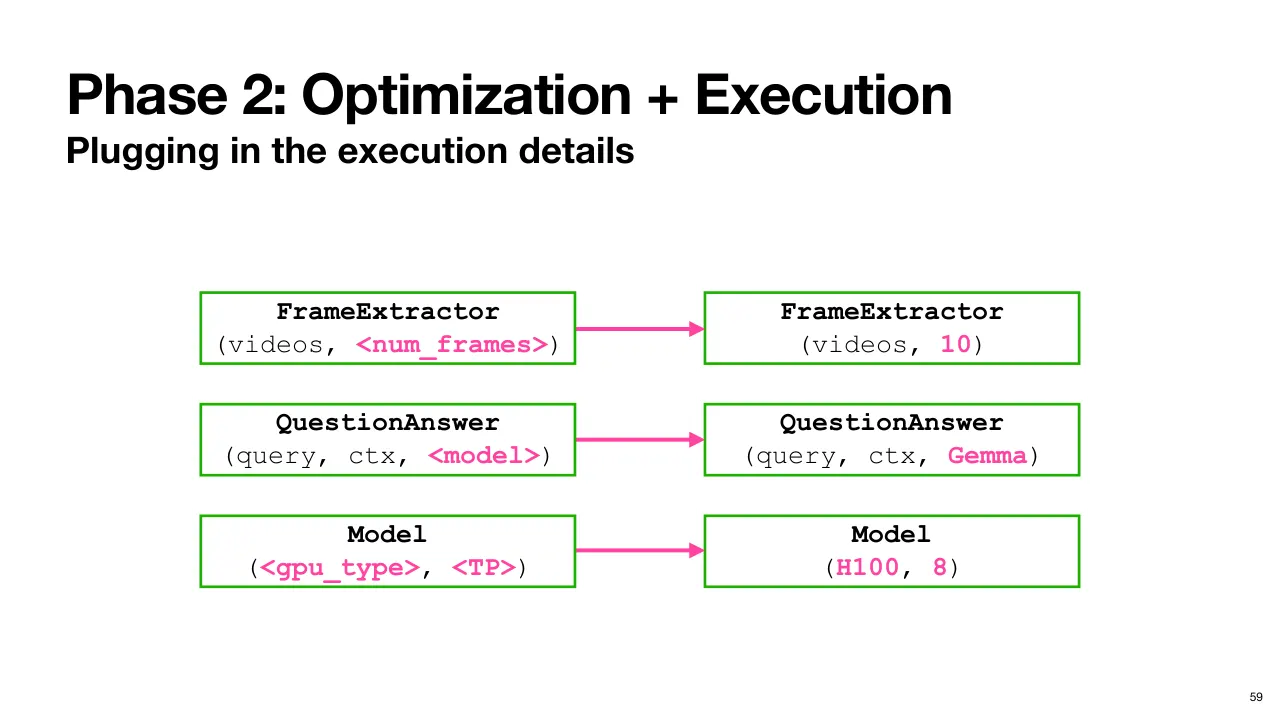
| 2.1.63 | 프레임 추출 작업에는 Frame Extractor, 질의와 문맥이 주어진 질문 답변에는 Question Answer Agent 를 고릅니다. 하지만 분홍색으로 표시된 Execution Detail, 즉 프레임 수, Model, Accelerator 종류, Parallelism 은 아직 정해지지 않았다는 점을 보세요. A frame extractor for the task of extracting frames, a question answer agent for answering questions given query and context, but notice the execution details shown in pink like the number of frames, the model, the accelerator type, parallelism are not locked in. |
| 2.1.64 | 그럼 이 설정들은 어떻게 할까요? So, what about these configurations? |
| 2.1.65 | 그건 다음 단계에서 이뤄집니다. Well, this happens in the next phase. |
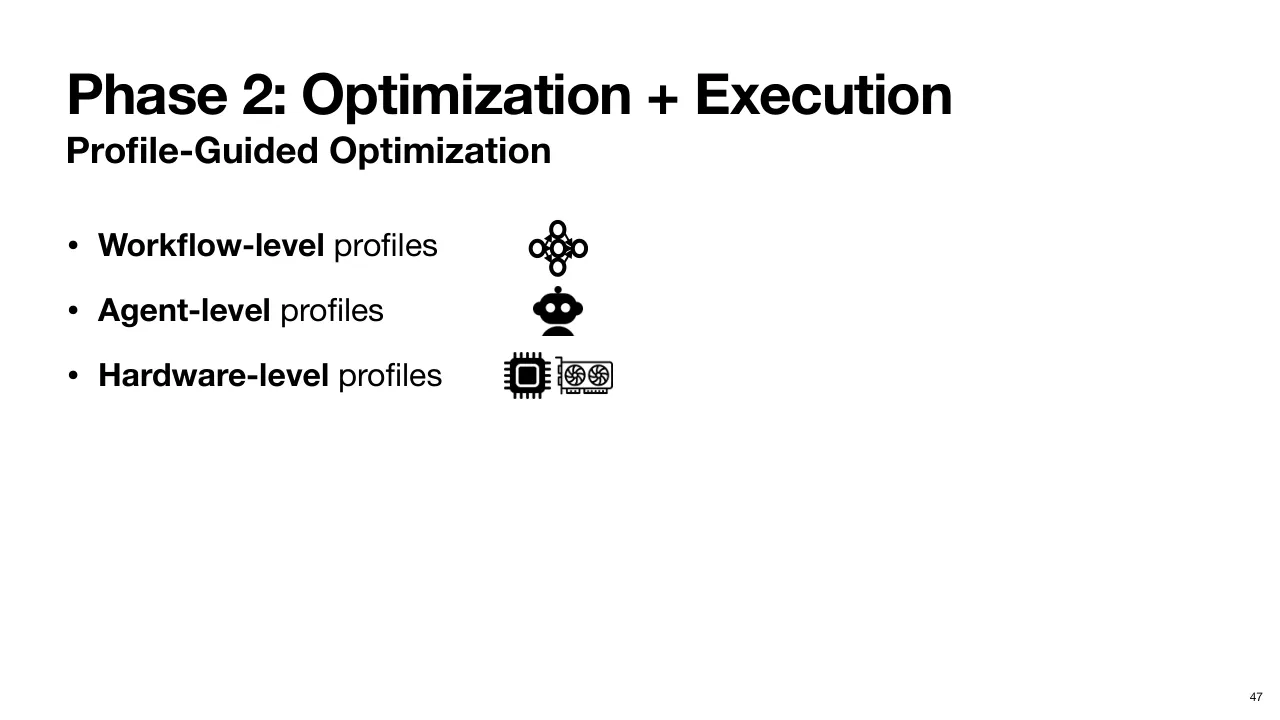
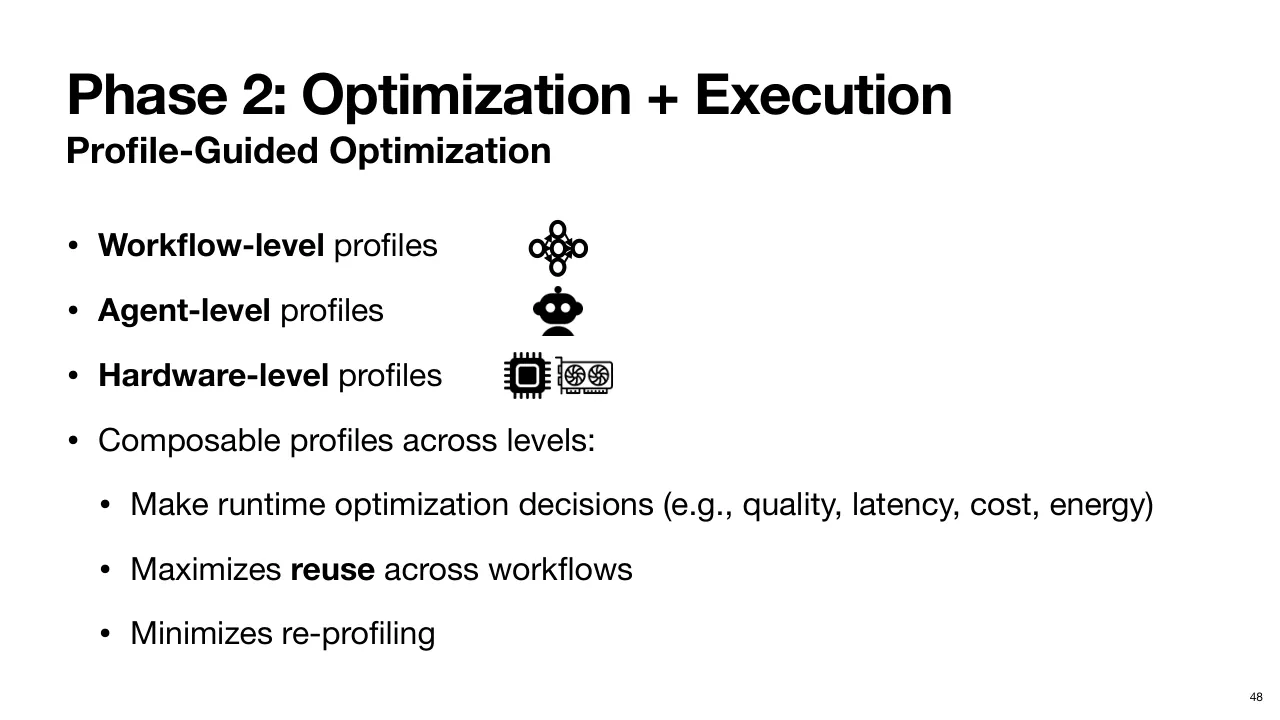
| 2.1.66 | Murakkab 은 이를 계층적 Profile(프로파일)을 이용한 Profile-Guided Optimization(프로파일 기반 최적화)으로 합니다. Workflow-Level, Agent-Level, Hardware-Level Profile 이 있고, 각각 Stack 의 다른 부분에 있는 구성 요소의 동작을 담습니다. Marabou does this through profile-guided optimization with a hierarchy of profiles. You have workflow level, agent level, and hardware level profiles, and each of these capture behavior of components in different parts of the stack. |
| 2.1.67 | 이 방식이 강력한 이유는 Stack 의 여러 수준의 Profile 을 Compose(조합)할 수 있다는 점입니다. Agent-Level Profile 은 어떤 Workflow 가 쓰는지와 무관하므로 매우 다양한 Workflow 에서 재사용할 수 있습니다. And what makes this powerful is we can now compose these profiles from various levels of the stack. The agent level profiles are agnostic to which workflow uses them and can be reused across a wide variety of workflows. |
| 2.1.68 | 마찬가지로 Hardware Profile 은 Model 을 Agent 로 어떻게 쓰는지와 무관합니다. 그래서 이 Profile 을 여러 Agent 에 재사용할 수 있고, 그 Agent 들은 다시 여러 Workflow 에서 쓰입니다. Similarly, the hardware profiles are agnostic of how you are using a model as an agent. You can hence reuse these profiles for many different agents, each being used in many different workflows in turn. |
| 2.1.69 | 그래서 Profiling(프로파일링)은 감당할 만하고 재사용 가능하며, 이것이 Murakkab 이 Workflow 의 Quality(품질), Latency, Cost, Energy Consumption 을 따져 Runtime 최적화를 하도록 돕습니다. So, profiling is tractable and reusable, which helps Marabou make runtime optimizations reasoning about the quality, latency, cost, and energy consumption of workflows. |
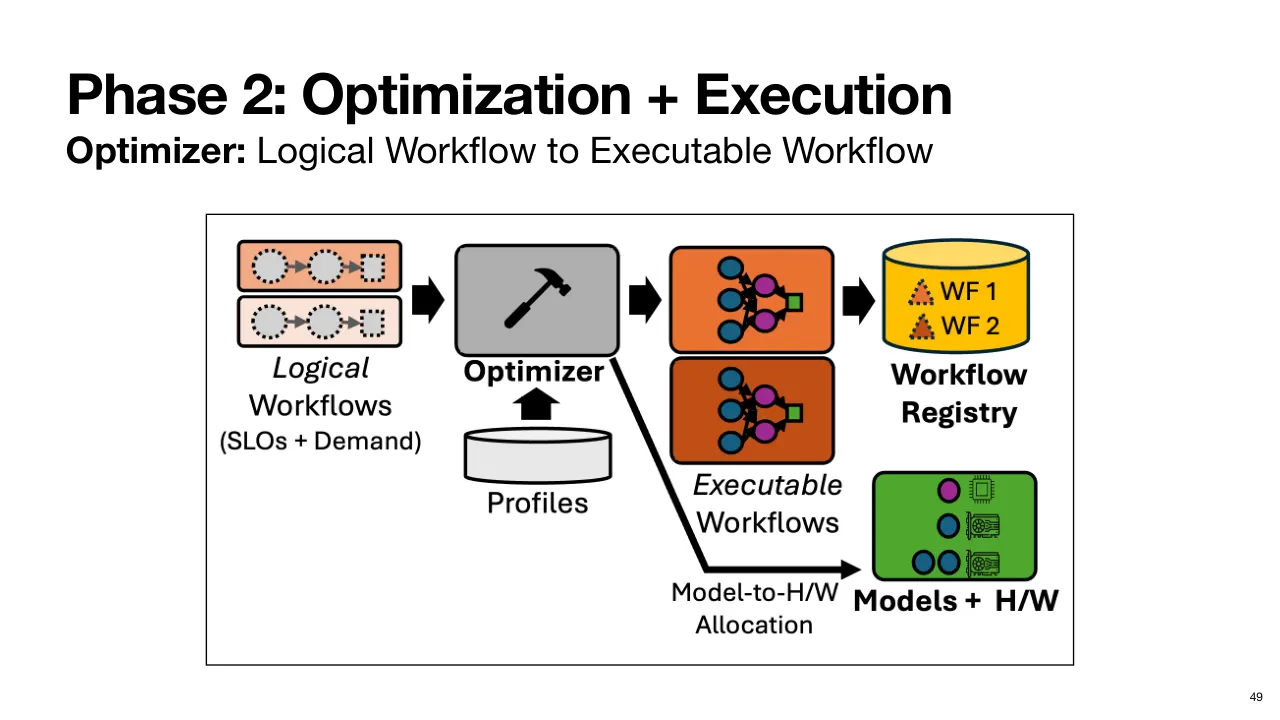
| 2.1.70 | 설정이 없는 Logical Workflow 가 Profile 과 함께 Optimizer 의 입력으로 들어갑니다. 그러면 Optimizer 는 Runtime 에 Execution Detail 이 확정된 Executable Workflow(실행 가능한 워크플로)를 만들고, Optimizer 가 다시 돌 때까지 재사용하도록 Cache(캐시)해 둡니다. So, the logical workflow without any configurations is taken as input by the optimizer along with the profiles. It then produces executable workflows with the execution details now locked in at runtime and also cached for later reuse until the optimizer runs again. |
| 2.1.71 | 이제 적절한 자원도 할당·준비되어 Workflow 를 실행할 준비가 끝났습니다. Now, the appropriate resources have also been allocated and provisioned, ready to execute the workflows. |
| 2.1.72 | 먼저 Workflow Profile 부터 봅시다. Let's look at workflow profiles first. |
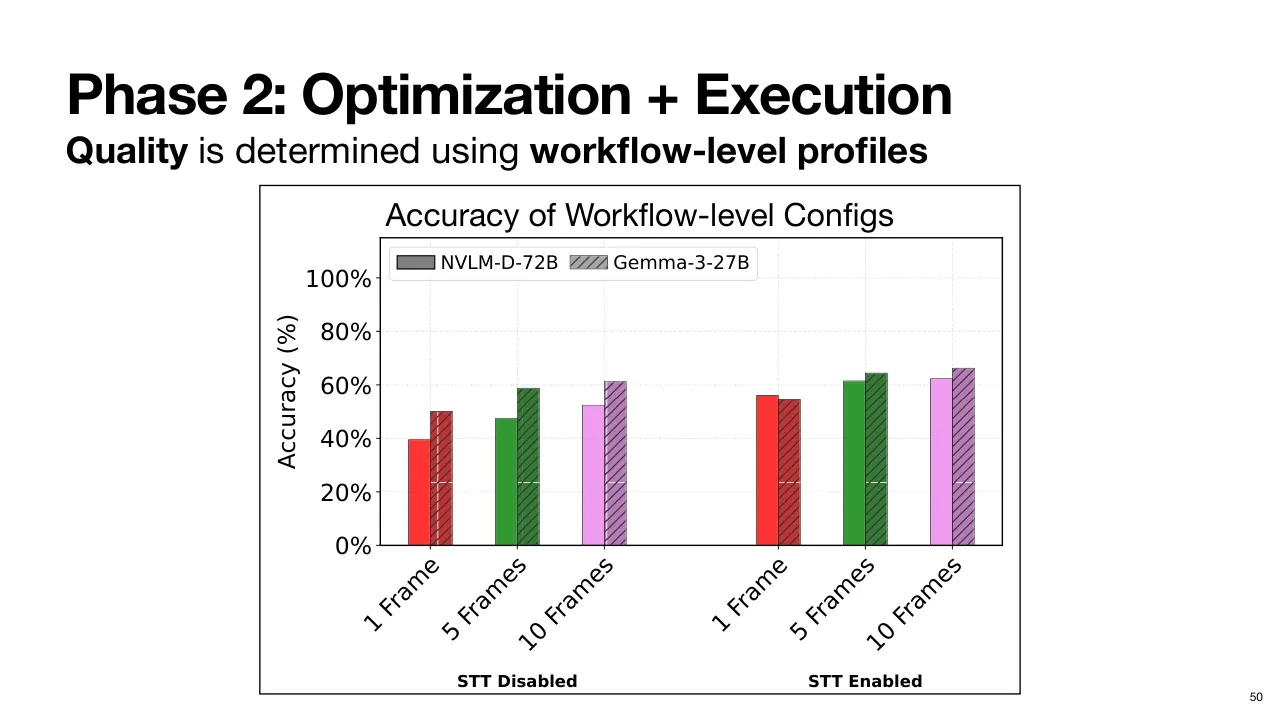
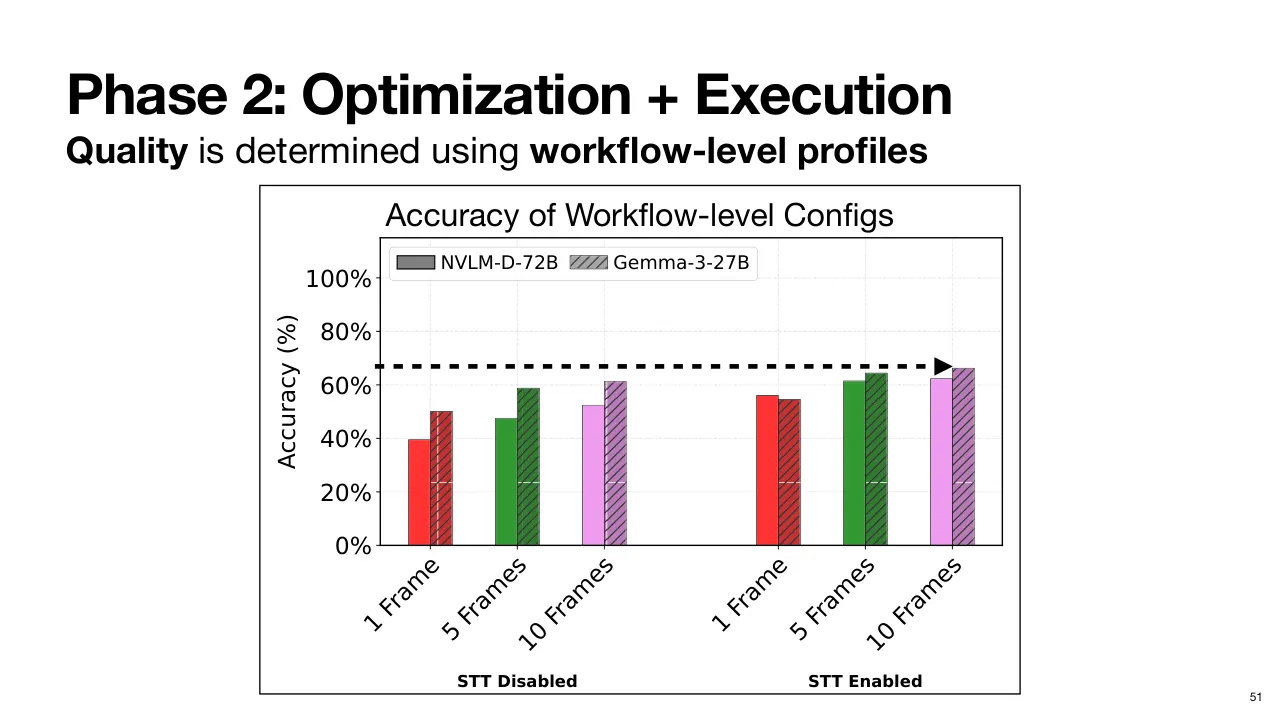
| 2.1.73 | 지금까지 본 Video QA Workflow 예에서 x축은 서로 다른 설정입니다. 선택한 Model 은 빗금 무늬로, 프레임 수와 Speech-to-Text 사용 여부는 x값으로 표시했습니다. For the video QA workflow example that we've been considering, on the x-axis, we have different configurations. The model chosen is shown in different hatch patterns, and the number of frames and speech-to-text enabled or disabled as the x values. |
| 2.1.74 | Workflow 품질의 Proxy(대리 지표)로 공개 Dataset(데이터셋)에서의 정확도 영향을 측정합니다. We measure the impact on accuracy on an open-source data set as a proxy for the workflow quality. |
| 2.1.75 | 예를 들어 프레임 10개에 Speech-to-Text Agent 를 켜면, Gemma Model 을 쓰는 QA Agent 는 이 데이터셋에서 약 65% 정확도를 냅니다. So, for example, with 10 frames and speech-to-text agent enabled, the QA agent using a Gemma model delivers about 65% accuracy on this set. |
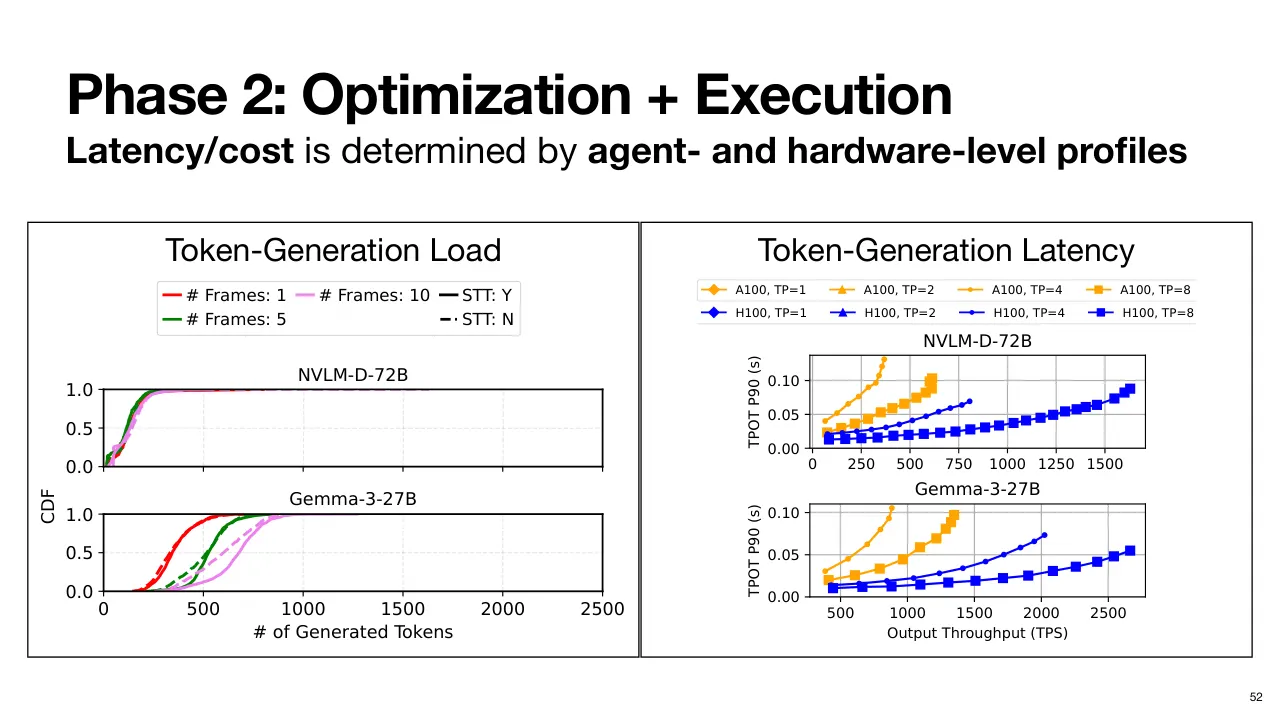
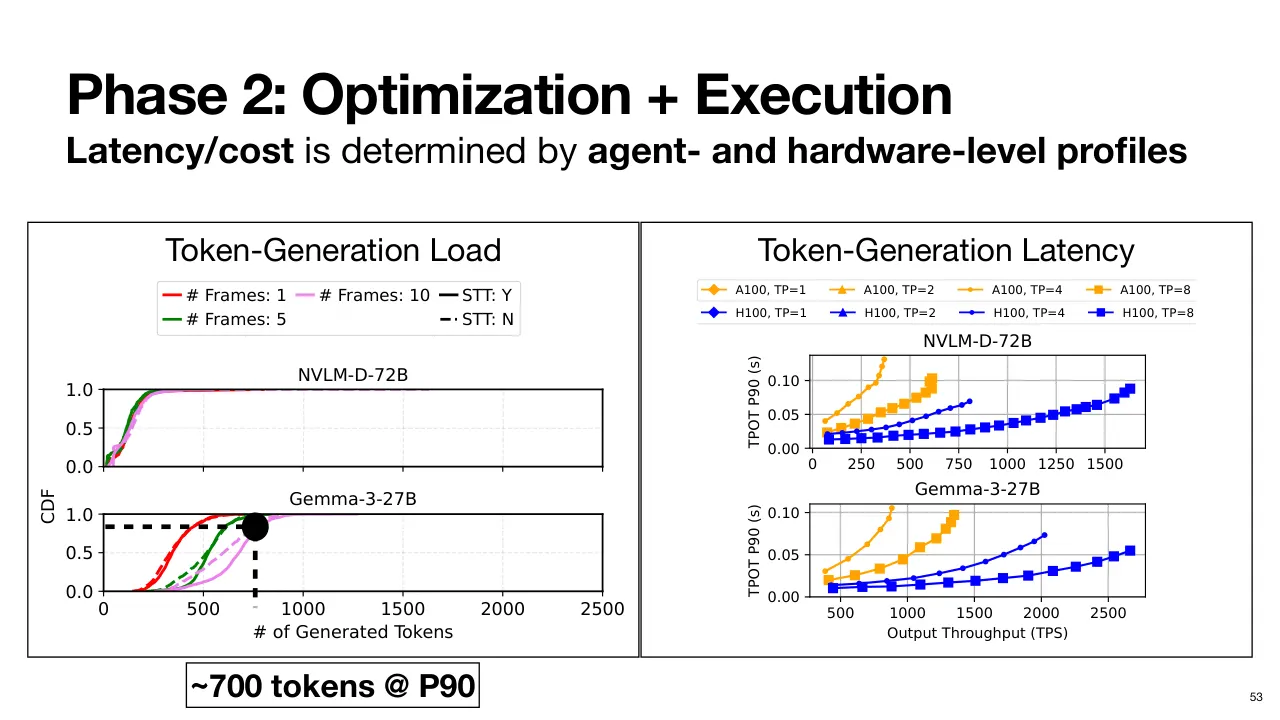
| 2.1.76 | 다음으로 각 설정이 Agent 자체에 주는 Load(부하)를 봅니다. 이 경우에는 Multimodal LLM 의 Token Generation(토큰 생성) 부하입니다. Now, next we consider the load of each of these configurations um on the agent itself. In this case, the multimodal LLM's token generation load. |
| 2.1.77 | 각 설정별 생성 토큰 수의 Distribution(분포)을 보여 줍니다. 예를 들어 프레임 10개에 Speech-to-Text 를 켜면 Gemma 는 Median(중앙값) 기준 약 650 토큰, NVLM 은 약 250 토큰을 생성합니다. We show a distribution of the number of tokens generated for each of these configurations. For example, with 10 frames and speech-to-text enabled, Gemma produces about 650 tokens at the median, while NVLLM produces about 250 tokens. |
| 2.1.78 | 공급자가 얼마나 보수적으로 또는 느슨하게 갈지, 자원을 얼마나 준비할지에 따라, 특정 설정의 Video QA Workflow 에 새 요청이 들어오면 토큰을 몇 개 만들지 근사하고 그에 맞춰 자원을 준비할 수 있습니다. Now, depending on how conservative or relaxed the provider wants to be or how many resources they may want to provision, they can approximate how many tokens a new request for a given configuration of the video QA workflow would produce and accordingly provision resources. |
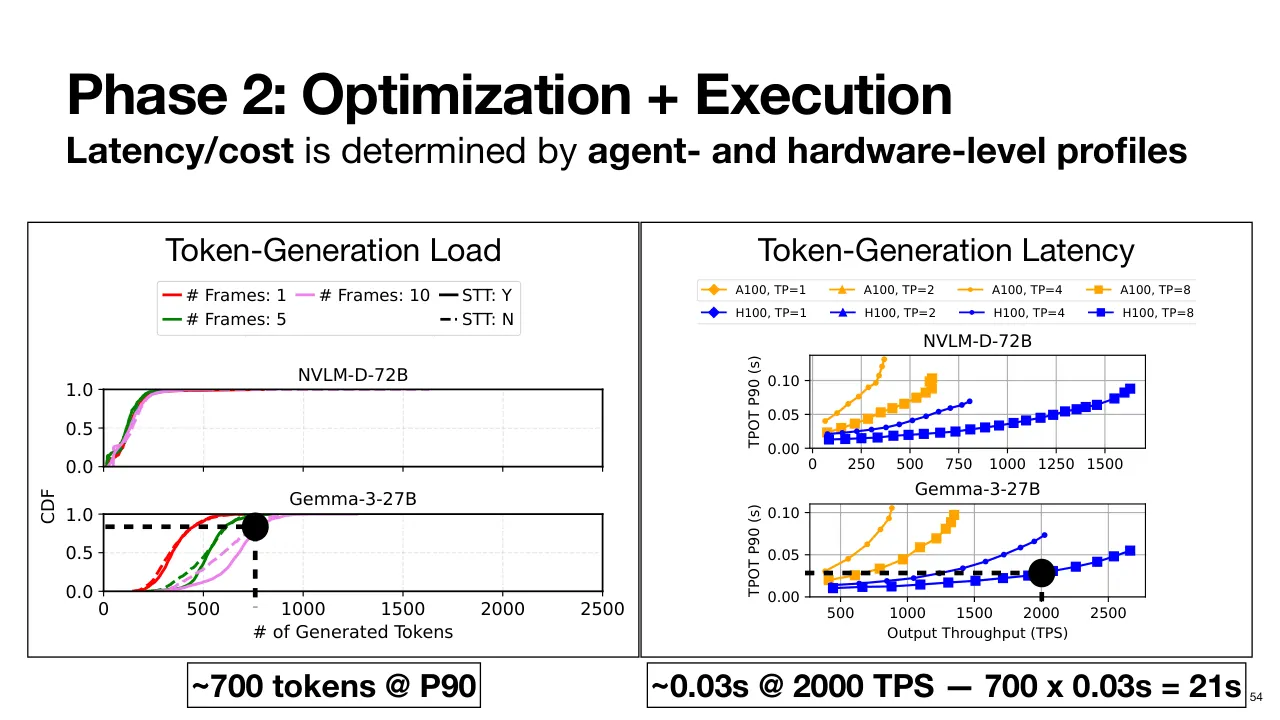
| 2.1.79 | 이것을 Hardware-Level Profile 과 조합하면, 여러 Hardware 설정에서 그만큼의 토큰을 만드는 데 시간이 얼마나 걸릴지 알 수 있습니다. 그래서 Latency 나 Cost SLO 에 맞는 설정을 고를 수 있습니다. This is then composed with the hardware-level profiles to determine how much time it would take to produce that number of tokens under various hardware configurations. So, we can select the appropriate configuration given the latency or cost SLOs. |
| 2.1.80 | 이 근사에서 벗어나거나 수요가 Spike(급증)할 때를 대비해, Murakkab 은 언제든 자원을 더 띄울 수 있는 Autoscaler(오토스케일러)를 쓰고, Optimizer 는 나중에 시스템을 다시 Rebalance(재조정)할 수 있습니다. And to handle deviations from this approximation or spikes in demand, Murakab uses an auto scaler that can always spin up more resources, but the optimizer can rebalance the system at a later point in time. |
| 2.1.81 | 다시 Gemma Model 에 프레임 10개, Speech-to-Text 를 켠 경우, 90th Percentile(90번째 백분위수)에서 요청은 약 700 토큰을 생성합니다. So, again, if we choose the Gemma model with 10 frames and speech-to-text enabled, at the 90th percentile, the requests would generate about 700 tokens. |
| 2.1.82 | H100 GPU 8개로 2,000 TPS(초당 토큰 수)로 돌린다고 하면, 0.03초 × 700 토큰, 즉 총 약 21초가 걸립니다. 지금은 단순한 예시일 뿐입니다. And let's say we operate with eight H100 GPUs at 2,000 TPS, it would take about, 0.03 seconds * 700 tokens, so in total about 21 seconds to produce these responses. And that's just a toy example for now. |
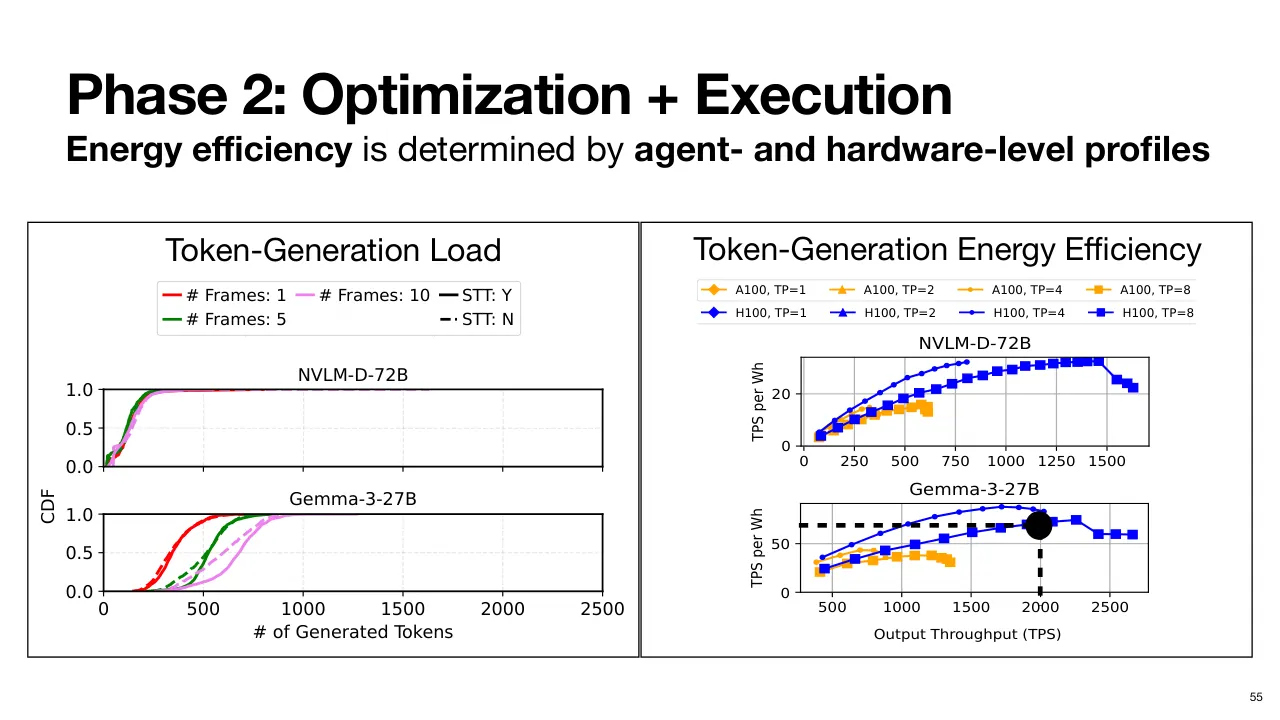
| 2.1.83 | 마찬가지로 이 Hardware 설정의 에너지 소비도 추정해 Energy Budget(에너지 예산) 안에 있는지 확인할 수 있습니다. Similarly, we can also estimate the energy expenditure of this hardware configuration to ensure we are under our energy budget. |
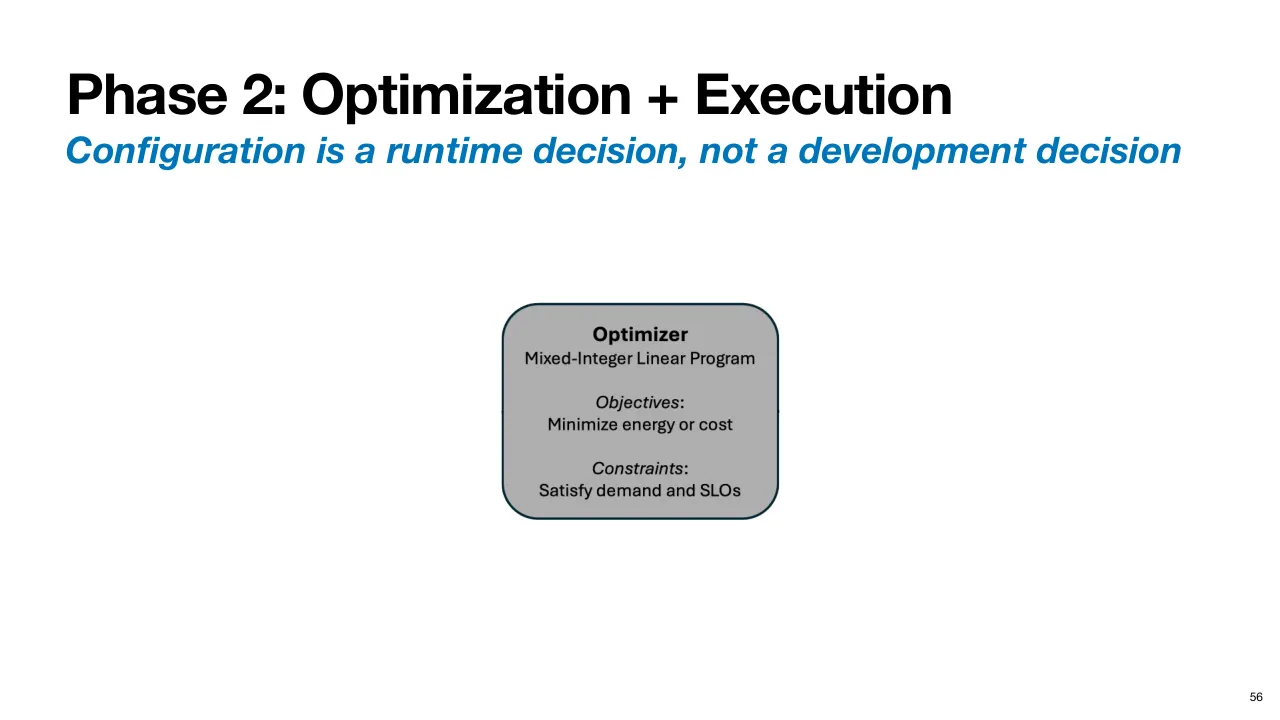
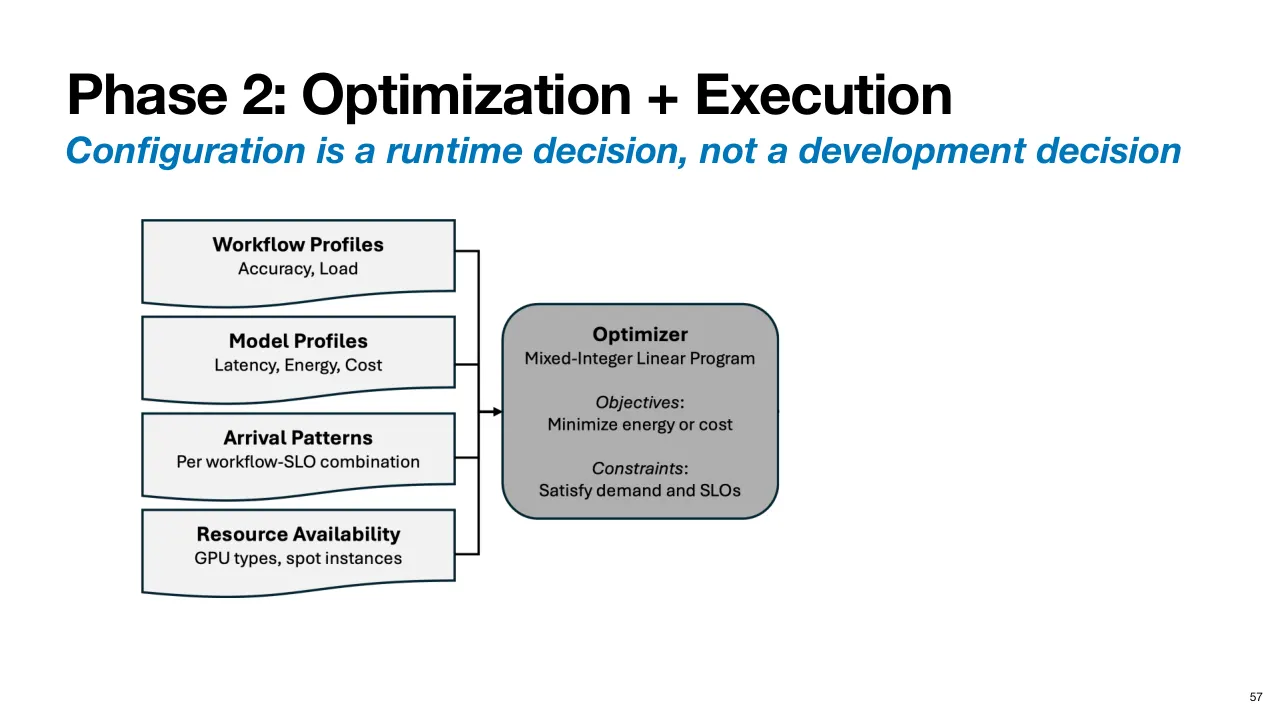
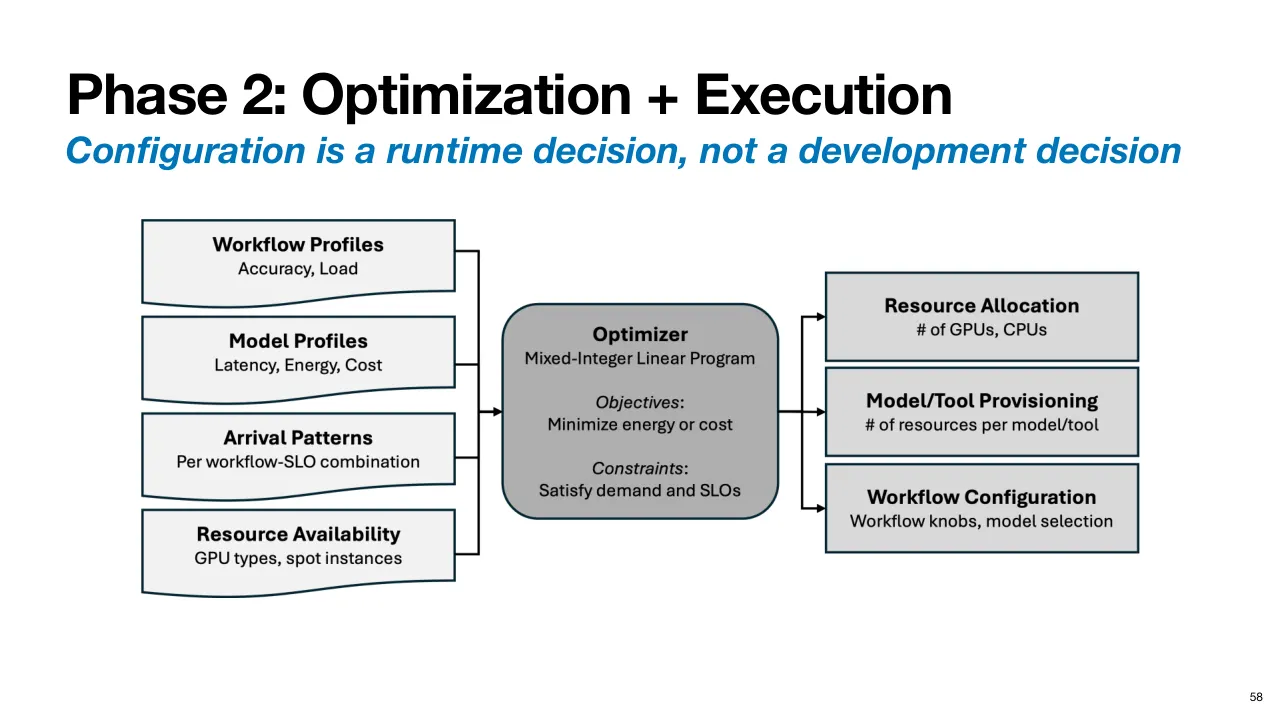
| 2.1.84 | Optimizer 를 개괄하면, 여러 목표를 가진 MILP(Mixed Integer Linear Program, 혼합 정수 선형 계획)로 정식화합니다. 예를 들어 SLO 를 지키며 전체 부하를 처리한다는 제약 아래 Operational Cost(운영 비용), GPU 수, 또는 총 에너지 소비를 최소화합니다. As an overview of the optimizer, we formulate it as a mixed integer linear program with multiple objectives. For example, minimizing operational cost, the number of GPUs, or the total energy expenditure under a given constraint of satisfying the total load given the SLOs. |
| 2.1.85 | Optimizer 는 Profile, Arrival Pattern(요청 도착 패턴), 시스템의 Resource Availability(자원 가용성) 정보를 입력으로 받습니다. The optimizer takes as input the profiles, arrival patterns, and resource availability information of the system. |
| 2.1.86 | 그리고 Resource Allocation Plan(자원 할당 계획)을 출력합니다. 예를 들어 GPU·CPU 를 몇 개 할당할지, 각각에서 어떤 Model 과 Tool 을 돌릴지, 이 최적화된 계획에 맞춰 Workflow Knob(조절 항목)과 Model 선택을 어떻게 설정할지입니다. And outputs a resource allocation plan, for example, how many GPUs, CPUs to allocate, which models and tools to run on each of them, and how to configure the workflow knobs and model selection to now use this optimized plan. |
| 2.1.87 | 즉 Optimizer 가 Profile 과 SLO 를 바탕으로 값을 채워 넣으면, 이제 Workflow 가 실행 가능해집니다. So, the optimizer, based on the profiles and SLOs, plugs the values in, and now the workflow is executable. |
| 2.1.88 | 끝으로, 시스템에서 함께 서비스되는 다른 Workflow 들과 Jointly(공동으로) 최적화해 자원을 Multiplexing(다중화)함으로써 훨씬 큰 효율을 얻을 수 있습니다. 이것은 Stack 전반의 Visibility 부족 때문에 지금은 크게 제한되는 부분입니다. Finally, we're going to be able to optimize workflows jointly with respect to other workflows being served in the system to unlock even greater efficiency by multiplexing resources, something which a lack of visibility across the stack severely limits. |
| 2.1.89 | 그래서 각 Workflow 를 따로따로 보는 대신 더 풍부한 Optimization Space(최적화 공간)가 열립니다. So, this opens up a richer optimization space, rather than looking at each workflow in isolation. |
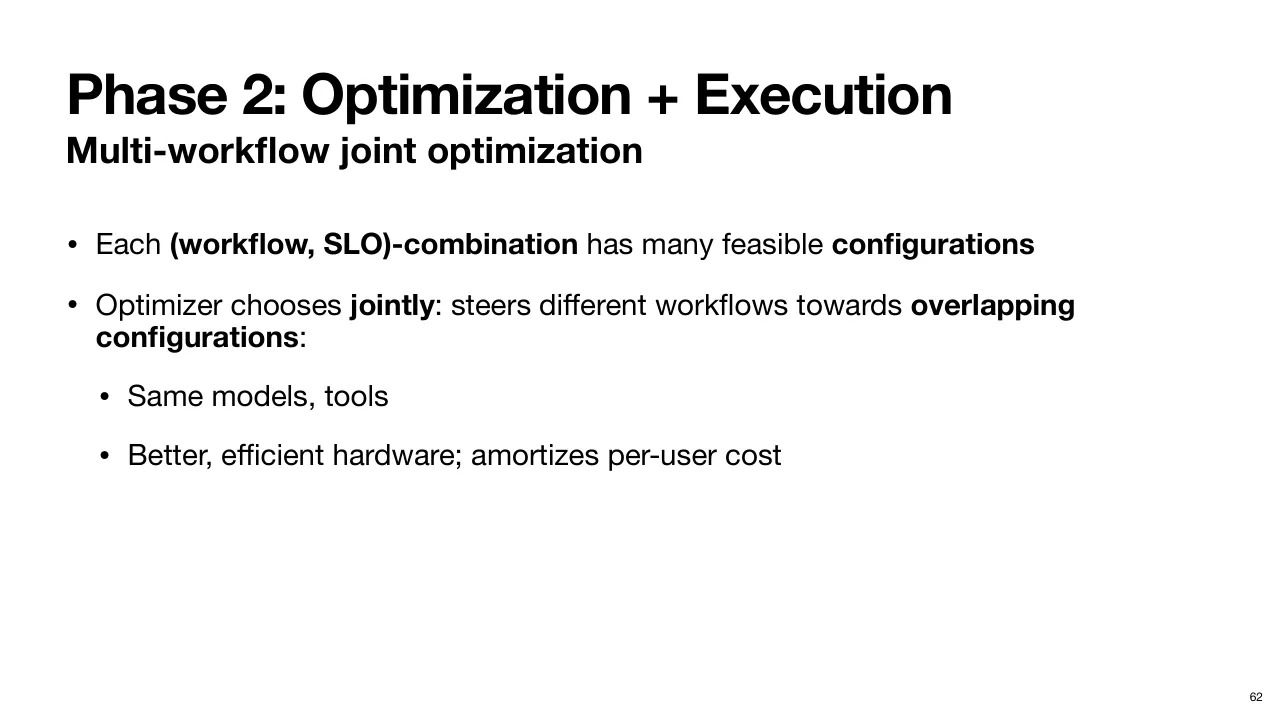
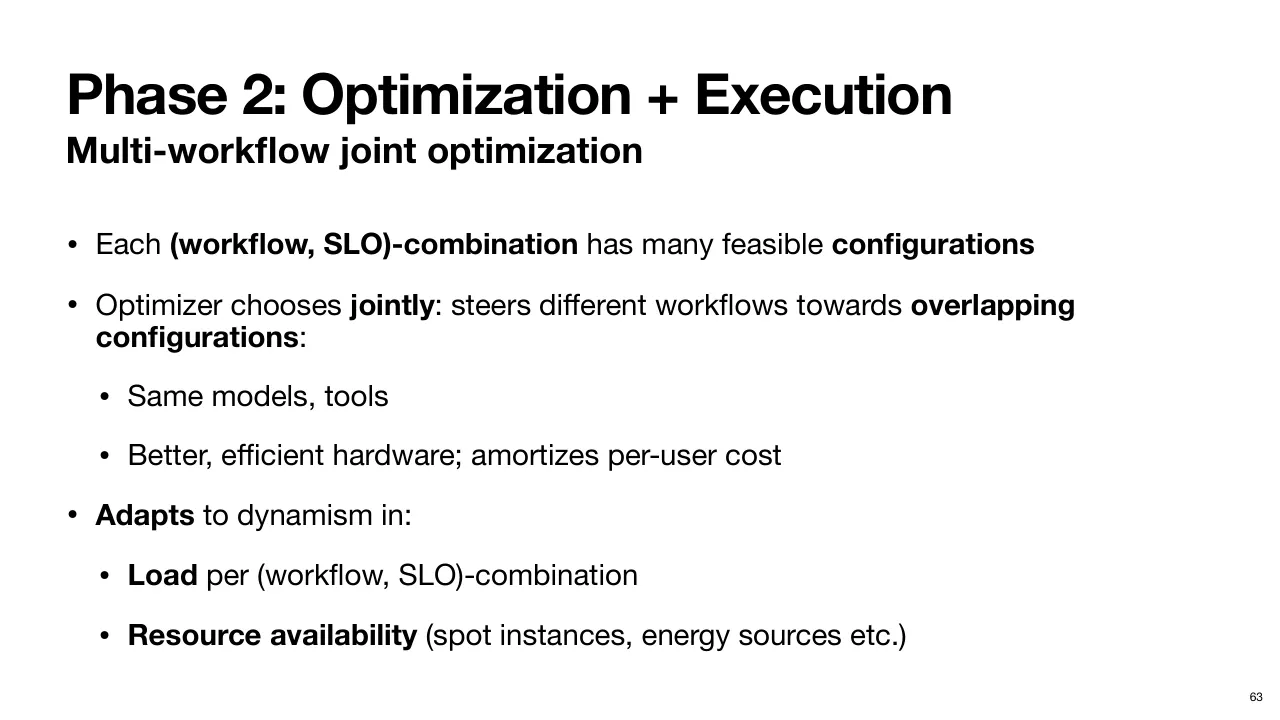
| 2.1.90 | 앞에서 봤듯이 Workflow 와 SLO 조합마다 Feasible(실현 가능한) 설정이 많을 수 있습니다. As we saw, each workflow SLO combination may have many feasible configurations. |
| 2.1.91 | Murakkab 의 Optimizer 는 Workflow 들을 겹치는 설정, 즉 같은 Model 과 Tool 을 쓸 수 있는 설정 쪽으로 유도합니다. 그래서 자원을 더 잘 할당하고 서로 다른 Workflow 사용자들 사이에 비용을 Amortize(분산 상각)할 수 있습니다. Murakab's optimizer tries to steer workflows towards overlapping configurations, those that can use the same models and tools, so that it can achieve better allocation of resources and amortize the cost across users of different workflows. |
| 2.1.92 | Workflow·SLO 조합별 부하나 수요의 Dynamism(변동), 그리고 Cloud Platform 의 끊임없이 바뀌는 자원 가용성에 적응합니다. 예를 들어 Spot Instance(스팟 인스턴스)가 생겼다 사라지고, 에너지원이 바뀌는 식입니다. It adapts to dynamism in the load or demand for different workflow SLO combinations, and the ever-changing resource availability in cloud platforms. For example, spot instances may come and go, energy sources may change, etc. |
| 2.1.93 | 핵심적인 Paradigm(패러다임) 전환은 이것입니다. So, the key shift in paradigm is this. |
| 2.1.94 | Cross-Stack Visibility 가 커집니다. There is more cross-stack visibility. |
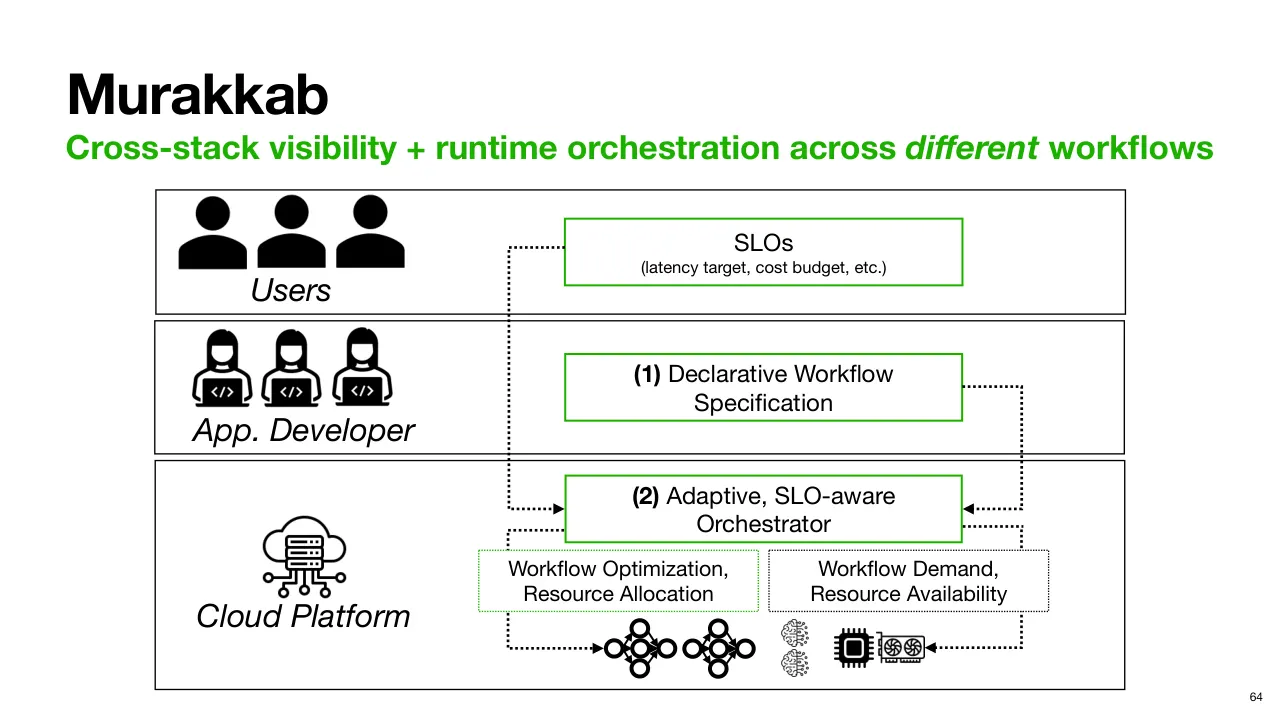
| 2.1.95 | Murakkab 의 Orchestrator 는 설정이 박혀 있지 않은 Workflow Specification 을 받고, 질의 시점에 SLO 도 받으며, 어떤 구성 요소가 배포돼 있는지, 어떤 자원이 가용한지, 현재 Workflow 별 부하가 얼마인지 등 플랫폼 상태도 관찰합니다. 다시 말해 실제 Production(운영 환경)의 모든 변동 요인을 추적합니다. The orchestrator in Murakab now gets the workflow specification without any configurations baked into it, and also gets SLOs at query time, and can also observe the state of the platform in terms of what pieces are deployed, what resources are available, what the current per workflow load is, etc. In other words, it tracks all the sources of dynamism in real production scenarios. |
| 2.1.96 | 그리고 이 넓어진 Visibility 를 활용해 모든 Workflow 를 Runtime 에 최적화하여, SLO 를 만족하면서 훨씬 큰 자원 효율을 얻습니다. And leveraging this greater visibility, it performs runtime optimization of all workflows to unlock much greater resource efficiency while satisfying SLOs. |
| 2.1.97 | 마지막으로 Murakkab 이 자원 효율을 얼마나 높이는지 간단히 보겠습니다. So finally, let's take a quick look at how much resource efficiency does Marakoud unlock. |
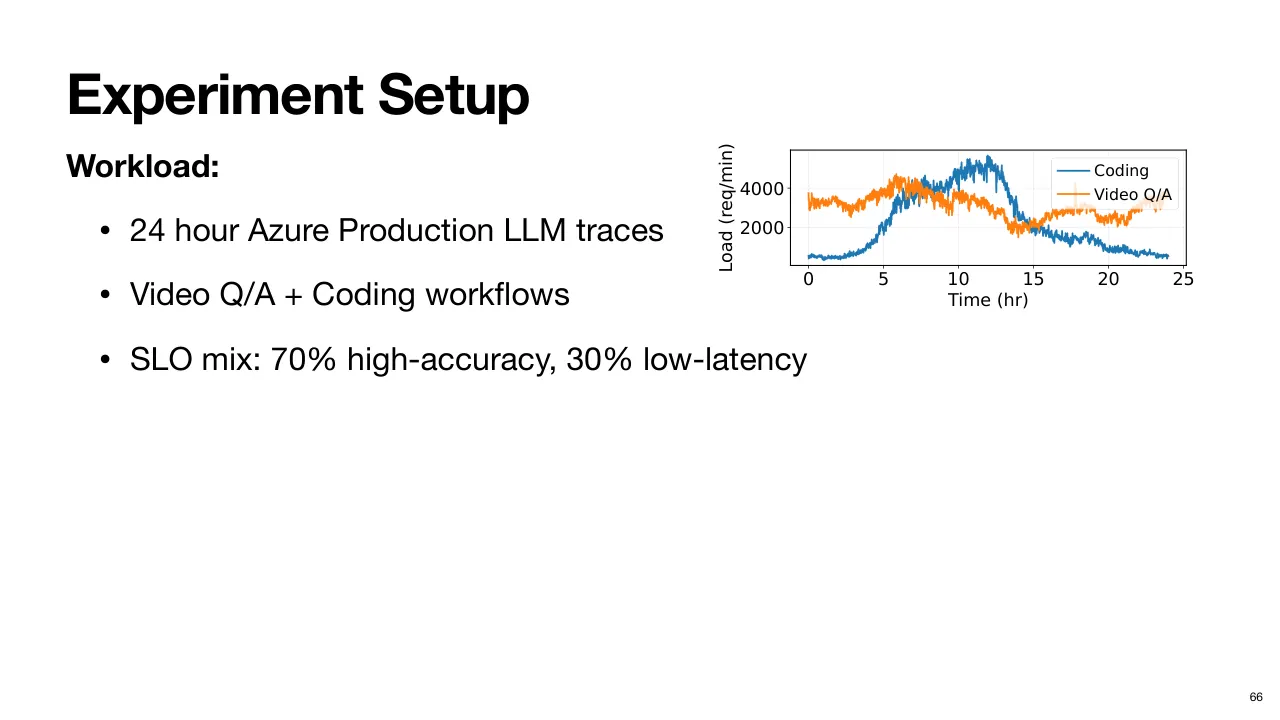
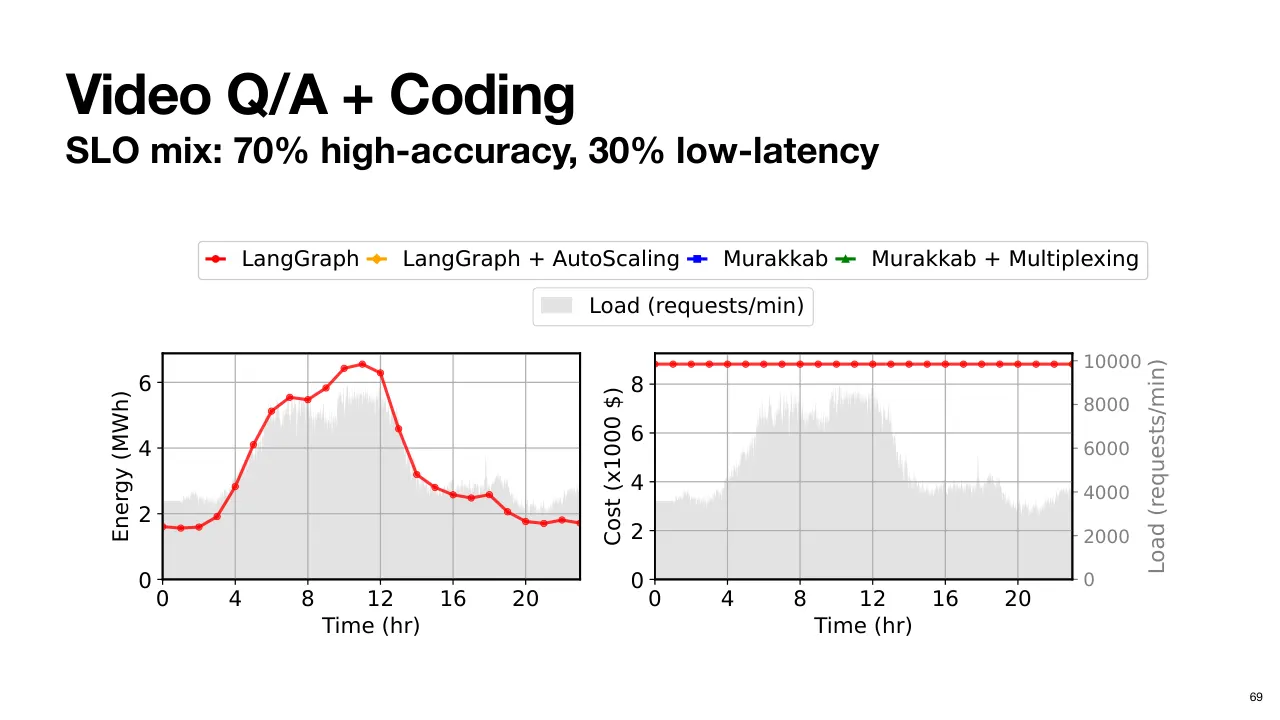
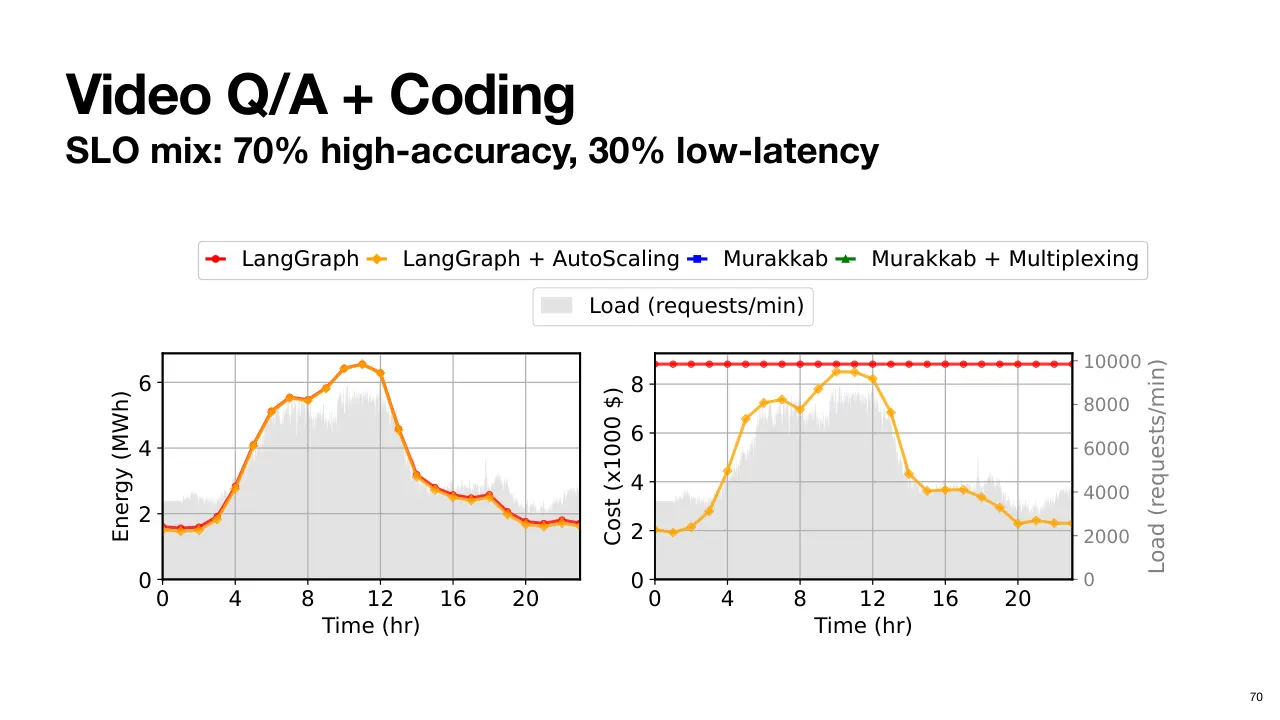
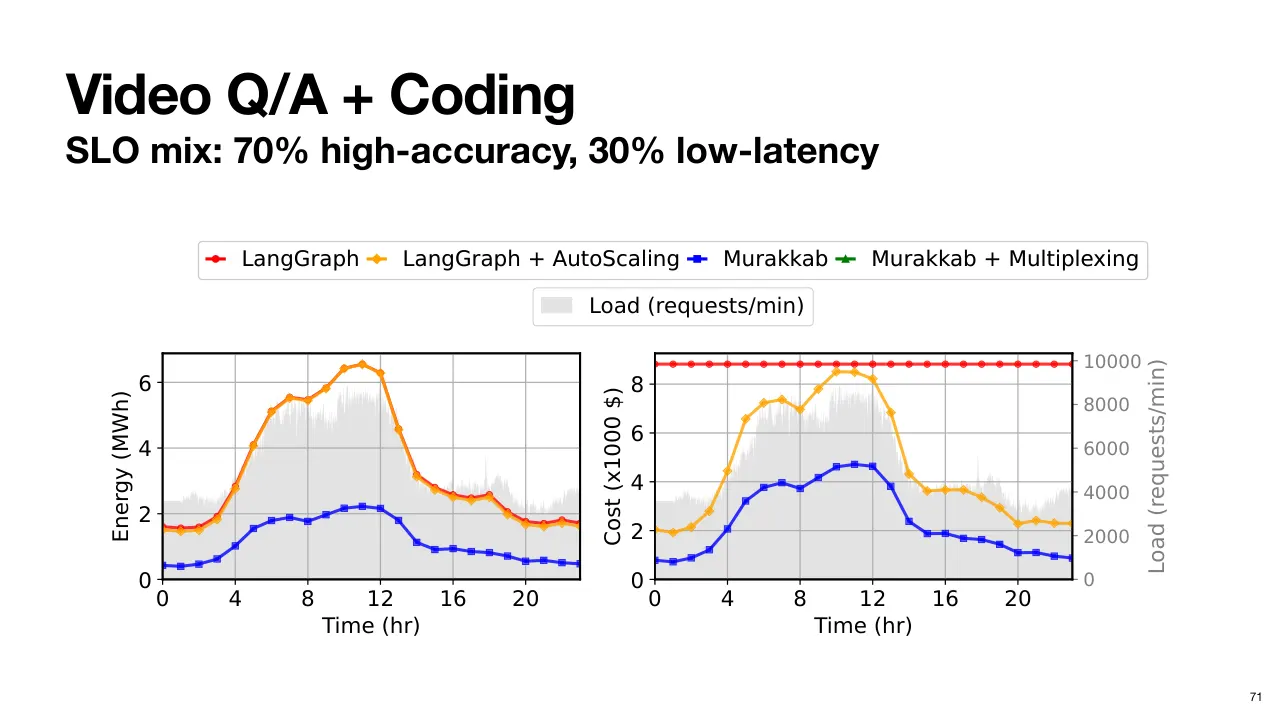
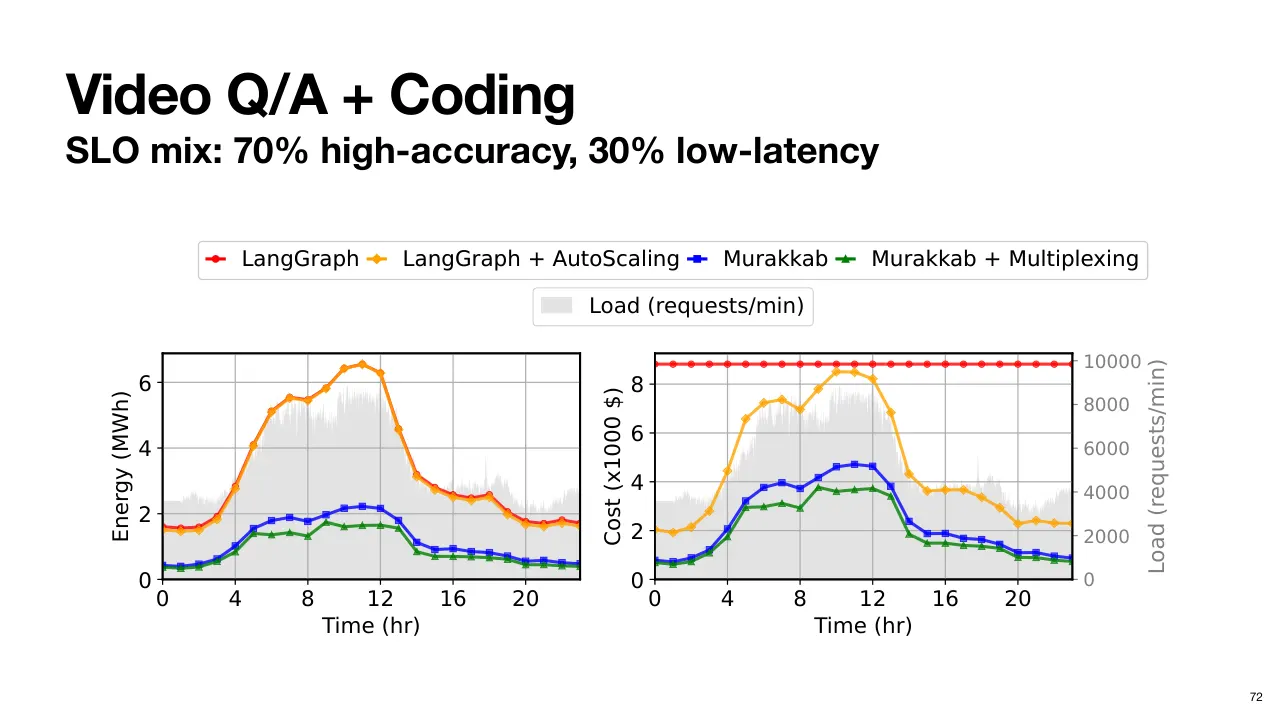
| 2.1.98 | Azure 의 두 LLM 서비스에서 나온 Production Workload 를 두 Agentic Workflow 에 대응시켜 봅니다. 하나는 Video QA, 다른 하나는 Claude Code 와 비슷한 Coding(코딩) Workflow 입니다. So we will look at a production workload from Azure for two LLM services, which we map onto two agentic workflows. One for video QA, and the other for a coding workflow, much like cloud code. |
| 2.1.99 | 각 Workflow 요청의 70% 는 High Accuracy(고정확도)로, 나머지 30% 는 Latency-Critical(지연 민감)로 지정합니다. We assign 70% of the requests from each workflow to be high accuracy, while the remaining 30% to be latency critical. |
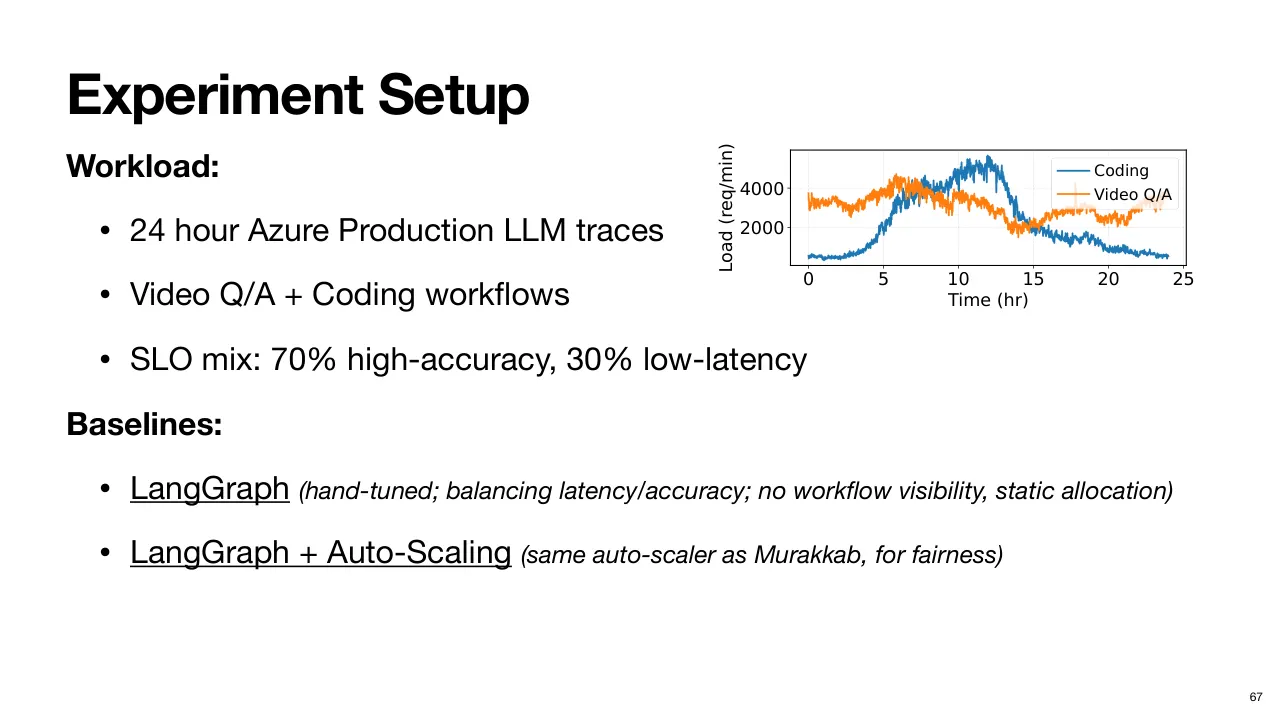
| 2.1.100 | LangGraph 를 Baseline(비교 기준)으로 삼습니다. LangGraph 는 본질적으로 정적이므로, 더 공정한 비교를 위해 Murakkab 과 같은 Autoscaling Policy(오토스케일링 정책)를 준 경우도 평가했습니다. 그다음 Murakkab 이 Workflow 를 따로 최적화할 때와, 여러 Workflow 를 함께 최적화할 때를 봅니다. We compare to LangGraph as a baseline, given that LangGraph is static by nature. We also evaluated given the same auto scaling policy that we used for Marakoud for a fairer comparison. Then we look at how Marakoud performs when optimizing workflows in isolation, and then also when it jointly optimizes across different workflows. |
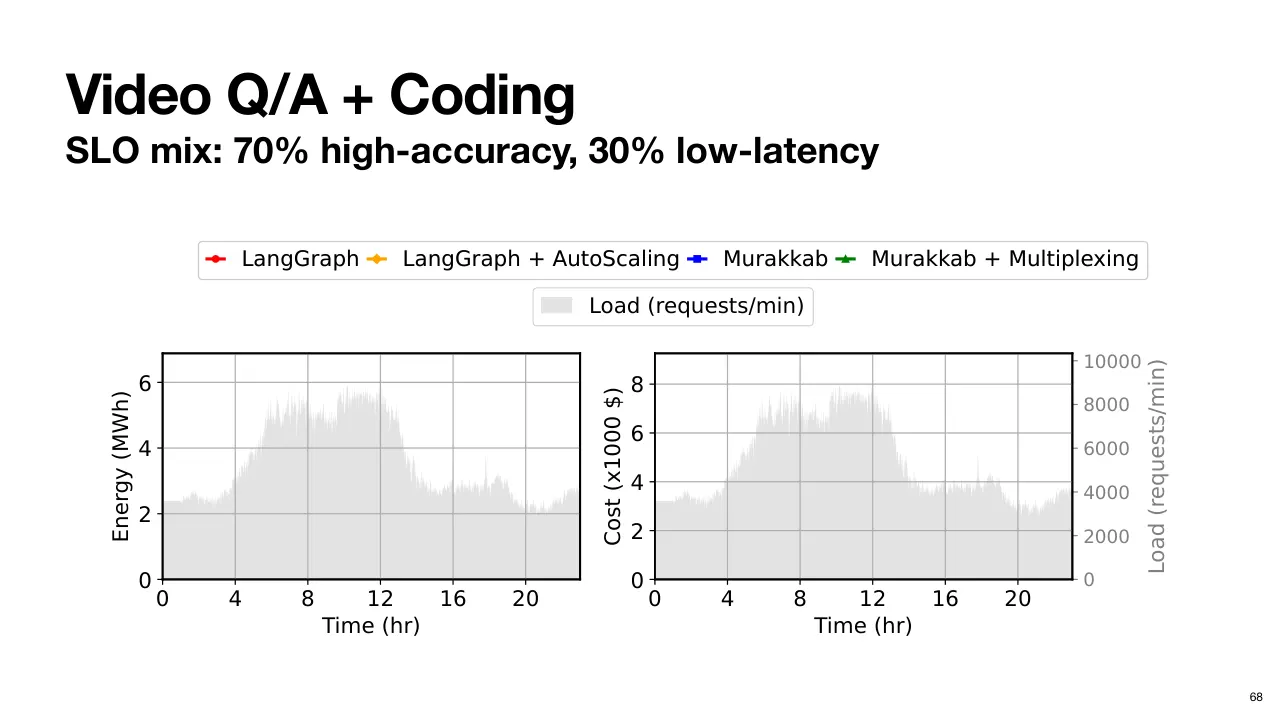
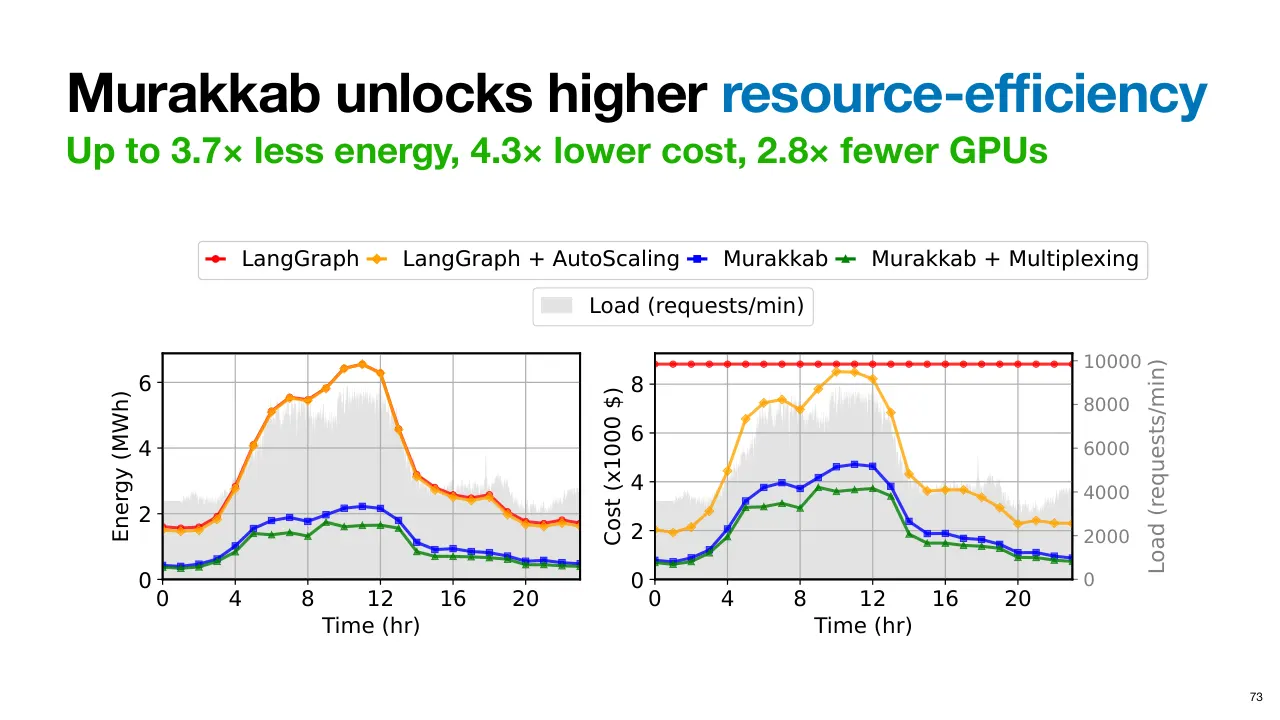
| 2.1.101 | 효율은 에너지와 비용 두 Metric(지표)으로 봅니다. 참고로 전체 Workload 추이를 회색으로 겹쳐 표시했습니다. So we will look at the efficiency from two metrics, energy and cost. Here we overlay the aggregated workload trend for reference, that is shown in gray. |
| 2.1.102 | 먼저 정확도와 지연 사이 균형을 맞추도록 손으로 튜닝한 설정의 기본 LangGraph 로 돌립니다. 그런데 이 Framework 는 기본적으로 SLO-Agnostic(SLO 무관)이라 모든 요청을 똑같이 다룹니다. First, we run with default LangGraph with a hand-tuned configuration that tries to balance between accuracy and latency. But by default, this workflow is This framework is SLO agnostic, so all requests are treated the same way. |
| 2.1.103 | 에너지 소비는 부하에 따라 변하지만, 자원 할당이 정적이라 비용은 평평하게 유지되는 것을 볼 수 있습니다. You can see how energy consumption varies with load, but the cost remains flat because of a static resource allocation. |
| 2.1.104 | LangGraph 에 Autoscaling 을 더하면 Murakkab 처럼 부하 변화에 맞춰 Instance(인스턴스)를 켜고 끌 수 있어 비용 그림이 훨씬 나아집니다. 하지만 한번 배포한 Workflow 는 재설정할 수 없으므로 여전히 정적이라는 점을 기억하세요. With auto scaling added to LangGraph, it is able to turn on or off instances, much like Marakoud, in response to changing load, so that the cost picture now looks much better. But again, remember that it cannot reconfigure any of the workflows once deployed, so they remain static. |
| 2.1.105 | 반면 Murakkab 은 SLO-Aware Orchestration 이 가능해, 서로 다른 SLO Class(등급)의 요구에 맞춰 최적화하면서 가장 자원 효율적인 설정을 고릅니다. 그래서 SLO 를 어기지 않고도 훨씬 낮은 에너지와 비용으로 돌 수 있습니다. Marakoud, on the other hand, having the ability to do SLO aware orchestration, can optimize to the requirements of the different SLO classes, while also picking configurations that are most resource efficient. So without violating SLOs, it is able to run with much lower energy and cost footprint. |
| 2.1.106 | 또 여러 Workflow 를 함께 볼 수 있으므로, 다른 Workflow 의 수요에 맞춰 Runtime 에 조정하고, 더 적고 더 효율적인 Hardware 에 Consolidate(통합 배치)하며 비용도 분산 상각할 수 있습니다. And given the ability to look across different workflows, it can adapt them at runtime given the demand for other workflows and consolidate them onto fewer, more efficient hardware and amortize the cost as well. |
| 2.1.107 | 그래서 에너지와 비용을 모두 더 낮춥니다. So, it brings down both the energy and cost even further. |
| 2.1.108 | 종합하면 Murakkab 은 에너지 소비를 약 3.7배, 비용을 4.3배 개선하고, GPU 를 약 2.8배 적게 씁니다. All in all, One A Cloud gives you about 3.7 x improvement in energy consumption, 4.3 x improvement in cost, and about 2.8 x fewer GPUs. |
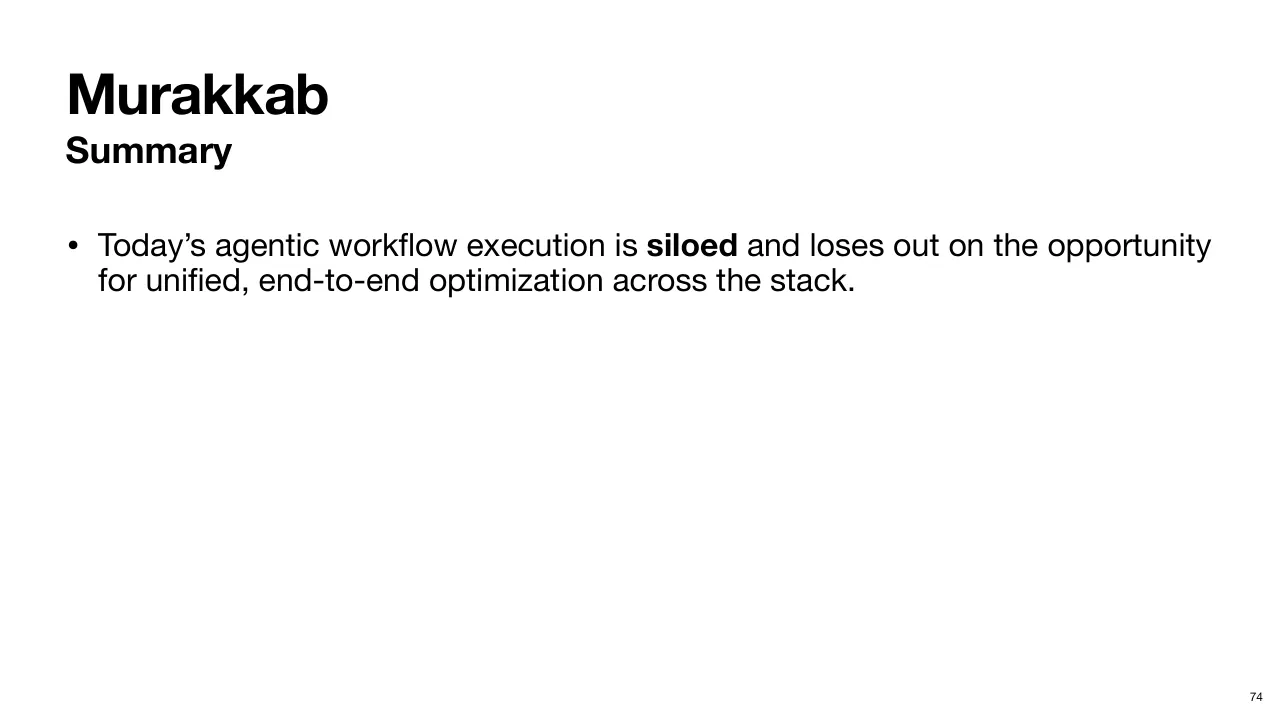
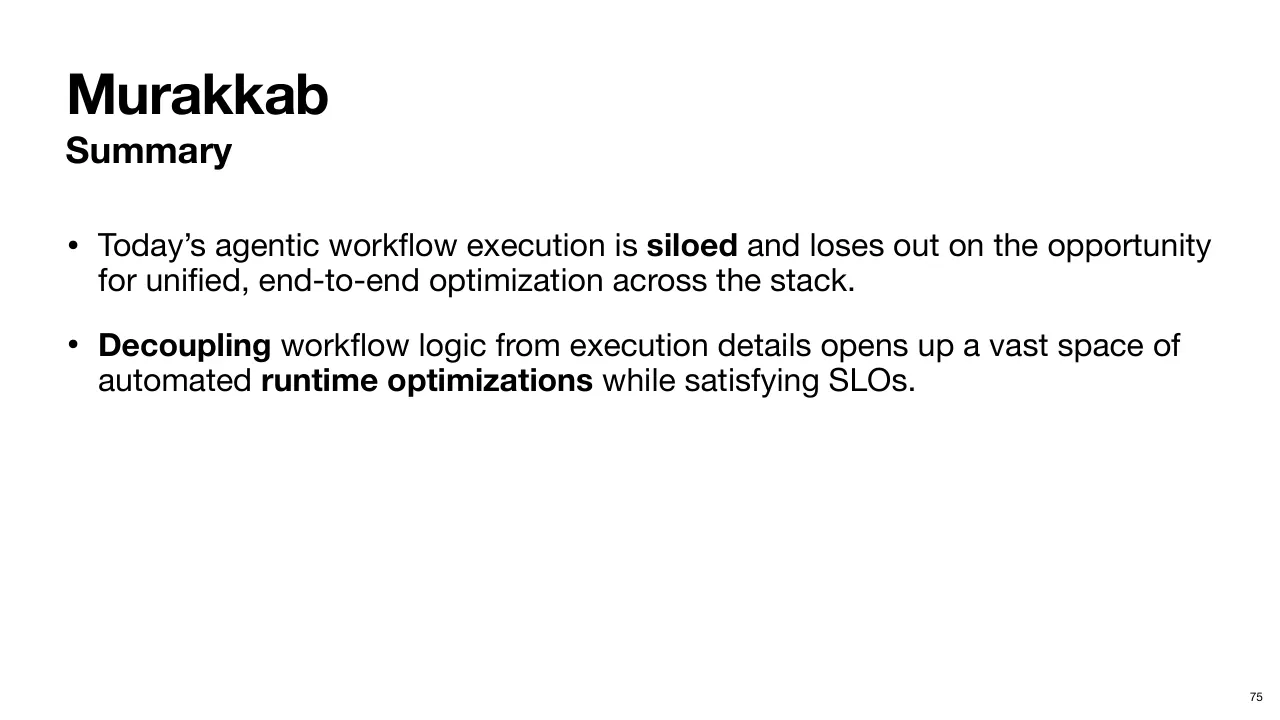
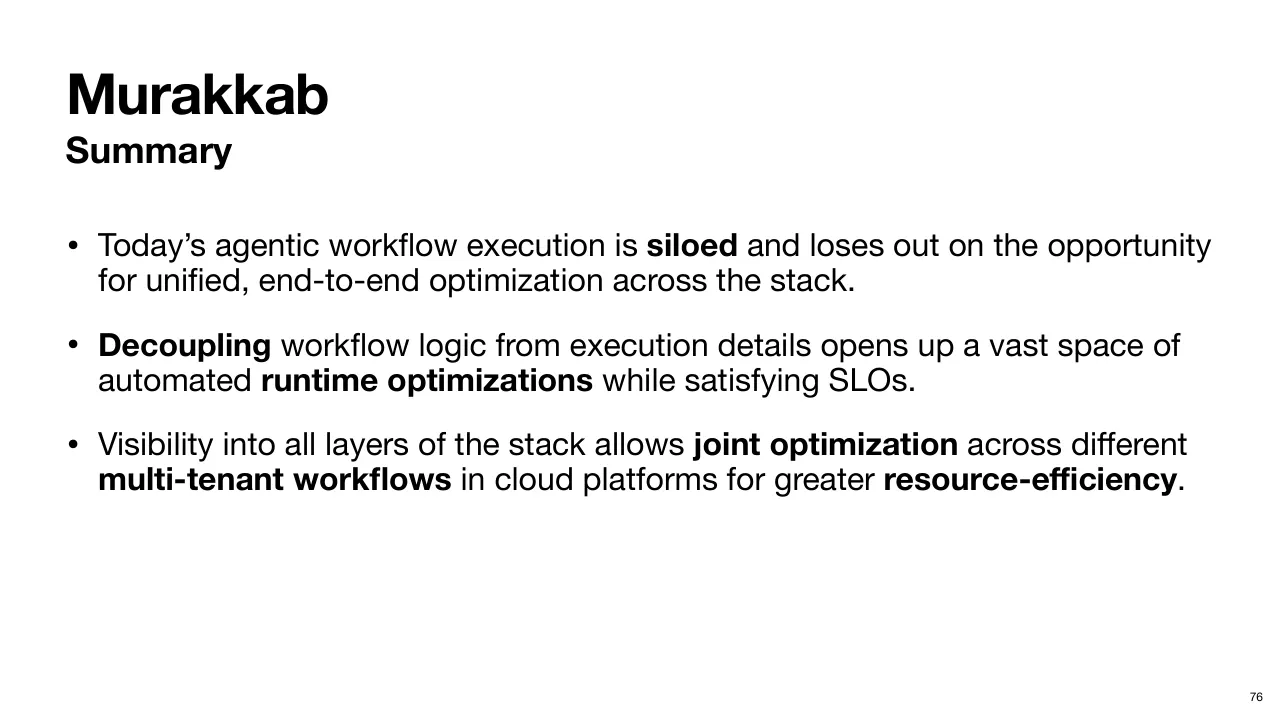
| 2.1.109 | 요약하면, 이 발표에서는 오늘날 Agentic Workflow 실행이 Siloed(칸막이로 분리)되어 있어 더 나은 최적화 기회를 놓치고 있음을 보였습니다. So, in summary, in this talk we saw that today's agentic workflow execution is siloed and loses out opportunities for better optimization. |
| 2.1.110 | Workflow 정의에서 무엇과 어떻게를 분리하면 자동화된 Runtime 최적화의 넓은 공간이 열립니다. Decoupling the what from the how in the workflow definition opens up a vast space of automated runtime optimizations. |
| 2.1.111 | 그리고 Stack 모든 계층에 대한 Visibility 가 있으면 Multi-Tenant(다중 사용자) Workflow 와 Cloud Platform 전반을 함께 최적화해 훨씬 큰 자원 효율을 얻을 수 있습니다. And visibility into all layers of the stack allows joint optimization across multi-tenant workflows and cloud platforms for much greater resource efficiency. |
| 2.1.112 | 감사합니다. Thank you. |
3발표자료
3.176쪽 · PDF 받기
4논문
4.1요약 문서: Murakkab_요약
4.2논문 PDF 받기
5만든 방법
5.1
| 5.1.1원본 영상 | https://youtu.be/VHZbH0NaPC4 |
| 5.1.2자막 원천 | YouTube 영어 자동 자막 |
| 5.1.3번역 | Claude. 기술 용어는 처음 나올 때 Term(한국어), 이후 원어. 자동 자막의 고유명사 오인식은 논문·발표자료 기준으로 고침 |
| 5.1.4더빙 | CosyVoice2 zero-shot, GKIM 목소리 (tools/tts_voice/CONSENT.md 등록). 발표자 본인 목소리는 복제하지 않음 |
| 5.1.5생성 | 2026-09-29 00:12 |